The hyphens property defines how words should be hyphenated when text wraps across the lines of text.
The hyphens property can take three values: none, manual, auto. It allows preventing hyphenation or allow it, or only allow it when certain characters are present.
| Initial Value | manual |
| Applies to | All elements. |
| Inherited | Yes. |
| Animatable | No. |
| Version | CSS3 |
| DOM Syntax | Object.style.hyphens = “none”; |
Syntax
hyphens: none | manual | auto | initial | inherit;Example of the hyphens property:
<!DOCTYPE html>
<html>
<head>
<title>Title of the document</title>
<style>
p {
width: 55px;
border: 1px solid #666;
}
p.none {
-webkit-hyphens: none;
-ms-hyphens: none;
hyphens: none;
}
p.manual {
-webkit-hyphens: manual;
-ms-hyphens: manual;
hyphens: manual;
}
p.auto {
-webkit-hyphens: auto;
-ms-hyphens: auto;
hyphens: auto;
}
</style>
</head>
<body>
<h2>Hyphens property example</h2>
<h3>none</h3>
<p class="none">An extreme­ly lengthy sentence</p>
<h3>manual</h3>
<p class="manual">An extreme­ly lengthy sentence</p>
<h3>auto</h3>
<p class="auto">An extreme­ly lengthy sentence</p>
</body>
</html>Result
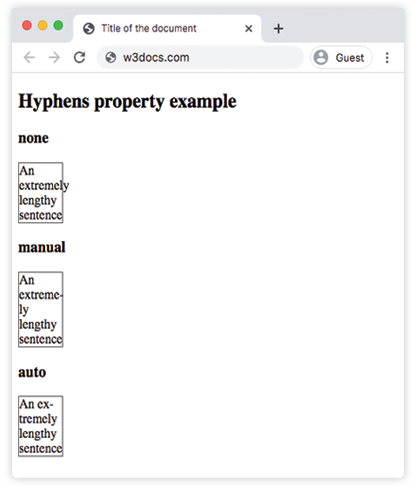
In the given example all three values are included so as to see the differences.
For maximum browser compatibility extension such as -webkit- for Safari is used.
Line break opportunities
With the help of the two Unicode characters below we can manually define potential line break points inside of the text:
U+00AD (SHY/Soft hyphen)
This character is rendered invisibly. It points a place, where the browser must break the word, in the case when we need hyphenation. For insertion of SHY use .
U+2010 (HYPHEN/Hard hyphen)
This character points visible line break possibility. The hyphen is rendered even in the case when the line is not broken at that point.
Values
| Value | Description |
|---|---|
| none | No hyphenation. Words are not broken at line breaks, even if the characters suggest line break points. |
| manual | Words are broken only for line-wrapping where there are line break opportunities inside the word. Words are only hyphenated at ‐ or . This is the default value of this property. |
| auto | The browser automatically breaks words at appropriate hyphenation points. Words are hyphenated where the algorithm is deciding. The auto value’s behavior depends on the language. |
| initial | Makes the property use its default value. |
| inherit | Inherits the property from its parents element. |