The justify-items property defines the default justify-self for all child boxes, giving them all a default way of justifying each box along the appropriate axis.
The justify-items property has gained use with the introduction of Flexbox and Grid layouts, but is also applies to:
- absolutely-positioned boxes
- block-level boxes
- static-position of absolutely positioned boxes
- table cells
| Initial Value | legacy |
| Applies to | All elements. |
| Inherited | No. |
| Animatable | No. |
| Version | CSS3 |
| DOM Syntax | object.style.justifyItems = “start”; |
Syntax
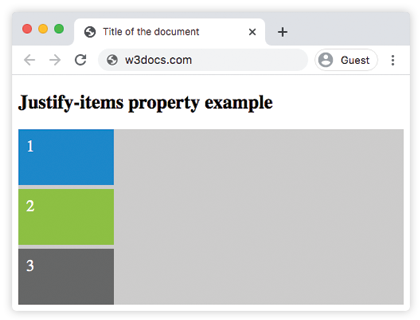
justify-items: auto | normal | start | end | flex-start | flex-end | self-start | self-end | center | left | right | baseline | first baseline | last baseline | stretch | safe | unsafe | legacy | initial | inherit;Example of the justify-items property:
<!DOCTYPE html>
<html>
  <head>
    <title>Title of the document</title>
    <style>
      #example {
        display: grid;
        grid-template-columns: 1fr;
        grid-template-rows: 1fr 1fr 1fr;
        grid-gap: 5px;
        justify-items: start;
        background-color: #cccccc;
      }
      #example > div {
        padding: 10px;
        font-size: 20px;
        color: white;
        width: 100px;
        height: 50px;
      }
      .one {
        background-color: #1c87c9;
      }
      .two {
        background-color: #8ebf42;
      }
      .three {
        background-color: #666666;
      }
    </style>
  </head>
  <body>
    <h2>Justify-items property example</h2>
    <div id="example">
      <div class="one">1</div>
      <div class="two">2</div>
      <div class="three">3</div>
    </div>
  </body>
</html>
Result
Example of the justify-items property with the “center” value:
<!DOCTYPE html>
<html>
  <head>
    <title>Title of the document</title>
    <style>
      #example {
        display: grid;
        grid-template-columns: 1fr;
        grid-template-rows: 1fr 1fr 1fr;
        grid-gap: 5px;
        justify-items: center;
        background-color: #cccccc;
      }
      #example > div {
        padding: 10px;
        font-size: 20px;
        color: white;
        width: 100px;
        height: 50px;
      }
      .one {
        background-color: #1c87c9;
      }
      .two {
        background-color: #8ebf42;
      }
      .three {
        background-color: #666666;
      }
    </style>
  </head>
  <body>
    <h2>Justify-items property example</h2>
    <div id="example">
      <div class="one">1</div>
      <div class="two">2</div>
      <div class="three">3</div>
    </div>
  </body>
</html>
Example of the justify-items property with the “first baseline” value:
<!DOCTYPE html>
<html>
  <head>
    <title>Title of the document</title>
    <style>
      .container {
        display: grid;
        padding-top: 10px;
        height: 250px;
        grid-template-columns: 1fr 1fr 1fr;
        grid-template-rows: auto;
        background: #ccc;
        justify-items: first baseline;
      }
      .item {
        width: 50%;
        height: 50%;
        text-align: center;
      }
      .item1 {
        background: red;
      }
      .item2 {
        background: blue;
      }
      .item3 {
        background: green;
      }
    </style>
  </head>
  <body>
    <h2>Justify-items property example</h2>
    <div class="container">
      <div class="item1 item">1</div>
      <div class="item2 item">2</div>
      <div class="item3 item">3</div>
    </div>
  </body>
</html>
Example of the justify-items property with the “self-end” value:
<!DOCTYPE html>
<html>
  <head>
    <title>Title of the document</title>
    <style>
      #example {
        display: grid;
        grid-template-columns: 1fr;
        grid-template-rows: 1fr 1fr 1fr;
        grid-gap: 5px;
        justify-items: self-end;
        background-color: #cccccc;
      }
      #example > div {
        padding: 10px;
        font-size: 20px;
        color: white;
        width: 100px;
        height: 50px;
      }
      .one {
        background-color: #1c87c9;
      }
      .two {
        background-color: #8ebf42;
      }
      .three {
        background-color: #666666;
      }
    </style>
  </head>
  <body>
    <h2>Justify-items property example</h2>
    <div id="example">
      <div class="one">1</div>
      <div class="two">2</div>
      <div class="three">3</div>
    </div>
  </body>
</html>
Values
| Value | Description |
|---|---|
| auto | If the box has no parent, or is absolutely positioned, the auto value represents normal. |
| normal | The effect of this value depends on the layout mode:In block-level layouts normal value behaves like start.In absolutely-positioned layouts, this value behaves like start on replaced absolutely-positioned boxes, and a stretch on all other absolutely-positioned boxes.In table cell layouts, this property is ignored.In flexbox layouts, this property is ignored.In grid layouts, this value behaves like stretch, except for boxes with an aspect ratio or an intrinsic sizes where it behaves like start. |
| start | All elements are positioned against each other on the starting (left) edge of the container. |
| end | All elements are positioned against each other on the ending (right) edge of the container. |
| flex-start | Items are placed at the beginning of the container. |
| flex-end | Items are placed at the end of the container. |
| self-start | Item is allowed to place itself on the container edge based on its own starting side. |
| self-end | Item is allowed to place itself on the container edge based on its own ending side. |
| center | Items are positioned next to each other toward the center of the container. |
| left | Items are placed next to each other toward the left side of the container. If the property’s axis is not parallel with the inline axis, this value behaves like end. |
| right | Items are placed next to each other toward the right side of the container. If the property’s axis is not parallel with the inline axis, this value behaves like start. |
| baseline first-baseline last-baseline | Aligns all elements within a group by matching up their alignment baselines. |
| stretch | Stretch the element to both edges of the container vertically and horizontally to fit the container. |
| safe | If the size of the item overflows the alignment container, the item is aligned as if the alignment mode is start. |
| unsafe | Regardless of the item’s size and alignment container, the alignment value is honored. |
| legacy | Makes the value inherited by the box descendants. |
| initial | It makes the property use its default value. |
| inherit | It inherits the property from its parents element. |