The margin-bottom property is used to set margin space on the bottom of an element.
| Initial Value | 0 |
| Applies to | All elements. It also applies to ::first-letter. |
| Inherited | No. |
| Animatable | Yes. Bottom margin of the element is animatable. |
| Version | CSS2 |
| DOM Syntax | object.style.marginBottom = “70px”; |
Syntax
margin-bottom: length | auto | initial | inherit;Example of the margin-bottom property:
<!DOCTYPE html>
<html>
  <head>
    <title>Title of the document</title>
    <style>
      .bottom {
        margin-bottom: 100px;
      }
    </style>
  </head>
  <body>
    <h2>Margin-bottom property example</h2>
    <p>Lorem Ipsum is simply dummy text of the printing and typesetting industry.</p>
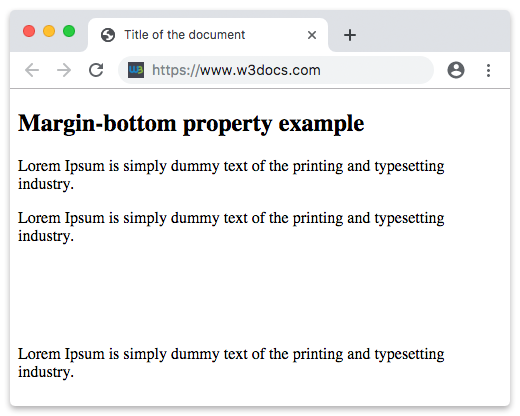
    <p class="bottom">Lorem Ipsum is simply dummy text of the printing and typesetting industry.</p>
    <p>Lorem Ipsum is simply dummy text of the printing and typesetting industry.</p>
  </body>
</html>
Result
Example of the margin-bottom property defined as “4em”:
<!DOCTYPE html>
<html>
  <head>
    <title>Title of the document</title>
    <style>
      .bottom {
        margin-bottom: 4em;
      }
    </style>
  </head>
  <body>
    <h2>Margin-bottom property example</h2>
    <p>Lorem Ipsum is simply dummy text of the printing and typesetting industry.</p>
    <p class="bottom">Lorem Ipsum is simply dummy text of the printing and typesetting industry.</p>
    <p>Lorem Ipsum is simply dummy text of the printing and typesetting industry.</p>
  </body>
</html>
Example of the margin-bottom property specified in “px”, “em” and “%”:
<!DOCTYPE html>
<html>
  <head>
    <title>Title of the document</title>
    <style>
      p.p1 {
        margin-bottom: 5em;
      }
      p.p2 {
        margin-bottom: 20%;
      }
      p.p3 {
        margin-bottom: 20px;
      }
    </style>
  </head>
  <body>
    <h2>Margin-bottom property example</h2>
    <p>A paragraph with no margins specified.</p>
    <p class="p1">Bottom margin is set to 5em.</p>
    <p class="p2">Bottom margin is set to 20%.</p>
    <p class="p3">Bottom margin is set to 20px.</p>
    <p>A paragraph with no margins specified.</p>
  </body>
</html>
Margin collapse
In some cases, top and bottom margins can be collapsed into a singular one that is equal to the largest one of these two margins. This can happen only vertical (top and bottom) margins.
p.one {
  margin: 20px 0;
}

p.two {
  margin: 35px 0;
}
In the code example above, the <p class=”one”> element has a vertical margin of 20px. The <p class=”two”> has a vertical margin of 35px. You will think that the vertical margin between these two elements must be 55px. However, as a result of the margin collapse, the actual margin will be 35px.
Example of a margin collapse:
<!DOCTYPE html>
<html>
  <head>
    <title>Title of the document</title>
    <style>
      p.one {
        margin: 20px 0;
      }
      p.two {
        margin: 35px 0;
      }
    </style>
  </head>
  <body>
    <h2>Margin-bottom property example</h2>
    <p>Lorem Ipsum is simply dummy text of the printing and typesetting industry.</p>
    <p class="one">Lorem Ipsum is simply dummy text of the printing and typesetting industry.</p>
    <p class="two">Lorem Ipsum is simply dummy text of the printing and typesetting industry.</p>
    <p>Lorem Ipsum is simply dummy text of the printing and typesetting industry.</p>
  </body>
</html>