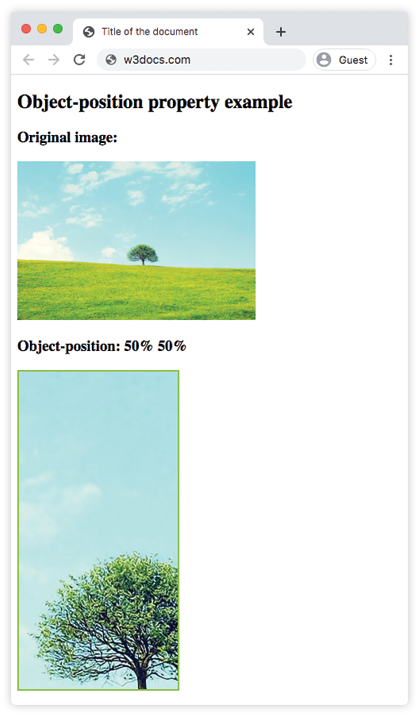
The object-position property is used together with the object-fit property to specify how an element should be positioned with x/y coordinates inside its content box. The first value controls the x-axis and the second value controls the y-axis.
This property can be specified by a string (left, center or right), or a number (in px or %).
| Initial Value | 50% 50% |
| Applies to | Replaced elements. |
| Inherited | Yes. |
| Animatable | Yes. The image is animatable. |
| Version | CSS3 |
| DOM Syntax | object.style.objectPosition = “20% 0%”; |
Syntax
object-fit: position | initial | inherit;Example of the object-position property:
<!DOCTYPE html>
<html>
  <head>
    <title>Title of the document</title>
    <style>
      img.tree {
        width: 200px;
        height: 400px;
        border: 2px solid #8ebf42;
        object-fit: none;
        object-position: 50% 50%;
      }
    </style>
  </head>
  <body>
    <h2>Object-position property example</h2>
    <h3>Original image:</h3>
    <img src="/uploads/media/default/0001/01/b408569013c0bb32b2afb0f0d45e93e982347951.jpeg" alt="Tree" width="300" height="200">
    <h3>Object-position: 50% 50%</h3>
    <img class="tree" src="/uploads/media/default/0001/01/b408569013c0bb32b2afb0f0d45e93e982347951.jpeg" alt="Tree" width="300" height="200">
  </body>
</html>
Result
Example of the object-position property specified as “left”:
<!DOCTYPE html>
<html>
  <head>
    <title>Title of the document</title>
    <style>
      img.tree {
        width: 200px;
        height: 400px;
        border: 2px solid #8ebf42;
        object-fit: none;
        object-position: left;
      }
    </style>
  </head>
  <body>
    <h2>Object-position property example</h2>
    <h3>Original image:</h3>
    <img src="/uploads/media/default/0001/01/b408569013c0bb32b2afb0f0d45e93e982347951.jpeg" alt="Tree" width="300" height="200">
    <h3>Object-position: left</h3>
    <img class="tree" src="/uploads/media/default/0001/01/b408569013c0bb32b2afb0f0d45e93e982347951.jpeg" alt="Tree" width="300" height="200">
  </body>
</html>
Example of the object-position property specified in “px” and “%”:
<!DOCTYPE html>
<html>
  <head>
    <title>Title of the document</title>
    <style>
      img.tree {
        width: 200px;
        height: 400px;
        border: 2px solid #8ebf42;
        object-fit: none;
        object-position: 10px 20%;
      }
    </style>
  </head>
  <body>
    <h2>Object-position property example</h2>
    <h3>Original image:</h3>
    <img src="/uploads/media/default/0001/01/b408569013c0bb32b2afb0f0d45e93e982347951.jpeg" alt="Tree" width="300" height="200">
    <h3>Object-position: left</h3>
    <img class="tree" src="/uploads/media/default/0001/01/b408569013c0bb32b2afb0f0d45e93e982347951.jpeg" alt="Tree" width="300" height="200">
  </body>
</html>
Values
| Value | Description |
|---|---|
| position | Specifies the position of the element inside its content box. |
| initial | Makes the property use its default value. |
| inherit | Inherits the property from its parents element. |