The outline-offset property is used to specify the space between an outline and the border edge of an element. The space between the outline and the element is transparent.
There are three ways in which outlines differ from borders:
- an outline is a line that is drawn outside of the element’s border edge,
- an outline can be non-rectangular,
- an outline doesn’t take up space.
This property is one of the CSS3 properties.
It is not a part of the outline shorthand property. The outline-offset property must be specified separately.
| Initial Value | 0 |
| Applies to | All elements. |
| Inherited | No. |
| Animatable | Yes. Width of space is animatable. |
| Version | CSS3 |
| DOM Syntax | object.style.outlineOffset = “20px”; |
Syntax
outline-offset: length | initial | inherit;Example of the outline-offset property:
<!DOCTYPE html>
<html>
  <head>
    <title>Title of the document</title>
    <style>
      div.ex1 {
        margin: 20px;
        border: 2px dotted #000;
        background-color: #8ebf42;
        outline: 4px solid #666;
        outline-offset: 10px;
      }
    </style>
  </head>
  <body>
    <h2>Outline-offset property example</h2>
    <div class="ex1">The outline-offset is 10px</div>
  </body>
</html>
Result
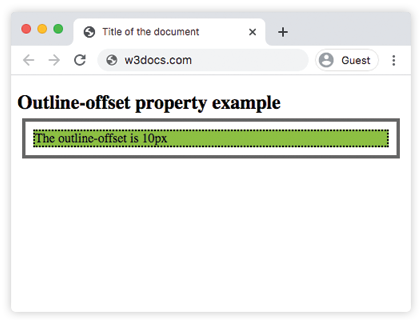
In the given example the space between outline and the border is 10px.
Values
| Value | Description |
|---|---|
| length | Space between outline and the border edge of an element. The default value is 0. |
| initial | Sets the property to its default value. |
| inherit | Inherits the property from its parent element. |
Browser support
 |  |  |  |  |
|---|---|---|---|---|
| 1.0+ | 15.0+ | 1.5+ | 1.2+ | 9.5+ |