The overflow-x property specifies whether the content should be hidden, visible or scrolls horizontally when the content overflows the element’s left and right edges. This property is one of the CSS3 properties.
The overflow-x property has four main values: visible, scroll, auto and hidden.
| Initial Value | visible |
| Applies to | Block-containers, flex containers and grid containers. |
| Inherited | No. |
| Animatable | No. |
| Version | CSS3 |
| DOM Syntax | object.style.overflowX = “visible”; |
Syntax
overflow-x: visible | hidden | scroll | auto | initial | inherit;Example of the overflow-x property:
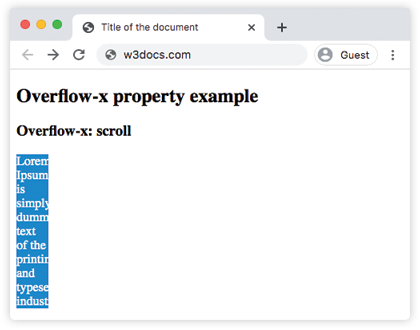
<!DOCTYPE html>
<html>
  <head>
    <title>Title of the document</title>
    <style>
      div.example {
        background-color: #1c87c9;
        color: #fff;
        width: 40px;
        overflow-x: scroll;
      }
    </style>
  </head>
  <body>
    <h2>Overflow-x property example</h2>
    <h3>Overflow-x: scroll</h3>
    <div class="example">
      Lorem Ipsum is simply dummy text of the printing and typesetting industry.
    </div>
  </body>
</html>
Result
Example of the overflow-x property with the “visible” value:
<!DOCTYPE html>
<html>
  <head>
    <title>Title of the document</title>
    <style>
      div.example {
        background-color: #1c87c9;
        color: #cccccc;
        width: 40px;
        overflow-x: visible;
      }
    </style>
  </head>
  <body>
    <h2>Overflow-x property example</h2>
    <h3>Overflow-x: visible</h3>
    <div class="example">
      Lorem Ipsum is simply dummy text of the printing and typesetting industry.
    </div>
  </body>
</html>
Example of the overflow-x property with the “hidden” value:
<!DOCTYPE html>
<html>
  <head>
    <title>Title of the document</title>
    <style>
      div.example {
        background-color: #1c87c9;
        color: #fff;
        width: 40px;
        overflow-x: hidden;
      }
    </style>
  </head>
  <body>
    <h2>Overflow-x property example</h2>
    <h3>Overflow-x: hidden</h3>
    <div class="example">
      Lorem Ipsum is simply dummy text of the printing and typesetting industry.
    </div>
  </body>
</html>
Example of the overflow-x property with the “auto” value:
<!DOCTYPE html>
<html>
  <head>
    <title>Title of the document</title>
    <style>
      div.example {
        background-color: #1c87c9;
        color: #fff;
        width: 40px;
        overflow-x: auto;
      }
    </style>
  </head>
  <body>
    <h2>Overflow-x property example</h2>
    <h3>Overflow-x: auto</h3>
    <div class="example">
      Lorem Ipsum is simply dummy text of the printing and typesetting industry.
    </div>
  </body>
</html>
Example of the overflow-x property with all the values:
<!DOCTYPE html>
<html>
  <head>
    <title>Title of the document</title>
    <style>
      div.scroll {
        background-color: #ccc;
        width: 50px;
        overflow-x: scroll;
      }
      div.hidden {
        background-color: #ccc;
        width: 50px;
        overflow: hidden;
      }
      div.auto {
        background-color: #ccc;
        width: 50px;
        overflow: auto;
      }
      div.visible {
        background-color: #ccc;
        width: 50px;
        overflow: visible;
      }
    </style>
  </head>
  <body>
    <h2>Overflow-x property example</h2>
    <h3>overflow-x: scroll</h3>
    <div class="scroll">
      Lorem Ipsum is simply dummy text of the printing and typesetting industry.
    </div>
    <h3>overflow-x: hidden</h3>
    <div class="hidden">
      Lorem Ipsum is simply dummy text of the printing and typesetting industry.
    </div>
    <h3>overflow-x: auto</h3>
    <div class="auto">
      Lorem Ipsum is simply dummy text of the printing and typesetting industry.
    </div>
    <h3>overflow-x: visible</h3>
    <div class="visible">
      Lorem Ipsum is simply dummy text of the printing and typesetting industry.
    </div>
  </body>
</html>