The padding-right CSS property sets the padding space on the right side of an element.
| Initial Value | 0 |
| Applies to | All elements. An exception is made when the display property is set to table-row-group, table-header-group, table-footer-group, table-row, table-column-group and table-column. It also applies to ::first-letter. |
| Inherited | No. |
| Animatable | Yes. Padding space is animatable. |
| Version | CSS1 |
| DOM Syntax | object.style.paddingRight = “40px”; |
With the help of the padding property you can set paddings on all the sides of an element with a single announcement.
Syntax
padding-right: length | initial | inherit;Example of the padding-right property:
<!DOCTYPE html>
<html>
  <head>
    <title>Title of the document</title>
    <style>
      p {
        border: 2px solid #000;
        color: #8ebf42;
        padding-right: 100px;
      }
    </style>
  </head>
  <body>
    <h2>Padding-right property example</h2>
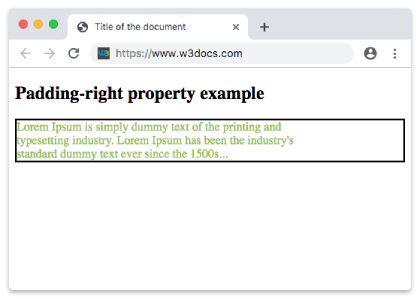
    <p>Lorem Ipsum is simply dummy text of the printing and typesetting industry. Lorem Ipsum has been the industry's standard dummy text ever since the 1500s...</p>
  </body>
</html>
Result
Example of the padding-right property with the “length” value:
<!DOCTYPE html>
<html>
  <head>
    <title>Title of the document</title>
    <style>
      p {
        border: 2px solid #000;
        color: #8ebf42;
        padding-right: 100pt;
      }
    </style>
  </head>
  <body>
    <h2>Padding-right property example</h2>
    <p>Lorem Ipsum is simply dummy text of the printing and typesetting industry. Lorem Ipsum has been the industry's standard dummy text ever since the 1500s</p>
  </body>
</html>
Example of the padding-right property specified in percentage:
<!DOCTYPE html>
<html>
  <head>
    <title>Title of the document</title>
    <style>
      p {
        border: 3px solid #cccccc;
        color: deepskyblue;
        padding: 15px;
        padding-right: 10%;
      }
    </style>
  </head>
  <body>
    <h2>Padding-left property example</h2>
    <p>
      Lorem Ipsum is simply dummy text of the printing and typesetting industry. Lorem Ipsum is simply dummy text of the printing and typesetting industry. Lorem Ipsum is simply dummy text of the printing and typesetting industry.
    </p>
  </body>
</html>