The perspective-origin defines the position at which the user is looking at the 3D-positioned element.
The perspective-origin property is one of the CSS3 properties.
The perspective property uses the value of the perspective-origin as a vanishing point. By default, the vanishing point of a 3D space is at the center. The perspective-origin property can be used to change the position of the vanishing point.
The perspective-origin property is always used with the perspective property.
When two or more values are specified but none of them is a keyword the first value will describe the horizontal position and the second one will describe the vertical position. If only one value is defined, the second one is supposed to be the center value.
| Initial Value | 50% 50% |
| Applies to | Transformable elements. |
| Inherited | No. |
| Animatable | Yes. The transformation of the perspective is animatable. |
| Version | CSS3 |
| DOM Syntax | object.style.perspectiveOrigin = “20px 70%”; |
Syntax
perspective-origin: x-position y-position | initial | inherit;Example of the perspective-origin property:
<!DOCTYPE html>
<html>
  <head>
    <title>Title of the document</title>
    <style>
      .element1 {
        position: relative;
        height: 150px;
        width: 150px;
        margin-left: 60px;
        border: 1px solid #666;
        -webkit-perspective: 130px;/* Safari 4-8  */
        -webkit-perspective-origin: 50% 50%;/* Safari 4-8  */
        perspective: 130px;
        perspective-origin: 50% 50%;
      }
      .element2 {
        padding: 50px;
        position: absolute;
        border: 1px solid #000;
        background-color: #1c87c9;
        background: #8ebf42;
        -webkit-transform-style: preserve-3d;/* Safari 3-8  */
        -webkit-transform: rotateX(45deg);/* Safari 3-8  */
        transform-style: preserve-3d;
        transform: rotateX(45deg);
      }
    </style>
  </head>
  <body>
    <h2>Perspective-origin property example</h2>
    <h3>Perspective-origin: 50% 50%:</h3>
    <div class="element1">
      Box1
      <div class="element2">Box2</div>
    </div>
  </body>
</html>
Result
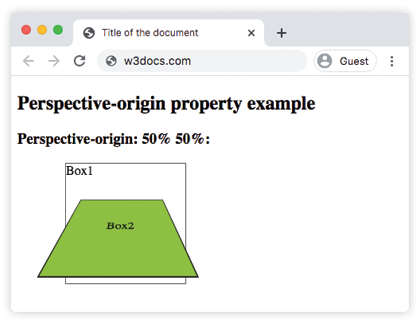
Example of the perspective-origin property with the “left” value:
<!DOCTYPE html>
<html>
  <head>
    <title>Title of the document</title>
    <style>
      .element1 {
        position: relative;
        height: 150px;
        width: 150px;
        margin-left: 20px;
        border: 1px solid #666;
        -webkit-perspective: 80px;/* Safari 4-8  */
        -webkit-perspective-origin: left;/* Safari 4-8  */
        perspective: 80px;
        perspective-origin: left;
      }
      .element2 {
        padding: 50px;
        position: absolute;
        border: 1px solid #000;
        background-color: #1c87c9;
        background: #8ebf42;
        -webkit-transform-style: preserve-3d;/* Safari 3-8  */
        -webkit-transform: rotateX(45deg);/* Safari 3-8  */
        transform-style: preserve-3d;
        transform: rotateX(45deg);
      }
    </style>
  </head>
  <body>
    <h2>Perspective-origin property example</h2>
    <h3>Perspective-origin: left:</h3>
    <div class="element1">
      Box1
      <div class="element2">Box2</div>
    </div>
  </body>
</html>
Example of the perspective-origin property with the “right” value:
<!DOCTYPE html>
<html>
  <head>
    <title>Title of the document</title>
    <style>
      .element1 {
        position: relative;
        height: 150px;
        width: 150px;
        margin-left: 160px;
        border: 1px solid #666;
        -webkit-perspective: 80px;/* Safari 4-8  */
        -webkit-perspective-origin: right;/* Safari 4-8  */
        perspective: 80px;
        perspective-origin: right;
      }
      .element2 {
        padding: 50px;
        position: absolute;
        border: 1px solid #000;
        background-color: #1c87c9;
        background: #8ebf42;
        -webkit-transform-style: preserve-3d;/* Safari 3-8  */
        -webkit-transform: rotateX(45deg);/* Safari 3-8  */
        transform-style: preserve-3d;
        transform: rotateX(45deg);
      }
    </style>
  </head>
  <body>
    <h2>Perspective-origin property example</h2>
    <h3>Perspective-origin: right:</h3>
    <div class="element1">
      Box1
      <div class="element2">Box2</div>
    </div>
  </body>
</html>
Example of the perspective-origin property defined as “bottom right”:
<!DOCTYPE html>
<html>
  <head>
    <title>Title of the document</title>
    <style>
      .element1 {
        position: relative;
        height: 150px;
        width: 150px;
        margin-left: 60px;
        border: 1px solid #666;
        -webkit-perspective: 130px;/* Safari 4-8  */
        -webkit-perspective-origin: bottom right;/* Safari 4-8  */
        perspective: 130px;
        perspective-origin: bottom right;
      }
      .element2 {
        padding: 50px;
        position: absolute;
        border: 1px solid #000;
        background-color: #1c87c9;
        background: #8ebf42;
        -webkit-transform-style: preserve-3d;/* Safari 3-8  */
        -webkit-transform: rotateX(45deg);/* Safari 3-8  */
        transform-style: preserve-3d;
        transform: rotateX(45deg);
      }
    </style>
  </head>
  <body>
    <h2>Perspective-origin property example</h2>
    <h3>Perspective-origin: bottom right:</h3>
    <div class="element1">
      Box1
      <div class="element2">Box2</div>
    </div>
  </body>
</html>
Values
| Value | Description |
|---|---|
| x-position | Specifies the position of view in x-axis. It can have the following values:left, which is equal to the 0 length value.right, which is equal to the 100% percentage value.center, which is equal to the 50% percentage value.lengthpercentage. |
| y-position | Specifies the position of view in y-axis. It can have the following values:top, which is equal to the 0 length value.center, which is equal to the 50% percentage value.bottom, which is equal to the 100% percentage value.length |
| initial | Sets this property to its default value. |
| inherit | Inherits this property from its parent element. |
Browser support
 |  |  |  |
|---|---|---|---|
| 36.0+ 12.0-35.0 -webkit- | 16.0+ 10.0-15.0 -moz- | 4.0+ -webkit- | 23.0+ 15.0-22.0 -webkit- |