The pointer-events property defines whether or not an element reacts to pointer events.
Many values are applicable to SVG elements, but only three of these values apply to HTML elements.
Important Notes
Using pointer-events to prevent an element from being the target of pointer events does not mean that pointer event listeners won’t be triggered. If one of the element’s children has pointer-events it means that the child can be the target of pointer events. Thus, any events that target that child passes through the parent and trigger event listeners on it.
| Initial Value | auto |
| Applies to | All elements. |
| Inherited | Yes. |
| Animatable | No. |
| Version | Scalable Vector Graphics (SVG) 1.1 (Second Edition). |
| DOM Syntax | object.style.pointerEvents = “auto”; |
Syntax
pointer-events: auto | none | visiblePainted | visibleFill | visibleStroke | visible | painted | fill | stroke | all | initial | inherit;Example of the pointer-events property:
<!DOCTYPE html>
<html>
  <head>
    <title>Title of the document</title>
    <style>
      div.example {
        pointer-events: none;
      }
      div.example2 {
        pointer-events: auto;
      }
    </style>
  </head>
  <body>
    <h2>The pointer-events Property</h2>
    <h3>Pointer-events: none</h3>
    <div class="example">
      Click here: <a href="https://www.w3docs.com/learn-javascript.html">JavaScript Tutorial</a>
    </div>
    <h3>Pointer-events: auto</h3>
    <div class="example2">
      Click here: <a href="https://www.w3docs.com/learn-css.html">CSS Tutorial</a>
    </div>
  </body>
</html>
Result
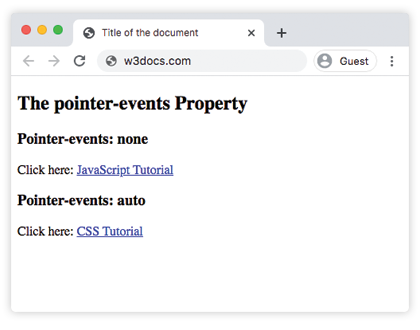
In the given example hover over the elements to see which one reacts to the pointer-events.
This example shows how pointer events can be specified to fall through or be caught by underlying elements:
Example of pointer-events with the <svg> tag:
<!DOCTYPE html>
<html>
  <head>
    <title>Title of the document</title>
    <style>
      .a {
        fill: #ccc;
      }
      .b {
        fill: #8ebf42;
      }
      .c {
        fill: #1c87c9;
        pointer-events: none;
      }
      .d {
        stroke: #666;
        fill: none;
        pointer-events: all;
      }
      .box:hover {
        stroke: #000;
        stroke-width: 5;
      }
    </style>
  </head>
  <body>
    <h2>Pointer-events property example</h2>
    <svg width="300" height="300">
      <g transform="translate(20, 20)">
        <path class="a box" d="M 0 0 L 100 0 L 100 100 L 0 100 z" />
        <path class="b box" d="M 50 50 l 100 0 l 0 100 l -100 0 z" />
        <path class="c box" d="M 100 100 l 100 0 l 0 100 l -100 0 z" />
        <path class="d box" d="M 150 150 l 100 0 l 0 100 l -100 0 z" />
      </g>
    </svg>
  </body>
</html>
Values
| Value | Description |
|---|---|
| none | The element never reacts to the pointer events. |
| auto | The elements accepts the pointer events such as clicks, hover etc. This is the default value of this property. |
| initial | Makes the property use its default value. |
| inherit | Inherits the property from its parents element. |
SVG only Values
| visiblePainted | The element can only be the target of a pointer event whenthe visibility property is set to visiblea mouse cursor is over the interior of the elementthe fill property is set to a value other than nonewhen a mouse cursor is over the perimeter of the elementthe stroke property is set to a value other than none. |
| visibleFill | The element can only be the target of a pointer event whenthe visibility property is set to visiblea mouse cursor is over the interior of the element. |
| visibleStroke | The element can only be the target of a pointer event whenthe visibility property is set to visiblewhen the mouse cursor is over the perimeter of the element. |
| visible | The element can only be the target of a pointer event whenthe visibility property is set to visiblethe mouse cursor is over either the interior or the perimeter of the element. |
| painted | The element can only be the target of a pointer event when e.g.the mouse cursor is over the interior of the elementthe fill property is set to a value other than nonethe mouse cursor is over the perimeter of the elementthe stroke property is set to a value other than none. |
| fill | The element can only be the target of a pointer event when the pointer is over the interior of the element. |
| stroke | The element can only be the target of a pointer event when the pointer is over the perimeter of the element. |
| all | The element can only be the target of a pointer event when the pointer is over the interior or the perimeter of the element. |
Browser support
 |  |  |  |  |
|---|---|---|---|---|
| 4.0+ | 12.0+ | 3.6+ | 4.0+ | 15.0+ |