The right property specifies part of the position of positioned elements.
The right property is used to set the right margin edge of the element and the right edge of its containing block for absolute or fixed positioned elements.
The effect of right depends on how the element is positioned (see position property).
- If position is set to “absolute” or “fixed”, the right property specifies the distance between the element’s edge and the right edge of its containing block.
- If position is set to “relative”, the right property specifies the distance the element’s right edge is moved to the right from its normal position.
- If position is set to “sticky”, the right property changes its position to relative when the element is inside the viewport, and changes to fixed when it is outside.
- If position is set to “static”, there won’t be any effect.
| Initial Value | auto |
| Applies to | Positioned elements. |
| Inherited | No. |
| Animatable | Yes. Position of the element is animatable. |
| Version | CSS2 |
| DOM Syntax | Object.style.right = “50px”; |
Syntax
right: auto | length | initial | inherit;Example of the right property:
<!DOCTYPE html>
<html>
  <head>
    <title>Title of the document</title>
    <style>
      img {
        position: absolute;
        right: 35px;
      }
    </style>
  </head>
  <body>
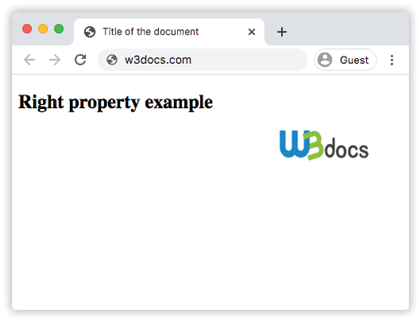
    <h2>Right property example</h2>
    <img src="/build/images/w3docs-logo-black.png" alt="W3docs logo" width="146" height="41">
  </body>
</html>
Result
Example of the right property specified in “%”:
<!DOCTYPE html>
<html>
  <head>
    <title>Title of the document</title>
    <style>
      div {
        height: 150px;
        width: 100%;
        background-color: #ccc;
        color: #ffffff;
      }
      img {
        position: absolute;
        right: 30%;
        top: 120px;
      }
    </style>
  </head>
  <body>
    <h2>Right property example</h2>
    <img src="/build/images/w3docs-logo-black.png" alt="W3docs logo" width="146" height="41">
    <div>This is some div element.</div>
  </body>
</html>
Example of the right property with the “initial” value:
<!DOCTYPE html>
<html>
  <head>
    <title>Title of the document</title>
    <style>
      div {
        position: relative;
        max-width: 300px;
        line-height: 20px;
      }
      p {
        position: absolute;
        right: initial;
        background-color: lightgreen;
      }
    </style>
  </head>
  <body>
    <h2>Right property example</h2>
    <div>
      Lorem ipsum, or lipsum as it is sometimes known, is dummy text used in laying out print, graphic or web designs
      <p>Some text</p>
    </div>
  </body>
</html>