The CSS stroke-width property specifies the width of the stroke on the element.
The presentation attribute will be overridden: e.g. <path stroke-width=”3px” … />. The inline style won’t be overridden: e.g. <path style=”stroke-width: 3px;” … />.
| Initial Value | 1 |
| Applies to | Shapes and text content elements. |
| Inherited | Yes. |
| Animatable | No. |
| Version | SVG 1.1 Specification |
| DOM Syntax | Object.strokeWidth = “0.5”; |
Syntax
stroke-width: length | percentage | initial | inherit;Example of the stroke-width property:
<!DOCTYPE html>
<html>
  <head>
    <title>Title of the document</title>
  </head>
  <body>
    <h2>Stroke-width property example</h2>
    <svg viewBox="0 0 30 10">
      <circle cx="5" cy="5" r="3" stroke="#1c87c9" stroke-width="1" />
    </svg>
  </body>
</html>
Result
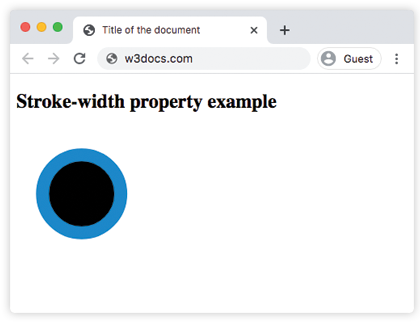
Example of the stroke-width property with the “length” value:
<!DOCTYPE html>
<html>
  <head>
    <title>Title of the document</title>
  </head>
  <body>
    <h2>Stroke-width property example</h2>
    <svg viewBox="0 0 30 10">
      <circle cx="5" cy="5" r="3" stroke="#1c87c9" stroke-width="3" />
    </svg>
  </body>
</html>
Example of the stroke-width property with the “%” value:
<!DOCTYPE html>
<html>
  <head>
    <title>Title of the document</title>
  </head>
  <body>
    <h2>Stroke-width property example</h2>
    <svg viewBox="0 0 30 10">
      <circle cx="5" cy="5" r="3" stroke="#1c87c9" stroke-width="2%" />
    </svg>
  </body>
</html>
Values
| Value | Description |
|---|---|
| length | Specifies the width of the stroke. |
| percentage | Specifies the width of the stroke in %. |
| initial | Makes the property use its default value. |
| inherit | Inherits the property from its parents element. |