The text-align property is used for aligning the inner content of a block element.
You can use the margin property to center the element.
| Initial Value | left if direction is “ltr”, right if direction is “rtl” |
| Applies to | Block containers. |
| Inherited | Yes |
| Animatable | No. |
| Version | CSS1 |
| DOM Syntax | object.style.textAlign = “right”; |
Syntax
text-align: left | right | center | justify | initial | inherit;Example of the text-align property with the “right” and “center” values:
<!DOCTYPE html>
<html>
  <head>
    <title>Title of the document</title>
    <style>
      div {
        text-align: right;
      }
      p {
        text-align: center;
      }
    </style>
  </head>
  <body>
    <h2>Text-align property example</h2>
    <div>Example for the text-align property.</div>
    <p>Some paragraph for example.</p>
  </body>
</html>
Result
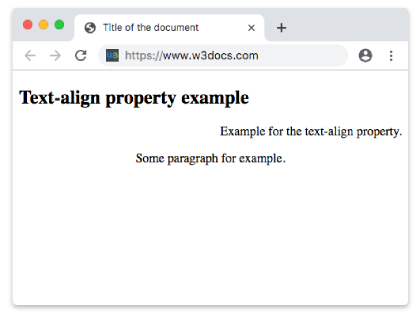
Example of the text-align property with the “center”, “left” and “justify” values:
<!DOCTYPE html>
<html>
  <head>
    <title>Title of the document</title>
    <style>
      h2 {
        text-align: center;
      }
      p.date {
        text-align: left;
      }
      p.example {
        text-align: justify;
      }
    </style>
  </head>
  <body>
    <h2>Text-align property example</h2>
    <p class="date">March, 2019</p>
    <p class="example">
      Lorem Ipsum is dummy text of the printing and typesetting industry. Lorem Ipsum h as been the industry's standard dummy text ever since the 1500s when an unknown pri nter took a galley of type and scrambled it to make a type specimen book. It has surviv ed not only five centuries, but also the leap into electronic typesetting, remaining essent ially unchanged. It was popularised in the 1960s with the release of Letraset sheets conta ining Lorem Ipsum passages, and more recently with desktop publishing software like Ald us PageMaker including versions of Lorem Ipsum.
    </p>
  </body>
</html>