The CSS text-overflow property specifies how the overflowing inline text should be signaled to the user. It is one of the CSS3 properties.
The text-overflow property works if the overflow property is set to “hidden”, and white-space is set to “nowrap”.
In CSS3, the specification allows using a custom string. White space, which is considered a string or any other custom string can be used. In the old version of the specification, it was noted that we could use an URL to an image for the ellipsis, but it was dropped.
| Initial Value | clip |
| Applies to | Block container elements. |
| Inherited | No. |
| Animatable | No. |
| Version | CSS3 |
| DOM Syntax | object.style.textOverflow = “ellipsis”; |
Syntax
text-overflow: clip | ellipsis | string | initial | inherit;Example of the text-overflow property:
<!DOCTYPE html>
<html>
  <head>
    <title>Title of the document</title>
    <style>
      div {
        white-space: nowrap;
        background-color: #eee;
        width: 50px;
        overflow: hidden;
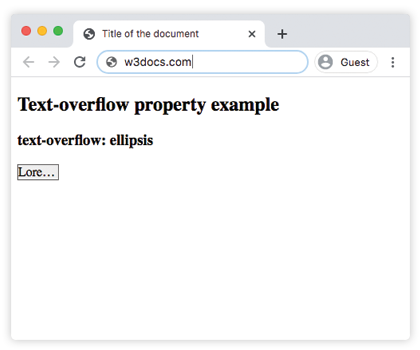
        text-overflow: ellipsis;
        border: 1px solid #666;
      }
    </style>
  </head>
  <body>
    <h2>Text-overflow property example</h2>
    <h3>text-overflow: ellipsis</h3>
    <div>Lorem Ipsum</div>
  </body>
</html>
Result
Example of the text-overflow property with the “clip”, “ellipsis” and “initial” values:
<!DOCTYPE html>
<html>
  <head>
    <title>Title of the document</title>
    <style>
      div.element1 {
        white-space: nowrap;
        background-color: #eee;
        width: 50px;
        overflow: hidden;
        text-overflow: clip;
        border: 1px solid #666;
      }
      div.element2 {
        white-space: nowrap;
        background-color: #eee;
        width: 50px;
        overflow: hidden;
        text-overflow: ellipsis;
        border: 1px solid #666;
      }
      div.element3 {
        white-space: nowrap;
        background-color: #eee;
        width: 50px;
        overflow: hidden;
        text-overflow: initial;
        border: 1px solid #666;
      }
    </style>
  </head>
  <body>
    <h2>Text-overflow property example</h2>
    <h3>text-overflow: clip</h3>
    <div class="element1">Lorem Ipsum</div>
    <h3>text-overflow: ellipsis</h3>
    <div class="element2">Lorem Ipsum</div>
    <h3>text-overflow: initial</h3>
    <div class="element3">Lorem Ipsum</div>
  </body>
</html>