The text-stroke property is an experimental property providing decoration options for a text. It is a shorthand for the following properties:
- text-stroke-width
- text-stroke-color
There is the text-fill-color property, which overrides the color property, allowing for a graceful fallback to a different text color in browsers that do not support the text-stroke property.
Web fonts are typically based on vector graphics which means that the shape is determined by mathematics and points instead of the pixel data. As they are vector we can do everything that can be done with vector text by other vector programs. For example, we can add a stroke for certain characters.
| Initial Value | 0 currentColor |
| Applies to | All elements. |
| Inherited | Yes. |
| Animatable | Yes. |
| Version | Compatibility Standard |
| DOM Syntax | object.style.textStroke = “1px #666”; |
Syntax
text-stroke: length | color | initial | inherit;Example of the text-stroke property:
<!DOCTYPE html>
<html>
  <head>
    <title>Title of the document</title>
    <style>
      p {
        font-size: 2.5em;
        margin: 0;
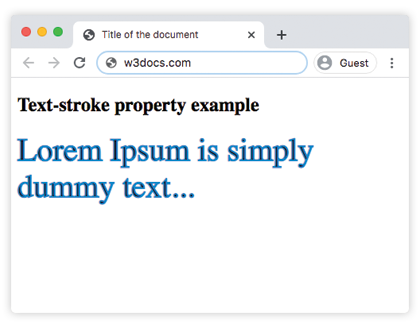
        -webkit-text-stroke: 2px #1c87c9;
      }
    </style>
  </head>
  <body>
    <h2>Text-stroke property example</h2>
    <p>Lorem Ipsum is simply dummy text...</p>
  </body>
</html>
Result
Example of the text-stroke property with multiple values:
<!DOCTYPE html>
<html>
  <head>
    <title>Title of the document</title>
    <style>
      .a {
        font-size: 2.5em;
        margin: 0;
        -webkit-text-stroke: 1px #8ebf42;
      }
      .b {
        font-size: 2.5em;
        margin: 0;
        -webkit-text-stroke: 2pt #8ebf42;
      }
      .c {
        font-size: 2.5em;
        margin: 0;
        -webkit-text-stroke: 0.1cm #8ebf42;
      }
    </style>
  </head>
  <body>
    <h2>Text-stroke property example</h2>
    <p class="a">Lorem Ipsum is simply dummy text...</p>
    <p class="b">Lorem Ipsum is simply dummy text...</p>
    <p class="c">Lorem Ipsum is simply dummy text...</p>
  </body>
</html>
Values
| Value | Description |
|---|---|
| length | Specifies the thickness of the stroke. |
| color | Specifies the color of the stroke. Color names, hexadecimal color codes, rgb(), rgba(), hsl(), hsla() can be used. |
| initial | Makes the property use its default value. |
| inherit | Inherits the property from its parents element. |