- Syntax
- Example of the text-transform property with the “uppercase” value:
- Result
- The “capitalize” value
- Example of the text-transform property with the “capitalize” and “lowercase” values:
- Example of the text-transform property with the “none” value:
- Example of the text-transform property with the “initial” value:
- Values
The text-transform property is used to make text appear in all-uppercase or all-lowercase, or with each word capitalized.
Some language-specific case mapping rules are taken into account by this property. Let’s go through some of them:
- In Turkic languages, such as Turkish (tr), Azerbaijani (az), Crimean Tatar (crh), Volga Tatar (tt), and Bashkir (ba), there exist two types of i, with and without the dot, and the following two case pairings: i/İ and ı/I.
- In German (de) languages, the ß becomes SS in uppercase.
- In Greek (el) languages, when the whole word is uppercase (ά/Α) the vowel accent is lost, except the disjunctive eta (ή/Ή).
The browser support for the language-specific cases may vary.
The “full-width” and “full-size-kana” values are experimental and not yet supported by any browser.
| Initial Value | none |
| Applies to | All elements. It also applies to ::first-letter and ::first-line. |
| Inherited | Yes. |
| Animatable | No. |
| Version | CSS1 |
| DOM Syntax | object.style.textTransform = “capitalize”; |
Syntax
text-transform: none | capitalize | uppercase | lowercase | full-width | full-width-kana | initial | inherit;Example of the text-transform property with the “uppercase” value:
<!DOCTYPE html>
<html>
  <head>
    <title>Title of the document</title>
    <style>
      p {
        text-transform: uppercase;
      }
    </style>
  </head>
  <body>
    <h2>Text-transform property example</h2>
    <p>This is some paragraph.</p>
    <div>
      Lorem Ipsum is simply dummy text of the printing and typesetting industry. Lorem Ipsum has been the industry's standard dummy text ever since the 1500s, when an unknown printer took a galley of type and scrambled it to make a type specimen book.
    </div>
  </body>
</html>Result
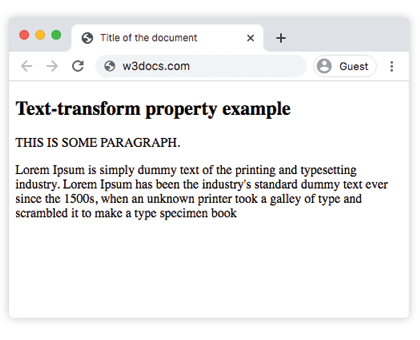
The “capitalize” value
The “capitalize” value of the text-transform property capitalizes the words inside single or double quotes, as well as the first letter that comes after a hyphen. The first letter coming after a number will not be capitalized. For example, dates like “January 3th, 2019” will not become “January 3Th, 2019”. This value only capitalizes the first letters of the word, so the other letters in the word won’t change.
In the example below, we have used the “capitalize” value for the first sentence and the “lowercase” value for the second sentence:
Example of the text-transform property with the “capitalize” and “lowercase” values:
<!DOCTYPE html>
<html>
  <head>
    <style>
      .a {
        text-transform: capitalize
      }
      .b {
        text-transform: lowercase
      }
    </style>
  </head>
  <body>
    <h2>Text-transform property example</h2>
    <div class="a">"Text transform property"</div>
    <br/>
    <div class="b">
      "THIS IS SOME PARAGRAPH FOR EXAMPLE".
    </div>
  </body>
</html>Example of the text-transform property with the “none” value:
<!DOCTYPE html>
<html>
  <head>
    <title>Title of the document</title>
    <style>
      h1 {
        color: red;
      }
      h2 {
        text-transform: none;
      }
    </style>
  </head>
  <body>
    <h1>Example with text-transform property</h1>
    <h2>
        Example of the  text-transform property with the "none” value:
    </h2>
  </body>
</html>Example of the text-transform property with the “initial” value:
<!DOCTYPE html>
<html>
  <head>
    <title>Title of the document</title>
    <style>
      h1 {
        color: red;
      }
      p.text {
        text-transform: initial;
      }
    </style>
  </head>
  <body>
    <h1>Example with text-transform property</h1>
    <h2>text-transform: initial:</h2>
    <p class="text">
      Example of the text-transform property with the "initial” value:
    </p>
  </body>
</html>