The zoom property is used to scale the content. For scaling the content, you can also use the transform property set to “scale()”.
| Initial Value | normal |
| Applies to | All elements. |
| Inherited | No. |
| Animatable | Yes. |
| Version | Safari CSS Reference. |
| DOM Syntax | object.style.zoom = “4”; |
Syntax
zoom: normal | number | percentage | reset | initial | inherit;
Example of the zoom property:
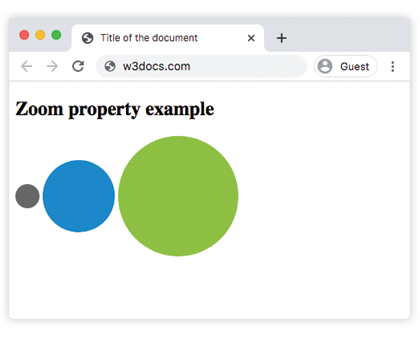
<!DOCTYPE html>
<html>
  <head>
    <title>Title of the document</title>
    <style>
      div.element {
        width: 30px;
        height: 30px;
        border-radius: 50%;
        text-align: center;
        vertical-align: middle;
        display: inline-block;
        zoom: 2;
      }
      div#grey {
        background-color: #666;
        zoom: normal;
      }
      div#blue {
        background-color: #1c87c9;
        zoom: 300%;
      }
      div#green {
        background-color: #8ebf42;
        zoom: 5;
      }
    </style>
  </head>
  <body>
    <h2>Zoom property example</h2>
    <div id="grey" class="element"></div>
    <div id="blue" class="element"></div>
    <div id="green" class="element"></div>
  </body>
</html>
Result
Values
| Value | Description |
|---|
| normal | Specifies the normal size of the element. |
| number | Zoom factor. Equivalent to the corresponding percentage (1.0 = 100% = normal). Values larger than 1.0 zoom in. Values smaller than 1.0 zoom out. |
| percentage | Specifies a value in percentage.100% is equivalent to normal. |
| reset | Do not magnify the element if the user applies non-pinch-based zooming to the document. |
| initial | Makes the property use its default value. |
| inherit | Inherits the property from its parents element. |