Understanding the jQuery Dimensions
jQuery provides several methods, such as height(), innerHeight(), outerHeight(), width(), innerWidth() and outerWidth() to get and set the CSS dimensions for the elements. Check out the following illustration to understand how these methods are calculating the dimensions of an element’s box.
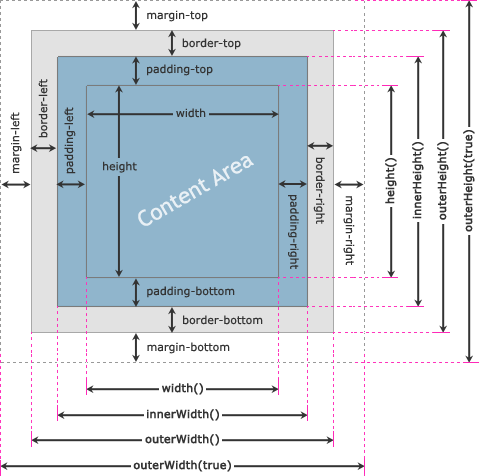
jQuery width() and height() Methods
The jQuery width() and height() methods get or set the width and the height of the element respectively. This width and height doesn’t include padding, border and margin on the element. The following example will return the width and height of a <div> element.
Example
<script>
$(document).ready(function(){
    $("button").click(function(){
        var divWidth = $("#box").width();
        var divHeight = $("#box").height();
        $("#result").html("Width: " + divWidth + ", " + "Height: " + divHeight);
    });
});
</script>
Similarly, you can set the width and height of the element by including the value as a parameter within the width() and height() method. The value can be either a string (number and unit e.g. 100px, 20em, etc.) or a number. The following example will set the width of a <div> element to 400 pixels and height to 300 pixels respectively.
Example
<script>
$(document).ready(function(){
    $("button").click(function(){
        $("#box").width(400).height(300);
    });
});
</script>
Note: Use the jQuery width() or height() method if you want to use an element’s width or height in a mathematical calculation, since it returns the width and height property value as a unit-less pixel value (e.g. 400). Whereas, the css("width") or css("height") methods returns value with units (e.g. 400px).