HTML <fieldset> tag is used to group the logically related fields/labels contained within an HTML form.
The use of this tag is optional while creating an HTML form but using <filedset>, it is easy to understand the purpose of grouped elements of form.
The <legend> tag is used with the <fieldset> element as a first child to define the caption for the grouped related fields.
Syntax:
<fieldset>.....</fieldset> Following are some specifications about the HTML <fieldset> tag
| Display | Block |
| Start tag/End tag | Both Start and End tag |
| Usage | Structural (Within HTML Form) |
Example 1:
<!DOCTYPE html>
<html>
<head>
<title>fieldset Tag</title>
<style>
    p{
       color: #db7093;
       margin-left: 440px;
       font-size: 40px;
       font-weight: bold;
        }
    form{
             color: white;
    width: 600px;
             height: 300px;
    margin: auto;
    margin-top: 30px;}
    div{
    background-color: #28455e;
        }
                  .tx{
    margin-left: 20px;
        }
</style>
</head>
<body>
 <h1>Example of fieldset Tag</h1>
 <p>User Feedback Form</p>
 <div>
 <form class="wd">
     <fieldset class="wd">
        <legend>User basic information:</legend>
        <label>First Name</label><br>
        <input type="text" name="fname"><br>
        <label>Last Name</label><br>
        <input type="text" name="lname"><br>
        <label>Enter Email</label><br>
        <input type="email" name="email"><br><br>
     </fieldset><br>
    <label class="tx">Enter your feedback:</label><br>
    <textarea class="tx" cols="30"></textarea><br><br>
     <input  class="tx" type="Submit"><br>
  </form>
 </div>
</body>
</html>
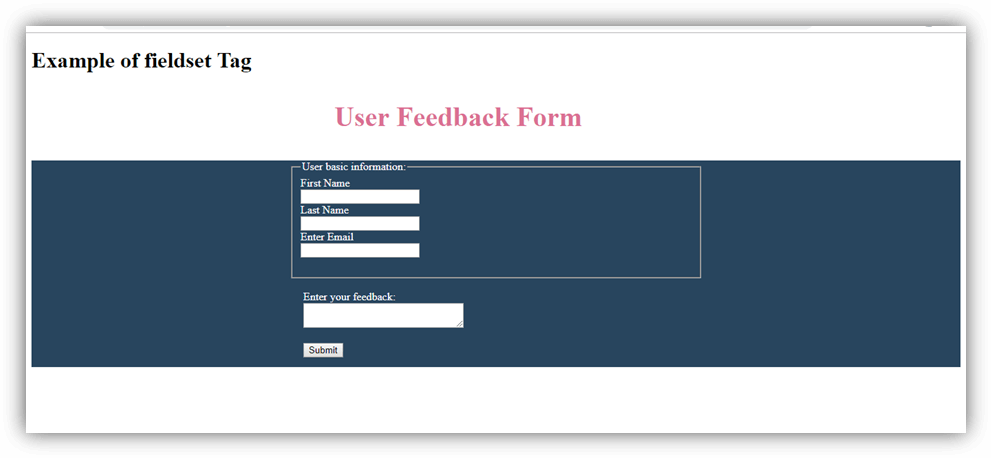
Output:
Attribute
 = New in HTML5.
Tag-specific attribute
| Attribute | Value | Description |
|---|---|---|
| disabled | disabled | It specifies that all form controls within the fieldset element are disabled. |
| form | form_id | It specifies the one or more form(s) to which fieldset controls belongs. |
| name | text | It specifies the name associated with fieldset. It will not display at the browser and useful with JS. |
Global attribute
HTML < fieldset > tag supports the global attributes in HTML
Event attribute
HTML < fieldset > tag supports the event attributes in HTML.