HTML <legend> tag is used to insert a title or caption to its parent element such as <fieldset>. The <legend> element must be the first child of <fieldset > element.
By using <legend> tag with <form> elements, it is easy to understand the purpose of grouped form elements.
Syntax
<legend> Content........<legend> Following are some specifications about the HTML <legend> tag
| Display | block |
| Start tag/End tag | Both Start and End tag |
| Usage | textual |
Example
<!DOCTYPE html>
<html>
<head>
<title>Legend Tag</title>
</head>
<body>
 <h1>Example of Legend Tag</h1>
 <form>
              <fieldset>
        <legend>Employee basic information:</legend>
        <label>First Name</label><br>
        <input type="text" name="fname"><br>
        <label>Last Name</label><br>
        <input type="text" name="lname"><br>
        <label>Enter Email</label><br>
        <input type="email" name="email"><br><br>
        <input type="Submit"><br>
                </fieldset>
</form>
</body>
</html>
Output:
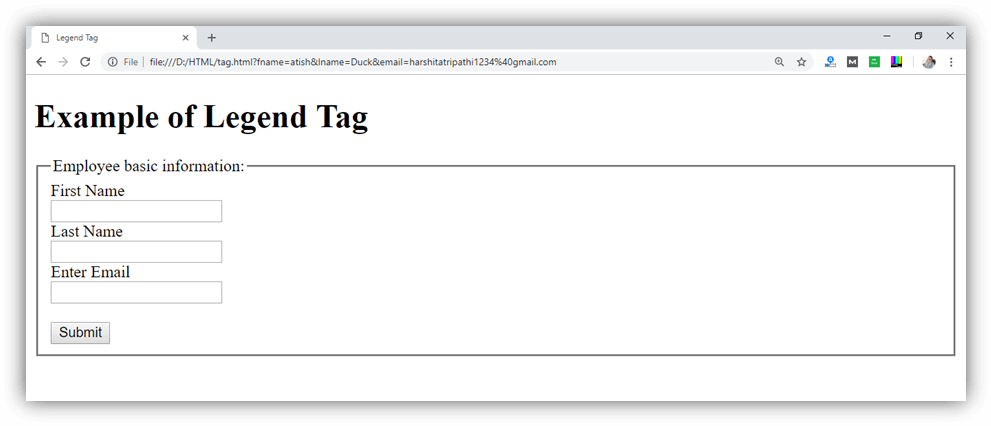
Attribute:
Tag-specific attributes:
| Attribute | Value | Description |
|---|---|---|
| align | topbottomleftright | It specifies the alignment of the caption. (Not Supported in HTML5) |
Global attribute:
The <legend > tag supports the global attributes in HTML
Event attribute:
The <legend> tag supports the event attributes in HTML.