The <background> attribute in the HTML document is used to specify the background image on a HTML page or a table. You can pass the path of an image as a value of background attribute to set the image of your HTML page or table.
Syntax
<tag background="Path_of_an_image"> <tag style="background-image:Path_of_an_image)"> Examples: The following examples set the background image in different styles:
Example 1: This example uses the background attribute with the body tag for displaying the image as a background of the web page.
<!DOCTYPE html>
<html>
<head>
<title>
Example of Background image
</title>
</head>
<body background="https://previews.123rf.com/images/kotenko/kotenko1403/kotenko140300008/26854631-snowy-winter-in-a-mountain-forest-sunny-cold-day-with-snow-covered-trees-carpathian-mountains-ukrain.jpg">

<font color="red">
<h1> click on this <a href="https://www.google.com/"> link </a> for the Home page of Our Website </h1>
</font>
</body>
</html>
Output:

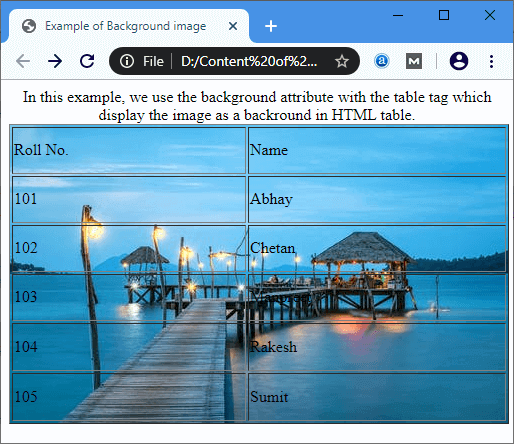
Example 2: This example uses the background attribute with the table tag for displaying the image as a background of html table.
<!DOCTYPE html>
<html>
<head>
<title>
    Example of Background image
</title>
</head>
<body>
<center>

In this example, we use the background attribute with the table tag, which displays the image as a background of the HTML table.

<table background="https://images.pexels.com/photos/237272/pexels-photo-237272.jpeg?auto=compress&cs=tinysrgb&dpr=1&w=500" height="300" border="1" width="500">

    <tr>
        <td> Roll No. </td>
        <td> Name </td>
    </tr>
    <tr>
        <td> 101 </td>
        <td> Abhay </td>
    </tr>
    <tr>
        <td> 102 </td>
        <td> Chetan </td>
    </tr>
    <tr>
        <td> 103 </td>
        <td> Manpreet </td>
    </tr>
    <tr>
        <td> 104 </td>
        <td> Rakesh </td>
    </tr>
    <tr>
        <td> 105 </td>
        <td> Sumit </td>
    </tr>
</table>
</center>
</body>
</html>
Output:
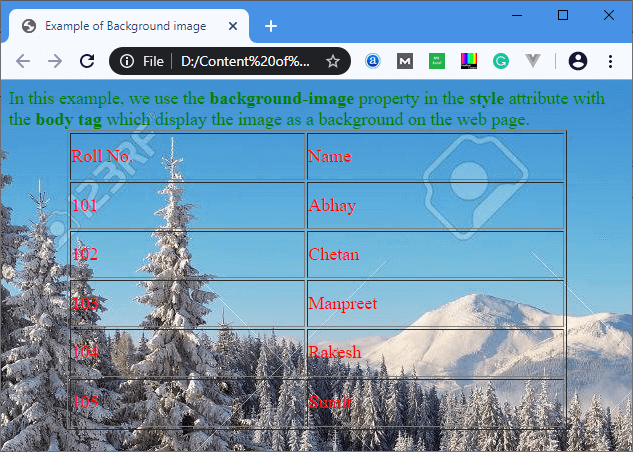
Example 3: This example uses the CSS syntax for the background-image property of the style attribute with the body tag.
<!DOCTYPE html>
<html>
<head>
<title>
    Example of Background image
</title>
</head>

<body style="background-image:url('https://previews.123rf.com/images/kotenko/kotenko1403/kotenko140300008/26854631-snowy-winter-in-a-mountain-forest-sunny-cold-day-with-snow-covered-trees-carpathian-mountains-ukrain.jpg');">

<font size="4" color="green">

In this example, we use the <b> background-image </b> property in the <b>style</b> attribute with the <b> body tag </b> which display the image as a background on the web page.

</font>
<center>
<font size="4" color="red">
<table height="300" border="1" width="500">
    <tr>
        <td> Roll No. </td>
        <td> Name </td>
    </tr>
    <tr>
        <td> 101 </td>
        <td> Abhay </td>
    </tr>
    <tr>
        <td> 102 </td>
        <td> Chetan </td>
    </tr>
    <tr>
        <td> 103 </td>
        <td> Manpreet </td>
    </tr>
    <tr>
        <td> 104 </td>
        <td> Rakesh </td>
    </tr>
    <tr>
        <td> 105 </td>
        <td> Sumit </td>
    </tr>
</table>
</font>
</center>
</body>
</html>
Output:
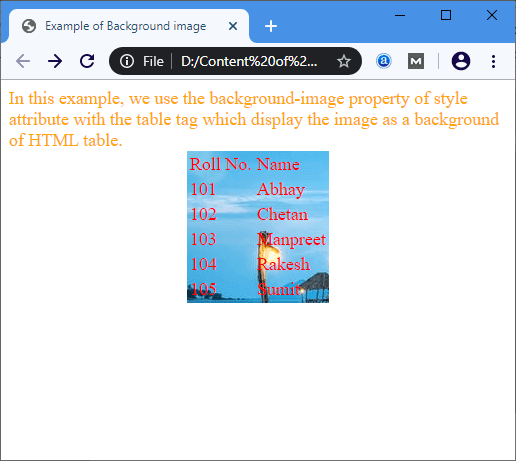
Example 4: This example uses the CSS syntax for the background-image property in the style attribute with the table tag.
<!DOCTYPE html>
<html>
<head>
<title>
    Example of Background image
</title>
</head>
<body>
<font size="4" color="orange">
In this example, we use the <b> background-image property </b> in the <b> style attribute </b> with the <b> table tag </b> which display the image as a background of HTML table.
</font>
<font size="4" color="red">
<center>

<table style="background-image:url('https://images.pexels.com/photos/237272/pexels-photo-237272.jpeg?auto=compress&cs=tinysrgb&dpr=1&w=500');">
    <tr>
        <td> Roll No. </td>
        <td> Name </td>
    </tr>

    <tr>
        <td> 101 </td>
        <td> Abhay </td>
    </tr>
    <tr>
        <td> 102 </td>
        <td> Chetan </td>
    </tr>
    <tr>
        <td> 103 </td>
        <td> Manpreet </td>
    </tr>
    <tr>
        <td> 104 </td>
        <td> Rakesh </td>
    </tr>
    <tr>
        <td> 105 </td>
        <td> Sumit </td>
    </tr>
</table>
</center>
</font>
</body>
</html>
Output:
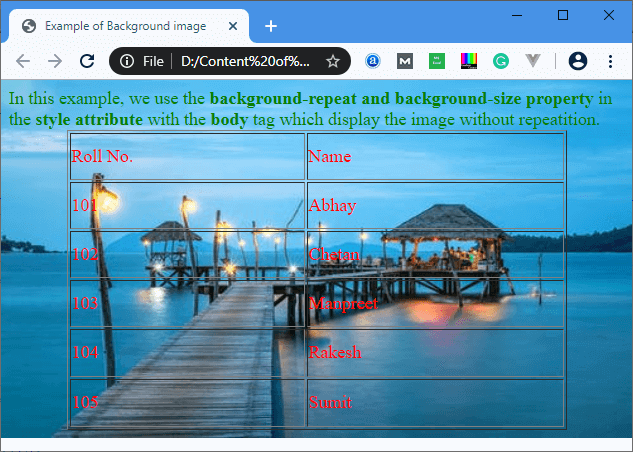
Example 5: This example uses the CSS syntax for the background-repeat and background-size property of the style attribute with the body tag.
<!DOCTYPE html>
<html>
<head>
<title>
    Example of Background image
</title>
</head>

<body style="background-image:url('https://images.pexels.com/photos/237272/pexels-photo-237272.jpeg?auto=compress&cs=tinysrgb&dpr=1&w=500');
background-repeat:no-repeat; background-size: 100% 100%">

<font size="4" color="green">

In this example, we use the <b> background-repeat and background-size property </b> in the <b> style attribute </b> with the <b> body </b> tag
which display the image without repeatition.

</font>
<center>

<font size="4" color="red">
<table height="300" border="1" width="500">
    <tr>
        <td> Roll No. </td>
        <td> Name </td>
    </tr>
    <tr>
        <td> 101 </td>
        <td> Abhay </td>
    </tr>
    <tr>
        <td> 102 </td>
        <td> Chetan </td>
    </tr>
    <tr>
        <td> 103 </td>
        <td> Manpreet </td>
    </tr>
    <tr>
        <td> 104 </td>
        <td> Rakesh </td>
    </tr>
    <tr>
        <td> 105 </td>
        <td> Sumit </td>
    </tr>
</table>
</font>
</center>
</body>
</html>
Output: