In this article, we will understand the working of the HTML5 spellcheck attribute.
What do you mean by the Spellcheck attribute?
In HTML 5, the spellcheck attribute identifies grammar or spelling mistakes in HTML text fields, textarea elements, and content editable attributes. The attribute returns the color resolution of the visitor’s screen.
Syntax
<tagname spellcheck="true | false"> In the above syntax, the tag name is an input element or tag in html. The spellcheck attribute has a true or false value which defines that spellcheck attribute is enabled or disabled.
Let’s take the following examples of the HTML 5 spell check attribute.
Example 1: Enable HTML 5 spell check attribute in textarea input type.
<! DOCTYPE html>
<html>
<head>
<meta charset = "utf-8">
        <meta name = "viewport" content="width=device-width, initial-scale = 1.0">
        <title> HTML Spell Check attribute </title>
        <link rel = "stylesheet" href = "https://codepen.io/gymratpacks/pen/VKzBEp#0">
        <link href = 'https://fonts.googleapis.com/css?family=Nunito:400,300' rel='stylesheet' type = 'text/css'>
<style>
@import url(https://fonts.googleapis.com/css?family=Roboto:400,300);
* { box-sizing: border-box; }
html { height: 100%; }
   body {
      color: #000;
      height: 100vh;
      background-color: #FBAB7E;
      background-image: linear-gradient(62deg, #FBAB7E 0%, #F7CE68 100%);
   }
   h1 {
  position: relative;
  padding: 0;
  margin: 0;
  font-family: "Raleway", sans-serif;
  font-weight: 300;
  font-size: 40px;
  color: #080808;
  -webkit-transition: all 0.4s ease 0s;
  -o-transition: all 0.4s ease 0s;
  transition: all 0.4s ease 0s;
  text-align: center;
}
form {
  position: absolute;
  top: 30;
  left: 50%;
  width: 500px;
  transform: translateX(-50%);
  margin: 2rem 0;
  z-index: 1;
}
fieldset {
  margin: 0 0 1rem 0;
  padding: 0;
  border: none;
}
legend {
  font-weight: 400;
}
Legend {
  display: inline-block;
  margin-bottom: .5rem;
}
label {
  display: inline-block;
  margin-bottom: .5rem;
}
input[type='text'] {
  display: block;
  padding: .5rem;
  width: 100%;
  background-color: white;
  border-radius: .25rem;
  border: 1px solid #e5e5e5;
  outline: none;
  transition-property: none;
  transition-duration: none;
   &:focus {
    border-color: rgb(239,126,173);
  }
}
textarea {
  display: block;
  padding: .5rem;
  width: 100%;
  background-color: white;
  border-radius: .25rem;
  border: 1px solid #e5e5e5;
  outline: none;
  transition-property: none;
  transition-duration: none;
    &:focus {
    border-color: rgb(239,126,173);
  }
}
select {
  display: block;
  padding: .5rem;
  width: 100%;
  background-color: white;
  border-radius: .25rem;
  border: 1px solid #e5e5e5;
  outline: none;
  transition-property: none;
  transition-duration: none;
    &:focus {
    border-color: rgb(239,126,173);
  }
}
textarea {
  max-width: 500px;
  height: 100px;
}
input[type='text']
  height: 34px;
}
select {
  font-size: .875rem;
  height: 34px;
}
input[type='checkbox'] {
  position: relative;
  top: 5px;
  width: 22px;
  height: 22px;
  margin: 0 .5rem;
  background-color: white;
  border: 1px solid #e5e5e5;
  outline: none;
  -moz-appearance: none;
  -webkit-appearance: none;
  transition-property: none;
  transition-duration: none;
}
  input[type='radio'] {
  position: relative;
  top: 5px;
  width: 22px;
  height: 22px;
  margin: 0 .5rem;
  background-color: white;
  border: 1px solid #e5e5e5;
  outline: none;
  -moz-appearance: none;
  -webkit-appearance: none;
  transition-property: none;
  transition-duration: none;
}
input[type='checkbox'] {
  border-radius: 5px;
  &:checked {
    background-color: rgb(239,126,173);
    border: none;
    &:after {
      display: block;
      content: '';
      height: 4px;
      width: 10px;
      border-bottom: 3px solid #fff;
      border-left: 3px solid #fff;
      transform: translate(5px,6px) rotate(-45deg) scale(1);
    }
  }
}
input[type='radio'] {
  border-radius: 50%;
    &:checked {
    border-width: 5px;
    border-color: white;
    background-color: rgb(239,126,173);
  }
}
button {
  display: block;
  margin: 3em auto;
  padding: .5rem 2rem;
  font-size: 125%;
  color: white;
  border: none;
  border-radius: .25rem;
  background-color: rgb(239,126,173);
  outline: none;
  box-shadow: 0 .4rem .1rem -.3rem rgba(0,0,0,.1);
   transform: perspective(300px) scale(.95) translateZ(0);
  transform-style: preserve-3d;
    transition-property: none;
  transition-duration: none;
  &:hover {
    cursor: pointer;
    background-color: rgb(255,150,200);
    box-shadow: 0 0 0 0 rgba(0,0,0,0);
    transform: scale(1.1) rotateX(0);
  }
  &:active {
    background-color: rgb(239,126,173);
    transform: scale(1.05) rotateX(-10deg);
  }
}
</style>
<h1> HTML Spell Check attribute </h1>
<form>
  <fieldset>
    <label for = "textarea"> Tell Me Yourself </label>
   <textarea rows = "5" cols = "20" spellcheck = "true" placeholder = "Enter your message here"> </textarea>
  </fieldset>
  <fieldset>
    <legend> Qualification </legend>
    <input type = "checkbox" id = "check1" name = "checkboxes" checked>
    <label for = "check1"> BCA </label> <br>
    <input type = "checkbox" id = "check2" name = "checkboxes">
    <label for = "check2"> MCA </label> <br>
<input type = "checkbox" id = "check2" name = "checkboxes">
    <label for = "check2"> BA </label> <br>
    <input type = "checkbox" id = "check2" name = "checkboxes">
    <label for = "check2"> MSC IT </label> <br>
  </fieldset>
  <fieldset>
    <legend> Gender </legend>
    <input type = "radio" id = "radio1" name = "radios" checked>
    <label for = "radio1"> Male </label> <br>
    <input type = "radio" id = "radio2" name = "radios">
    <label for = "radio2"> Female </label> <br>
    <input type = "radio" id = "radio2" name = "radios">
<label for = "radio2"> Transgender </label> <br>
  </fieldset>
  <fieldset>
    <label for = "select-choice"> Select Hobbies </label>
    <select name = "select-choice" id = "select-choice">
      <option value = "Choice 1"> - - select one - - </option>
      <option value = "Choice 2"> Dancing </option>
      <option value = "Choice 2"> Singing </option>
      <option value = "Choice 2"> Playing </option>
      <option value = "Choice 2"> Cooking </option>
    </select>
  </fieldset>
  <button> Submit </button>
</form>
  </body>
</html>
Explanation:
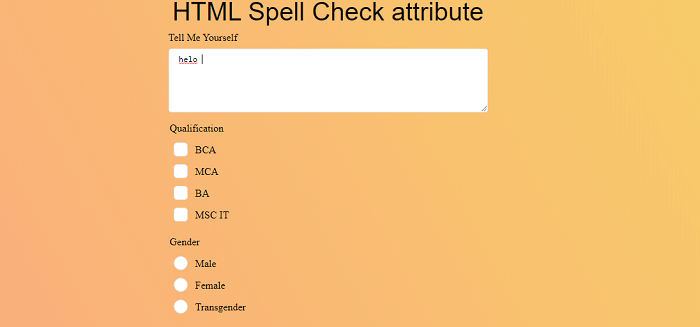
In the above example, we have created an example of enabling spell check attribute in the input type text area. We have passed the value of spell check =”true”.
Output:
Following is the output of this example.
Example 2: Disable HTML 5 spell check attribute in textarea input type.
<! DOCTYPE html>
<html>
<head>
<meta charset = "utf-8">
        <meta name = "viewport" content="width=device-width, initial-scale = 1.0">
        <title> Disable HTML5 Spell Check attribute </title>
        <link rel = "stylesheet" href = "https://codepen.io/gymratpacks/pen/VKzBEp#0">
        <link href = 'https://fonts.googleapis.com/css?family=Nunito:400,300' rel='stylesheet' type = 'text/css'>
<style>
@import url(https://fonts.googleapis.com/css?family=Roboto:400,300);
* { box-sizing: border-box; }
html { height: 100%; }
   body {
      color: #000;
      height: 100vh;
      background-color: #FBAB7E;
      background-image: linear-gradient(62deg, #FBAB7E 0%, #F7CE68 100%);
   }
   h1 {
  position: relative;
  padding: 0;
  margin: 0;
  font-family: "Raleway", sans-serif;
  font-weight: 300;
  font-size: 40px;
  color: #080808;
  -webkit-transition: all 0.4s ease 0s;
  -o-transition: all 0.4s ease 0s;
  transition: all 0.4s ease 0s;
  text-align: center;
}
form {
  position: absolute;
  top: 30;
  left: 50%;
  width: 500px;
  transform: translateX(-50%);
  margin: 2rem 0;
  z-index: 1;
}
fieldset {
  margin: 0 0 1rem 0;
  padding: 0;
  border: none;
}
legend {
  font-weight: 400;
}
Legend {
  display: inline-block;
  margin-bottom: .5rem;
}
label {
  display: inline-block;
  margin-bottom: .5rem;
}
input[type='text'] {
  display: block;
  padding: .5rem;
  width: 100%;
  background-color: white;
  border-radius: .25rem;
  border: 1px solid #e5e5e5;
  outline: none;
  transition-property: none;
  transition-duration: none;
   &:focus {
    border-color: rgb(239,126,173);
  }
}
textarea {
  display: block;
  padding: .5rem;
  width: 100%;
  background-color: white;
  border-radius: .25rem;
  border: 1px solid #e5e5e5;
  outline: none;
  transition-property: none;
  transition-duration: none;
    &:focus {
    border-color: rgb(239,126,173);
  }
}
select {
  display: block;
  padding: .5rem;
  width: 100%;
  background-color: white;
  border-radius: .25rem;
  border: 1px solid #e5e5e5;
  outline: none;
  transition-property: none;
  transition-duration: none;
    &:focus {
    border-color: rgb(239,126,173);
  }
}
textarea {
  max-width: 500px;
  height: 100px;
}
input[type='text'],
  height: 34px;
}
select {
  font-size: .875rem;
  height: 34px;
}
input[type='checkbox'] {
  position: relative;
  top: 5px;
  width: 22px;
  height: 22px;
  margin: 0 .5rem;
  background-color: white;
  border: 1px solid #e5e5e5;
  outline: none;
  -moz-appearance: none;
  -webkit-appearance: none;
  transition-property: none;
  transition-duration: none;
}
  input[type='radio'] {
  position: relative;
  top: 5px;
  width: 22px;
  height: 22px;
  margin: 0 .5rem;
  background-color: white;
  border: 1px solid #e5e5e5;
  outline: none;
  -moz-appearance: none;
  -webkit-appearance: none;
  transition-property: none;
  transition-duration: none;
}
input[type='checkbox'] {
  border-radius: 5px;
  &:checked {
    background-color: rgb(239,126,173);
    border: none;
    &:after {
      display: block;
      content: '';
      height: 4px;
      width: 10px;
      border-bottom: 3px solid #fff;
      border-left: 3px solid #fff;
      transform: translate(5px,6px) rotate(-45deg) scale(1);
    }
  }
}
input[type='radio'] {
  border-radius: 50%;
    &:checked {
    border-width: 5px;
    border-color: white;
    background-color: rgb(239,126,173);
  }
}
button {
  display: block;
  margin: 3em auto;
  padding: .5rem 2rem;
  font-size: 125%;
  color: white;
  border: none;
  border-radius: .25rem;
  background-color: rgb(239,126,173);
  outline: none;
  box-shadow: 0 .4rem .1rem -.3rem rgba(0,0,0,.1);
   transform: perspective(300px) scale(.95) translateZ(0);
  transform-style: preserve-3d;
    transition-property: none;
  transition-duration: none;
  &:hover {
    cursor: pointer;
    background-color: rgb(255,150,200);
    box-shadow: 0 0 0 0 rgba(0,0,0,0);
    transform: scale(1.1) rotateX(0);
  }
  &:active {
    background-color: rgb(239,126,173);
    transform: scale(1.05) rotateX(-10deg);
  }
}
</style>
<h1> Disable HTML5 Spell Check attribute </h1>
<form>
  <fieldset>
    <label for = "textarea"> Tell Me Yourself </label>
   <textarea rows = "5" cols = "20" spellcheck = "false" placeholder = "Enter your message here"> </textarea>
  </fieldset>
  <fieldset>
    <legend> Qualification </legend>
    <input type = "checkbox" id = "check1" name = "checkboxes" checked>
    <label for = "check1"> BCA </label> <br>
    <input type = "checkbox" id = "check2" name = "checkboxes">
    <label for = "check2"> MCA </label> <br>
<input type = "checkbox" id = "check2" name = "checkboxes">
    <label for = "check2"> BA </label> <br>
    <input type = "checkbox" id = "check2" name = "checkboxes">
    <label for = "check2"> MSC IT </label> <br>
  </fieldset>
  <fieldset>
    <legend> Gender </legend>
    <input type = "radio" id = "radio1" name = "radios" checked>
    <label for = "radio1"> Male </label> <br>
    <input type = "radio" id = "radio2" name = "radios">
    <label for = "radio2"> Female </label> <br>
    <input type = "radio" id = "radio2" name = "radios">
<label for = "radio2"> Transgender </label> <br>
  </fieldset>
  <fieldset>
    <label for="select-choice"> Select Hobbies </label>
    <select name = "select-choice" id = "select-choice">
      <option value = "Choice 1"> - - select one - - </option>
      <option value = "Choice 2"> Dancing </option>
      <option value = "Choice 2"> Singing </option>
      <option value = "Choice 2"> Playing </option>
      <option value = "Choice 2"> Cooking </option>
    </select>
  </fieldset>
  <button> Submit </button>
</form>
  </body>
</html>
Explanation:
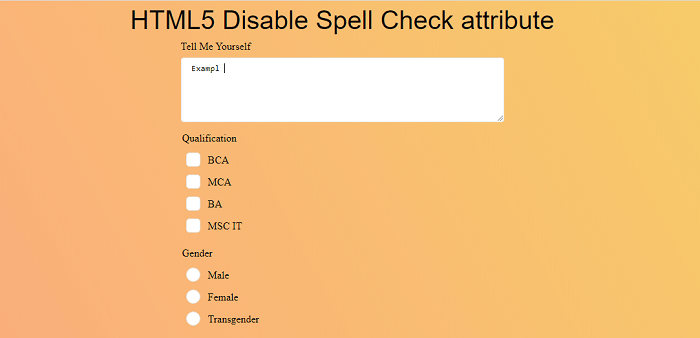
In the above example, we have created an example of disabling the spell check attribute in the input type text area. We have passed the value of spell check =”false”.
Output:
Following is the output of this example.
Example 3: How to enable HTML 5 spell check attribute in input type text.
<! DOCTYPE html>
<html>
<head>
<meta charset = "utf-8">
        <meta name = "viewport" content="width=device-width, initial-scale = 1.0">
        <title> Disable HTML5 Spell Check attribute </title>
        <link rel = "stylesheet" href = "https://codepen.io/gymratpacks/pen/VKzBEp#0">
        <link href = 'https://fonts.googleapis.com/css?family=Nunito:400,300' rel='stylesheet' type = 'text/css'>
<style>
@import url(https://fonts.googleapis.com/css?family=Roboto:400,300);
* { box-sizing: border-box; }
html { height: 100%; }
   body {
      color: #000;
      height: 100vh;
      background-color: #FBAB7E;
      background-image: linear-gradient(62deg, #FBAB7E 0%, #F7CE68 100%);
   }
   h1 {
  position: relative;
  padding: 0;
  margin: 0;
  font-family: "Raleway", sans-serif;
  font-weight: 300;
  font-size: 40px;
  color: #080808;
  -webkit-transition: all 0.4s ease 0s;
  -o-transition: all 0.4s ease 0s;
  transition: all 0.4s ease 0s;
  text-align: center;
}
form {
  position: absolute;
  top: 30;
  left: 50%;
  width: 500px;
  transform: translateX(-50%);
  margin: 2rem 0;
  z-index: 1;
}
fieldset {
  margin: 0 0 1rem 0;
  padding: 0;
  border: none;
}
legend {
 font-weight: bold;
}
Legend {
  display: inline-block;
  margin-bottom: .5rem;
 font-weight: bold;
}
label {
  display: inline-block;
  margin-bottom: .5rem;
  font-weight: bold;
}
input[type='text'] {
  display: block;
  padding: .5rem;
  width: 100%;
  background-color: white;
  border-radius: .25rem;
  border: 1px solid #e5e5e5;
  outline: none;
  transition-property: none;
  transition-duration: none;
   &:focus {
    border-color: rgb(239,126,173);
  }
}
textarea {
  display: block;
  padding: .5rem;
  width: 100%;
  background-color: white;
  border-radius: .25rem;
  border: 1px solid #e5e5e5;
  outline: none;
  transition-property: none;
  transition-duration: none;
    &:focus {
    border-color: rgb(239,126,173);
  }
}
select {
  display: block;
  padding: .5rem;
  width: 100%;
  background-color: white;
  border-radius: .25rem;
  border: 1px solid #e5e5e5;
  outline: none;
  transition-property: none;
  transition-duration: none;
    &:focus {
    border-color: rgb(239,126,173);
  }
}
textarea {
  max-width: 500px;
  height: 100px;
}
input[type='text'],
  height: 34px;
}
select {
  font-size: .875rem;
  height: 34px;
}
input[type='checkbox'] {
  position: relative;
  top: 5px;
  width: 22px;
  height: 22px;
  margin: 0 .5rem;
  background-color: white;
  border: 1px solid #e5e5e5;
  outline: none;
  -moz-appearance: none;
  -webkit-appearance: none;
  transition-property: none;
  transition-duration: none;
}
  input[type='radio'] {
  position: relative;
  top: 5px;
  width: 22px;
  height: 22px;
  margin: 0 .5rem;
  background-color: white;
  border: 1px solid #e5e5e5;
  outline: none;
  -moz-appearance: none;
  -webkit-appearance: none;
  transition-property: none;
  transition-duration: none;
}
input[type='checkbox'] {
  border-radius: 5px;
  &:checked {
    background-color: rgb(239,126,173);
    border: none;
    &:after {
      display: block;
      content: '';
      height: 4px;
      width: 10px;
      border-bottom: 3px solid #fff;
      border-left: 3px solid #fff;
      transform: translate(5px,6px) rotate(-45deg) scale(1);
    }
  }
}
input[type='radio'] {
  border-radius: 50%;
    &:checked {
    border-width: 5px;
    border-color: white;
    background-color: rgb(239,126,173);
  }
}
button {
  display: block;
  margin: 3em auto;
  padding: .5rem 2rem;
  font-size: 125%;
  color: white;
  border: none;
  border-radius: .25rem;
  background-color: rgb(92 34 8);
  outline: none;
  box-shadow: 0 .4rem .1rem -.3rem rgba(0,0,0,.1);
   transform: perspective(300px) scale(.95) translateZ(0);
  transform-style: preserve-3d;
    transition-property: none;
  transition-duration: none;
  &:hover {
    cursor: pointer;
    background-color: rgb(255,150,200);
    box-shadow: 0 0 0 0 rgba(0,0,0,0);
    transform: scale(1.1) rotateX(0);
  }
  &:active {
    background-color: rgb(239,126,173);
    transform: scale(1.05) rotateX(-10deg);
  }
}
</style>
<h1> HTML5 Spell Check attribute in Input type text </h1>
<form>
  <fieldset>
    <label for = "firstName"> Full Name </label>
    <input type = "text" name = "name" id = "firstName" spellcheck = "true" placeholder = "First Name">
  </fieldset>
  <fieldset>
    <legend> Qualification </legend>
    <input type = "checkbox" id = "check1" name = "checkboxes" checked>
    <label for = "check1"> BCA </label> <br>
    <input type = "checkbox" id = "check2" name = "checkboxes">
    <label for = "check2"> MCA </label> <br>
<input type = "checkbox" id = "check2" name = "checkboxes">
    <label for = "check2"> BA </label> <br>
    <input type = "checkbox" id = "check2" name = "checkboxes">
    <label for = "check2"> MSC IT </label> <br>
  </fieldset>
  <fieldset>
    <legend> Gender </legend>
    <input type = "radio" id = "radio1" name = "radios" checked>
    <label for = "radio1"> Male </label> <br>
    <input type = "radio" id = "radio2" name = "radios">
    <label for = "radio2"> Female </label> <br>
    <input type = "radio" id = "radio2" name = "radios">
<label for = "radio2"> Transgender </label> <br>
  </fieldset>
  <fieldset>
    <label for="select-choice"> Select Hobbies </label>
    <select name = "select-choice" id = "select-choice">
      <option value = "Choice 1"> - - select one - - </option>
      <option value = "Choice 2"> Dancing </option>
      <option value = "Choice 2"> Singing </option>
      <option value = "Choice 2"> Playing </option>
      <option value = "Choice 2"> Cooking </option>
    </select>
  </fieldset>
  <button> Submit </button>
</form>
  </body>
</html>
Explanation:
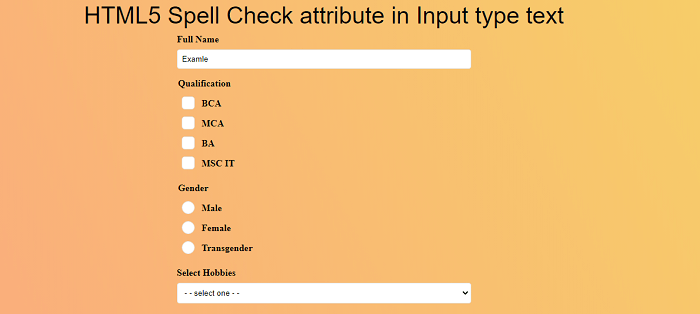
In the above example, we have created an example of how to enable spell check attribute in the input type text field.
Output:
Following is the output of this example.
Example 4: How to disable HTML 5 spell check attribute in input type text.
<! DOCTYPE html>
<html>
<head>
<meta charset = "utf-8">
        <meta name = "viewport" content="width=device-width, initial-scale = 1.0">
        <title> Disable HTML5 Spell Check attribute </title>
        <link rel = "stylesheet" href = "https://codepen.io/gymratpacks/pen/VKzBEp#0">
        <link href = 'https://fonts.googleapis.com/css?family=Nunito:400,300' rel='stylesheet' type = 'text/css'>
<style>
@import url(https://fonts.googleapis.com/css?family=Roboto:400,300);
* { box-sizing: border-box; }
html { height: 100%; }
   body {
      color: #000;
      height: 100vh;
      background-color: #FBAB7E;
      background-image: linear-gradient(62deg, #FBAB7E 0%, #F7CE68 100%);
   }
   h1 {
  position: relative;
  padding: 0;
  margin: 0;
  font-family: "Raleway", sans-serif;
  font-weight: 300;
  font-size: 40px;
  color: #080808;
  -webkit-transition: all 0.4s ease 0s;
  -o-transition: all 0.4s ease 0s;
  transition: all 0.4s ease 0s;
  text-align: center;
}
form {
  position: absolute;
  top: 30;
  left: 50%;
  width: 500px;
  transform: translateX(-50%);
  margin: 2rem 0;
  z-index: 1;
}
fieldset {
  margin: 0 0 1rem 0;
  padding: 0;
  border: none;
}
legend {
 font-weight: bold;
}
Legend {
  display: inline-block;
  margin-bottom: .5rem;
 font-weight: bold;
}
label {
  display: inline-block;
  margin-bottom: .5rem;
  font-weight: bold;
}
input[type='text'] {
  display: block;
  padding: .5rem;
  width: 100%;
  background-color: white;
  border-radius: .25rem;
  border: 1px solid #e5e5e5;
  outline: none;
  transition-property: none;
  transition-duration: none;
   &:focus {
    border-color: rgb(239,126,173);
  }
}
textarea {
  display: block;
  padding: .5rem;
  width: 100%;
  background-color: white;
  border-radius: .25rem;
  border: 1px solid #e5e5e5;
  outline: none;
  transition-property: none;
  transition-duration: none;
    &:focus {
    border-color: rgb(239,126,173);
  }
}
select {
  display: block;
  padding: .5rem;
  width: 100%;
  background-color: white;
  border-radius: .25rem;
  border: 1px solid #e5e5e5;
  outline: none;
  transition-property: none;
  transition-duration: none;
    &:focus {
    border-color: rgb(239,126,173);
  }
}
textarea {
  max-width: 500px;
  height: 100px;
}
input[type='text'],
  height: 34px;
}
select {
  font-size: .875rem;
  height: 34px;
}
input[type='checkbox'] {
  position: relative;
  top: 5px;
  width: 22px;
  height: 22px;
  margin: 0 .5rem;
  background-color: white;
  border: 1px solid #e5e5e5;
  outline: none;
  -moz-appearance: none;
  -webkit-appearance: none;
  transition-property: none;
  transition-duration: none;
}
  input[type='radio'] {
  position: relative;
  top: 5px;
  width: 22px;
  height: 22px;
  margin: 0 .5rem;
  background-color: white;
  border: 1px solid #e5e5e5;
  outline: none;
  -moz-appearance: none;
  -webkit-appearance: none;
  transition-property: none;
  transition-duration: none;
}
input[type='checkbox'] {
  border-radius: 5px;
  &:checked {
    background-color: rgb(239,126,173);
    border: none;
    &:after {
      display: block;
      content: '';
      height: 4px;
      width: 10px;
      border-bottom: 3px solid #fff;
      border-left: 3px solid #fff;
      transform: translate(5px,6px) rotate(-45deg) scale(1);
    }
  }
}
input[type='radio'] {
  border-radius: 50%;
    &:checked {
    border-width: 5px;
    border-color: white;
    background-color: rgb(239,126,173);
  }
}
button {
  display: block;
  margin: 3em auto;
  padding: .5rem 2rem;
  font-size: 125%;
  color: white;
  border: none;
  border-radius: .25rem;
  background-color: rgb(92 34 8);
  outline: none;
  box-shadow: 0 .4rem .1rem -.3rem rgba(0,0,0,.1);
   transform: perspective(300px) scale(.95) translateZ(0);
  transform-style: preserve-3d;
    transition-property: none;
  transition-duration: none;
  &:hover {
    cursor: pointer;
    background-color: rgb(255,150,200);
    box-shadow: 0 0 0 0 rgba(0,0,0,0);
    transform: scale(1.1) rotateX(0);
  }
  &:active {
    background-color: rgb(239,126,173);
    transform: scale(1.05) rotateX(-10deg);
  }
}
</style>
<h1> HTML5 disable Spell Check attribute in Input type text </h1>
<form>
  <fieldset>
    <label for = "firstName"> Full Name </label>
    <input type = "text" name = "name" id = "firstName" spellcheck = "true" placeholder = "First Name">
  </fieldset>
  <fieldset>
    <legend> Qualification </legend>
    <input type = "checkbox" id = "check1" name = "checkboxes" checked>
    <label for = "check1"> BCA </label> <br>
    <input type = "checkbox" id = "check2" name = "checkboxes">
    <label for = "check2"> MCA </label> <br>
<input type = "checkbox" id = "check2" name = "checkboxes">
    <label for = "check2"> BA </label> <br>
    <input type = "checkbox" id = "check2" name = "checkboxes">
    <label for = "check2"> MSC IT </label> <br>
  </fieldset>
  <fieldset>
    <legend> Gender </legend>
    <input type = "radio" id = "radio1" name = "radios" checked>
    <label for = "radio1"> Male </label> <br>
    <input type = "radio" id = "radio2" name = "radios">
    <label for = "radio2"> Female </label> <br>
    <input type = "radio" id = "radio2" name = "radios">
<label for = "radio2"> Transgender </label> <br>
  </fieldset>
  <fieldset>
    <label for="select-choice"> Select Hobbies </label>
    <select name = "select-choice" id = "select-choice">
      <option value = "Choice 1"> - - select one - - </option>
      <option value = "Choice 2"> Dancing </option>
      <option value = "Choice 2"> Singing </option>
      <option value = "Choice 2"> Playing </option>
      <option value = "Choice 2"> Cooking </option>
    </select>
  </fieldset>
  <button> Submit </button>
</form>
  </body>
</html>
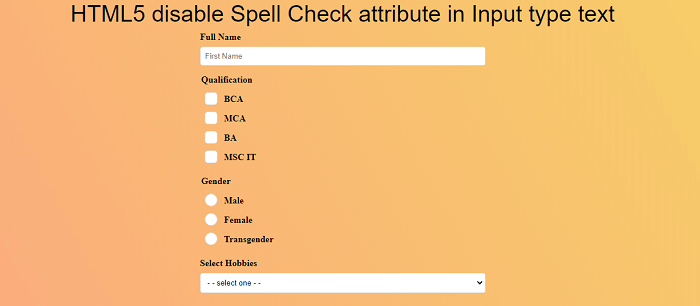
Explanation:
In the above example, we have created an example of disabling the spell check attribute in the input type text field.
Output:
Following is the output of this example.
Example 5: How to enable and disable HTML 5 spell check attribute with content editable attribute.
<! DOCTYPE html>
<html lang = "en">
<head>
  <title> Bootstrap 4 breadcrumbs Example </title>
  <meta charset = "utf-8">
  <meta name = "viewport" content="width=device-width, initial-scale=1">
  <link rel = "stylesheet" href = "https://maxcdn.bootstrapcdn.com/bootstrap/4.0.0-beta.3/css/bootstrap.min.css" integrity = "sha384-Zug+QiDoJOrZ5t4lssLdxGhVrurbmBWopoEl+M6BdEfwnCJZtKxi1KgxUyJq13dy" crossorigin = "anonymous">
  <script src = "https://ajax.googleapis.com/ajax/libs/jquery/3.3.1/jquery.min.js"> </script>
  <script src = "https://cdnjs.cloudflare.com/ajax/libs/popper.js/1.14.3/umd/popper.min.js"> </script>
  <script src = "https://maxcdn.bootstrapcdn.com/bootstrap/4.1.3/js/bootstrap.min.js"> </script>
   <link href = "https://maxcdn.bootstrapcdn.com/font-awesome/4.7.0/css/font-awesome.min.css" rel = "stylesheet">
</head>
<style>
@import url(https://fonts.googleapis.com/css?family=Roboto:400,300);
* { box-sizing: border-box; }
html { height: 100%; }
   body {
      color: #000;
      height: 100vh;
      background-color: #FBAB7E;
      background-image: linear-gradient(62deg, #FBAB7E 0%, #F7CE68 100%);
   }
   body {
  display: flex;
  align-items: center;
  justify-content: center;
  min-height: 100vh;
  flex-direction: column;
  font-family: Roboto,"Helvetica Neue",Arial,sans-serif;
}
p {
color: #495057;
 font-weight: bold;
  font-size: 20px;
   padding: 10;
  margin: 10;
}
   h1 {
  position: relative;
  padding: 10;
  margin: 10;
  font-family: "Raleway", sans-serif;
  font-weight: bold;
  font-size: 40px;
  color: #bf2121;
  -webkit-transition: all 0.4s ease 0s;
  -o-transition: all 0.4s ease 0s;
  transition: all 0.4s ease 0s;
  text-align: center;
}
</style>
<h1> HTML5 Spell Check attribute in Contenteditable tag </h1>
<body>
<p contenteditable = "true" spellcheck = "true"> Hello, I am contet Writer </p>
<p contenteditable = "true" spellcheck = "false"> Hello, I am contet Writer </p>
  </body>
</html>
Explanation:
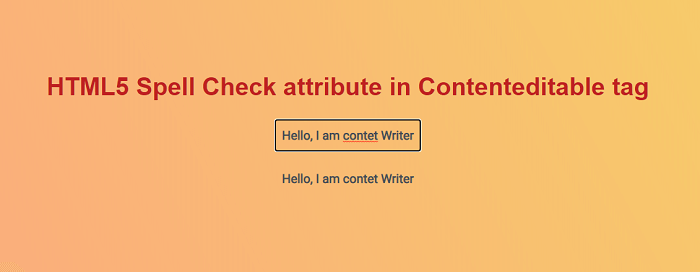
We have created an example of enabling and disabling the spell check attribute in the content editable attribute in the above example. In this, in the first tag, we have enabled the spell check attribute & in another tag spell check attribute is disabled.
Output:
Following is the output of this example.