This article will understand the working of the HTML5 accept attribute.
What do you mean by accepting attributes in HTML5?
In HTML, accept attribute specifies a filter for what file types the user can pick from the file input dialog box. This attribute can only be used with <input type=”file”>. It allows a browsers to only show files that are allowed for the current input.
Syntax:
<input accept="file_extension|audio/*|video/*|image/*"> In the above syntax, we can either pass an extension of the file or a type of file you want to select from a file upload option such as image, audio, video, etc.
Following are the various examples of HTML 5 accept attributes.
Example 1:
<! DOCTYPE html>
<html>
<head>
<meta charset = "utf-8">
        <meta name = "viewport" content = "width=device-width, initial-scale = 1.0">
        <title> HTML5 accept attribute </title>
        <link rel = "stylesheet" href = "https://codepen.io/gymratpacks/pen/VKzBEp#0">
        <link href = 'https://fonts.googleapis.com/css?family=Nunito:400,300' rel = 'stylesheet' type = 'text/css'>
<style>
@import url(https://fonts.googleapis.com/css?family=Roboto:400,300);
* { box-sizing: border-box; }
html { height: 100%; }
   body {
      color: #000;
      height: 100vh;
      background-color: #FBAB7E;
      background-image: linear-gradient(62deg, #FBAB7E 0%, #F7CE68 100%);
   }
   h1 {
  position: relative;
  padding: 0;
  margin: 0;
  font-family: "Raleway", sans-serif;
  font-weight: 300;
  font-size: 40px;
  color: #080808;
  -webkit-transition: all 0.4s ease 0s;
  -o-transition: all 0.4s ease 0s;
  transition: all 0.4s ease 0s;
  text-align: center;
}
form {
  position: absolute;
  top: 20;
  left: 50%;
  width: 500px;
  transform: translateX(-50%);
  margin: 2rem 1;
  z-index: 1;
}
fieldset {
  margin: 0 0 1rem 0;
  padding: 0;
  border: none;
}
legend {
 font-weight: bold;
}
Legend {
  display: inline-block;
  margin-bottom: .5rem;
 font-weight: bold;
}
label {
  display: inline-block;
  margin-bottom: .5rem;
  font-weight: bold;
}
input[type='text'] {
  display: block;
  padding: .5rem;
  width: 100%;
  background-color: white;
  border-radius: .35rem;
  border: 1px solid #e5e5e5;
  outline: none;
  transition-property: none;
  transition-duration: none;
   &:focus {
    border-color: rgb(239,126,173);
  }
}
textarea {
  display: block;
  padding: .5rem;
  width: 100%;
  background-color: white;
  border-radius: .25rem;
  border: 1px solid #e5e5e5;
  outline: none;
  transition-property: none;
  transition-duration: none;
    &:focus {
    border-color: rgb(239,126,173);
  }
}
select {
  display: block;
  padding: .5rem;
  width: 100%;
  background-color: white;
  border-radius: .25rem;
  border: 1px solid #e5e5e5;
  outline: none;
  transition-property: none;
  transition-duration: none;
    &:focus {
    border-color: rgb(239,126,173);
  }
}
textarea {
  max-width: 500px;
  height: 100px;
}
input[type='text'] {
  height: 34px;
}
select {
  font-size: .875rem;
  height: 34px;
}
input[type='checkbox'] {
  position: relative;
  top: 5px;
  width: 24px;
  height: 22px;
  margin: 0 .5rem;
  background-color: white;
  border: 1px solid #e5e5e5;
  outline: none;
  -moz-appearance: none;
  -webkit-appearance: none;
  transition-property: none;
  transition-duration: none;
}
  input[type='radio'] {
  position: relative;
  top: 5px;
  width: 24px;
  height: 22px;
  margin: 0 .6rem;
  background-color: white;
  border: 1px solid #e5e5e5;
  outline: none;
  -moz-appearance: none;
  -webkit-appearance: none;
  transition-property: none;
  transition-duration: none;
}
input[type='checkbox'] {
  border-radius: 5px;
  &:checked {
    background-color: rgb(239,126,173);
    border: none;
    &:after {
      display: block;
      content: ' ';
      height: 4px;
      width: 10px;
      border-bottom: 3px solid #fff;
      border-left: 3px solid #fff;
      transform: translate(5px,6px) rotate(-45deg) scale(1);
    }
  }
}
input[type='radio'] {
  border-radius: 50%;
    &:checked {
    border-width: 5px;
    border-color: white;
    background-color: rgb(239,126,173);
  }
}
button {
  display: block;
  margin: 1em auto;
  padding: .5rem 2rem;
  font-size: 125%;
  color: white;
  border: none;
  border-radius: .25rem;
  background-color: rgb(92 34 8);
  outline: none;
  box-shadow: 0 .4rem .1rem -.3rem rgba(0,0,0,.1);
   transform: perspective(300px) scale(.95) translateZ(0);
  transform-style: preserve-3d;
    transition-property: none;
  transition-duration: none;
  &:hover {
    cursor: pointer;
    background-color: rgb(255,150,200);
    box-shadow: 0 0 0 0 rgba(0,0,0,0);
    transform: scale(1.1) rotateX(0);
  }
  &:active {
    background-color: rgb(239,126,173);
    transform: scale(1.05) rotateX(-10deg);
  }
}
</style>
<h1> HTML5 accept attribute Example </h1>
<form>
  <fieldset>
    <label for = "firstName"> Full Name </label>
    <input type = "text" name = "name" id = "firstName" spellcheck = "true" placeholder = "First Name">
  </fieldset>
  <fieldset>
    <legend> Qualification </legend>
    <input type = "checkbox" id = "check1" name = "checkboxes" checked>
    <label for = "check1"> BCA </label> <br>
    <input type = "checkbox" id = "check2" name = "checkboxes">
    <label for = "check2"> MCA </label> <br>
<input type = "checkbox" id = "check2" name = "checkboxes">
    <label for = "check2"> BA </label> <br>
    <input type = "checkbox" id = "check2" name = "checkboxes">
    <label for = "check2"> MSC IT </label> <br>
  </fieldset>
  <fieldset>
    <legend> Gender </legend>
    <input type = "radio" id = "radio1" name = "radios" checked>
    <label for = "radio1"> Male </label> <br>
    <input type = "radio" id = "radio2" name = "radios">
    <label for = "radio2"> Female </label> <br>
    <input type = "radio" id = "radio2" name = "radios">
<label for = "radio2"> Transgender </label> <br>
  </fieldset>
  <fieldset>
    <label for="select-choice"> Select Hobbies </label>
    <select name = "select-choice" id = "select-choice">
      <option value = "Choice 1"> - - select one - - </option>
      <option value = "Choice 2"> Dancing </option>
      <option value = "Choice 2"> Singing </option>
      <option value = "Choice 2"> Playing </option>
      <option value = "Choice 2"> Cooking </option>
    </select>
  </fieldset>
<p>
  <label for = "imageFile"> Select some images: </label>
  <input type = "file" id = "imageFile" accept = "image/*" multiple>
</p>
  <button> Submit </button>
</form>
  </body>
</html>
Explanation:
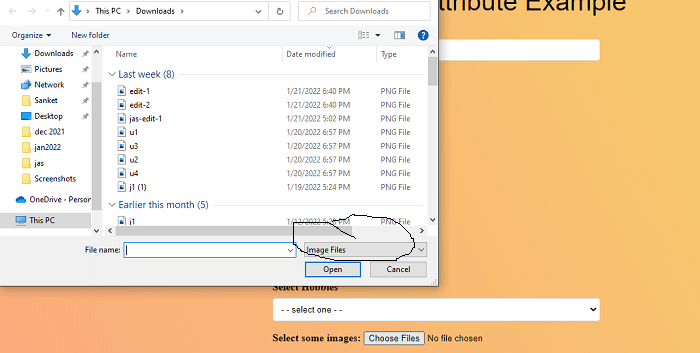
In the above example, we have created an example of the accept attribute. In this, we have uploaded only the image from the file input box.
<input type = "file" id = "imageFile" accept = "image/*" multiple> In this
- <input> tag is used to get the input from the user
- type=”file” used to specifies the file input.
- accept parameter is used to specifies that the server accepted file types.
- “image/*” is define the input file must be image format.
- multiple attribute means we can upload multiple image files from the input dialog box.
Output:
Following is the output of this example.
Example 2:
<! DOCTYPE html>
<html>
<head>
<meta charset = "utf-8">
        <meta name = "viewport" content = "width=device-width, initial-scale = 1.0">
        <title> HTML5 accept attribute </title>
        <link rel = "stylesheet" href = "https://codepen.io/gymratpacks/pen/VKzBEp#0">
        <link href = 'https://fonts.googleapis.com/css?family=Nunito:400,300' rel = 'stylesheet' type = 'text/css'>
<style>
@import url(https://fonts.googleapis.com/css?family=Roboto:400,300);
* { box-sizing: border-box; }
html { height: 100%; }
   body {
      color: #000;
      height: 100vh;
      background-color: #FBAB7E;
      background-image: linear-gradient(62deg, #FBAB7E 0%, #F7CE68 100%);
   }
   h1 {
  position: relative;
  padding: 0;
  margin: 0;
  font-family: "Raleway", sans-serif;
  font-weight: 300;
  font-size: 40px;
  color: #080808;
  -webkit-transition: all 0.6s ease 0s;
  -o-transition: all 0.6s ease 0s;
  transition: all 0.6s ease 0s;
  text-align: center;
}
form {
  position: absolute;
  top: 40;
  left: 50%;
  width: 510px;
  transform: translateX(-50%);
  margin: 2rem 1;
  z-index: 1;
}
fieldset {
  margin: 0 0 1rem 0;
  padding: 1;
  border: none;
}
legend {
 font-weight: bold;
}
label {
  display: inline-block;
  margin-bottom: .5rem;
  font-weight: bold;
}
input[type='text'] {
  display: block;
  padding: .5rem;
  width: 100%;
  background-color: white;
  border-radius: .25rem;
  border: 1px solid #e5e5e5;
  outline: none;
  transition-property: none;
  transition-duration: none;
   &:focus {
    border-color: rgb(239,126,173);
  }
}
Legend {
  display: inline-block;
  margin-bottom: .5rem;
 font-weight: bold;
}
textarea {
  display: block;
  padding: .5rem;
  width: 100%;
  background-color: white;
  border-radius: .25rem;
  border: 1px solid #e5e5e5;
  outline: none;
  transition-property: none;
  transition-duration: none;
    &:focus {
    border-color: rgb(239,126,173);
  }
}
select {
  display: block;
  padding: .5rem;
  width: 100%;
  background-color: white;
  border-radius: .25rem;
  border: 1px solid #e5e5e5;
  outline: none;
  transition-property: none;
  transition-duration: none;
    &:focus {
    border-color: rgb(239,126,173);
  }
}
textarea {
  max-width: 500px;
  height: 100px;
}
input[type='text'] {
  height: 34px;
}
select {
  font-size: .875rem;
  height: 34px;
}
input[type='checkbox'] {
  position: relative;
  top: 5px;
  width: 22px;
  height: 22px;
  margin: 0 .5rem;
  background-color: white;
  border: 1px solid #e5e5e5;
  outline: none;
  -moz-appearance: none;
  -webkit-appearance: none;
  transition-property: none;
  transition-duration: none;
}
  input[type='radio'] {
  position: relative;
  top: 5px;
  width: 22px;
  height: 22px;
  margin: 0 .5rem;
  background-color: white;
  border: 1px solid #e5e5e5;
  outline: none;
  -moz-appearance: none;
  -webkit-appearance: none;
  transition-property: none;
  transition-duration: none;
}
input[type='checkbox'] {
  border-radius: 5px;
  &:checked {
    background-color: rgb(239,126,173);
    border: none;
    &:after {
      display: block;
      content: ' ';
      height: 4px;
      width: 10px;
      border-bottom: 3px solid #fff;
      border-left: 3px solid #fff;
      transform: translate(5px,6px) rotate(-45deg) scale(1);
    }
  }
}
input[type='radio'] {
  border-radius: 50%;
    &:checked {
    border-width: 5px;
    border-color: white;
    background-color: rgb(239,126,173);
  }
}
button {
  display: block;
  margin: 1em auto;
  padding: .5rem 2rem;
  font-size: 125%;
  color: white;
  border: none;
  border-radius: .35rem;
  background-color: rgb(92 34 8);
  outline: none;
  box-shadow: 0 .4rem .1rem -.3rem rgba(0,0,0,.1);
   transform: perspective(300px) scale(.95) translateZ(0);
  transform-style: preserve-3d;
    transition-property: none;
  transition-duration: none;
  &:hover {
    cursor: pointer;
    background-color: rgb(255,150,200);
    box-shadow: 0 0 0 0 rgba(0,0,0,0);
    transform: scale(1.1) rotateX(0);
  }
  &:active {
    background-color: rgb(239,126,173);
    transform: scale(1.05) rotateX(-10deg);
  }
}
</style>
<h1> HTML5 accept attribute Example </h1>
<form>
  <fieldset>
    <label for = "firstName"> Full Name </label>
    <input type = "text" name = "name" id = "firstName" spellcheck = "true" placeholder = "First Name">
  </fieldset>
  <fieldset>
    <legend> Qualification </legend>
    <input type = "checkbox" id = "check1" name = "checkboxes" checked>
    <label for = "check1"> BCA </label> <br>
    <input type = "checkbox" id = "check2" name = "checkboxes">
    <label for = "check2"> MCA </label> <br>
<input type = "checkbox" id = "check2" name = "checkboxes">
    <label for = "check2"> BA </label> <br>
    <input type = "checkbox" id = "check2" name = "checkboxes">
    <label for = "check2"> MSC IT </label> <br>
  </fieldset>
  <fieldset>
    <legend> Gender </legend>
    <input type = "radio" id = "radio1" name = "radios" checked>
    <label for = "radio1"> Male </label> <br>
    <input type = "radio" id = "radio2" name = "radios">
    <label for = "radio2"> Female </label> <br>
    <input type = "radio" id = "radio2" name = "radios">
<label for = "radio2"> Transgender </label> <br>
  </fieldset>
  <fieldset>
    <label for="select-choice"> Select Hobbies </label>
    <select name = "select-choice" id = "select-choice">
      <option value = "Choice 1"> - - select one - - </option>
      <option value = "Choice 2"> Dancing </option>
      <option value = "Choice 2"> Singing </option>
      <option value = "Choice 2"> Playing </option>
      <option value = "Choice 2"> Cooking </option>
    </select>
  </fieldset>
  <p>
  <label for = "soundFile"> Select an audio file: </label>
  <input type = "file" id = "soundFile" accept = "audio/*">
</p>
  <button> Submit </button>
</form>
  </body>
</html>
Explanation:
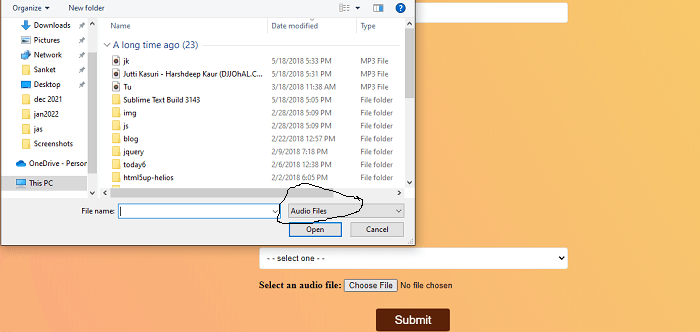
In the above example, we have created an example of the accept attribute. In this, we have uploaded only the audio from the file input box.
<input type = "file" id = "soundFile" accept = "audio/*"> In this
- <input> tag is used to get the input from the user
- type=”file” used to specifies the file input.
- accept parameter is used to specifies that the server accepted file types.
- “audio/*” is define the input file must be audio format.
Output:
Following is the output of this example.
Example 3:
<! DOCTYPE html>
<html>
<head>
<meta charset = "utf-8">
        <meta name = "viewport" content = "width=device-width, initial-scale = 1.0">
        <title> HTML5 accept attribute </title>
        <link rel = "stylesheet" href = "https://codepen.io/gymratpacks/pen/VKzBEp#0">
        <link href = 'https://fonts.googleapis.com/css?family=Nunito:400,300' rel = 'stylesheet' type = 'text/css'>
<style>
@import url(https://fonts.googleapis.com/css?family=Roboto:400,300);
* { box-sizing: border-box; }
html { height: 100%; }
   body {
      color: #000;
      height: 100vh;
      background-color: #FBAB7E;
      background-image: linear-gradient(62deg, #FBAB7E 0%, #F7CE68 100%);
   }
   h1 {
  position: relative;
  padding: 0;
  margin: 0;
  font-family: "Raleway", sans-serif;
  font-weight: 300;
  font-size: 40px;
  color: #080808;
  -webkit-transition: all 0.4s ease 0s;
  -o-transition: all 0.4s ease 0s;
  transition: all 0.4s ease 0s;
  text-align: center;
}
form {
  position: absolute;
  top: 30;
  left: 50%;
  width: 500px;
  transform: translateX(-50%);
  margin: 2rem 0;
  z-index: 1;
}
fieldset {
  margin: 0 1 1rem 0;
  padding: 1;
  border: none;
}
legend {
 font-weight: bold;
}
Legend {
  display: inline-block;
  margin-bottom: .5rem;
 font-weight: bold;
}
input[type='text'] {
  display: block;
  padding: .5rem;
  width: 100%;
  background-color: white;
  border-radius: .25rem;
  border: 1px solid #e5e5e5;
  outline: none;
  transition-property: none;
  transition-duration: none;
   &:focus {
    border-color: rgb(239,126,173);
  }
}
label {
  display: inline-block;
  margin-bottom: .5rem;
  font-weight: bold;
}
textarea {
  display: block;
  padding: .5rem;
  width: 100%;
  background-color: white;
  border: 1px solid #e5e5e5;
  outline: none;
  transition-property: none;
  border-radius: .25rem;
  transition-duration: none;
    &:focus {
    border-color: rgb(259,126,173);
  }
}
select {
  display: block;
  padding: .8rem;
  width: 100%;
  outline: none;
  background-color: white;
  border-radius: .25rem;
  border: 1px solid #e5e5e5;
  transition-property: none;
  transition-duration: none;
    &:focus {
    border-color: rgb(239,126,173);
  }
}
textarea {
  max-width: 500px;
  height: 100px;
}
input[type='text'] {
  height: 34px;
}
input[type='checkbox'] {
  position: relative;
  top: 6px;
  width: 22px;
  height: 23px;
  margin: 0 .5rem;
  background-color: white;
  border: 1px solid #e5e5e5;
  outline: none;
  -moz-appearance: none;
  -webkit-appearance: none;
  transition-property: none;
  transition-duration: none;
}
select {
  font-size: .885rem;
  height: 34px;
}
  input[type='radio'] {
  position: relative;
  top: 5px;
  width: 22px;
  height: 23px;
  margin: 0 .5rem;
  background-color: white;
  border: 1px solid #e5e5e5;
  outline: none;
  -moz-appearance: none;
  -webkit-appearance: none;
  transition-property: none;
  transition-duration: none;
}
input[type='checkbox'] {
  border-radius: 5px;
  &:checked {
    background-color: rgb(239,126,173);
    border: none;
    &:after {
      display: block;
      content: ' ';
      height: 4px;
      transform: translate(5px,6px) rotate(-45deg) scale(1);
      width: 12px;
      border-bottom: 3px solid #fff;
      border-left: 3px solid #fff;
    }
  }
}
input[type='radio'] {
  border-radius: 51%;
    &:checked {
background-color: rgb(239,126,173);
    border-width: 6px;
    border-color: white;
      }
}
button {
  display: block;
  margin: 1em auto;
  padding: .5rem 2rem;
  font-size: 125%;
  color: white;
  border: none;
  border-radius: .25rem;
  background-color: rgb(92 34 8);
  outline: none;
  box-shadow: 0 .4rem .1rem -.3rem rgba(0,0,0,.1);
   transform: perspective(300px) scale(.95) translateZ(0);
  transform-style: preserve-3d;
    transition-property: none;
  transition-duration: none;
  &:hover {
    cursor: pointer;
    background-color: rgb(255,150,200);
    box-shadow: 0 0 0 0 rgba(0,0,0,0);
    transform: scale(1.1) rotateX(0);
  }
  &:active {
    background-color: rgb(239,126,173);
    transform: scale(1.05) rotateX(-10deg);
  }
}
</style>
<h1> HTML5 accept attribute Example </h1>
<form>
  <fieldset>
    <label for = "firstName"> Full Name </label>
    <input type = "text" name = "name" id = "firstName" spellcheck = "true" placeholder = "First Name">
  </fieldset>
  <fieldset>
    <legend> Qualification </legend>
    <input type = "checkbox" id = "check1" name = "checkboxes" checked>
    <label for = "check1"> BCA </label> <br>
    <input type = "checkbox" id = "check2" name = "checkboxes">
    <label for = "check2"> MCA </label> <br>
<input type = "checkbox" id = "check2" name = "checkboxes">
    <label for = "check2"> BA </label> <br>
    <input type = "checkbox" id = "check2" name = "checkboxes">
    <label for = "check2"> MSC IT </label> <br>
  </fieldset>
  <fieldset>
    <legend> Gender </legend>
    <input type = "radio" id = "radio1" name = "radios" checked>
    <label for = "radio1"> Male </label> <br>
    <input type = "radio" id = "radio2" name = "radios">
    <label for = "radio2"> Female </label> <br>
    <input type = "radio" id = "radio2" name = "radios">
<label for = "radio2"> Transgender </label> <br>
  </fieldset>
  <fieldset>
    <label for="select-choice"> Select Hobbies </label>
    <select name = "select-choice" id = "select-choice">
      <option value = "Choice 1"> - - select one - - </option>
      <option value = "Choice 2"> Dancing </option>
      <option value = "Choice 2"> Singing </option>
      <option value = "Choice 2"> Playing </option>
      <option value = "Choice 2"> Cooking </option>
    </select>
  </fieldset>
<p>
  <label for = "videoFile"> Select a video file: </label>
  <input type = "file" id = "videoFile" accept = "video/*">
</p>
  <button> Submit </button>
</form>
  </body>
</html>
Explanation:
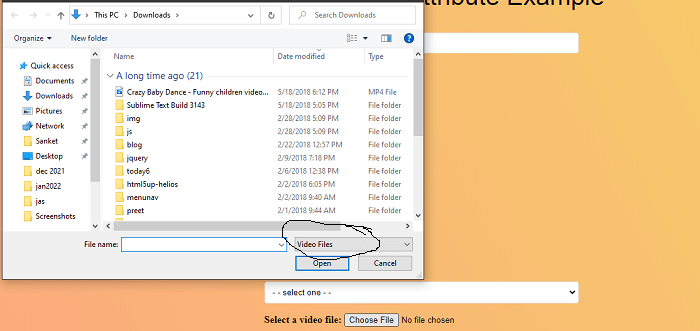
In the above example, we have created an example of the accept attribute. In this, we have uploaded only the video from the file input box.
<input type = "file" id = "videoFile" accept = "video/*"> In this
- <input> tag is used to get the input from the user
- type=”file” used to specifies the file input.
- accept parameter is used to specifies that the server accepted file types.
- “video/*” is define the input file must be video format.
Output:
Following is the output of this example.