CSS border-bottom-color property is used to specify the color of the bottom border of an element.
First you need to define the border-style or the border-bottom-style properties, because an element must have a border before you will change the color.
The bottom border color can also be defined with the border-color shorthand property.
| Initial Value | currentColor |
| Applies to | All elements. |
| Inherited | No |
| Animatable | Yes. The color of the border-bottom is animatable. |
| Version | CSS1. |
| DOM Syntax | object.style.borderBottomColor = “blue”; |
Syntax
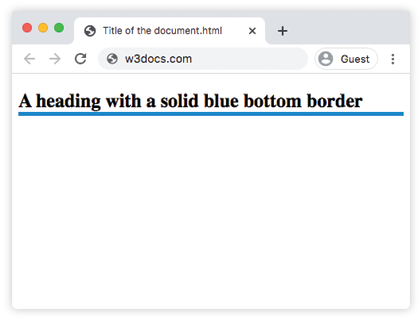
border-bottom-color: color | transparent | initial | inherit;Example of the border-bottom-color property:
<!DOCTYPE html>
<html>
  <head>
    <style>
      h2 {
        border-bottom-style: solid;
        border-bottom-color: #1c87c9;
        border-bottom-width: 5px;
      }
    </style>
  </head>
  <body>
    <h2> A heading with a solid blue bottom border</h2>
  </body>
</html>
Result
Example of the border-bottom-color property, where colors are added to different HTML elements to show the color effect:
<!DOCTYPE html>
<html>
  <head>
    <style>
      h2 {
        border-bottom-style: groove;
        border-bottom-color: #8ebf42;
        border-bottom-width: 5px;
      }
      div {
        border-style: inset;
        border-bottom-color: #ccc;
        border-bottom-width: 8px;
      }
      p {
        border-style: double;
        border-bottom-color: #1c87c9;
        border-bottom-width: 8px;
      }
    </style>
  </head>
  <body>
    <h2>A heading with a groove green bottom border.</h2>
    <div>A div element with an inset gray bottom border.</div>
    <p>A paragraph with a double blue border.</p>
  </body>
</html>
Example of the border-bottom-color property with the “transparent” value:
<!DOCTYPE html>
<html>
  <head>
    <style>
      div {
        border: #666 dashed;
        border-bottom-color: transparent;
        padding: 8px;
      }
    </style>
  </head>
  <body>
    <h2>Example of transparent border-bottom-color</h2>
    <div>This is an example of a div element which has a transparent border-bottom-color.</div>
  </body>
</html>
You can set hexadecimal, RGB, RGBA, HSL, HSLA or color names as a value for the border-bottom-color property.
Example of the border-bottom-color property with the “color” value:
<!DOCTYPE html>
<html>
  <head>
    <style>
      p {
        border: 5px solid #666;
        width: 60%;
        padding: 5px;
      }
      .name {
        border-bottom-color: lightblue;
      }
      .hex {
        border-bottom-color: #1c87c9;
      }
      .rgb {
        border-bottom-color: rgba(0, 0, 0, 0.15);
      }
      .hsl {
        border-bottom-color: hsl(89, 43%, 51%);
      }
    </style>
  </head>
  <body>
    <p class="name">Bottom border with a named color.</p>
    <p class="hex">Bottom border with a hexadecimal value.</p>
    <p class="rgb">Bottom border with a RGB color value.</p>
    <p class="hsl">Bottom border with a HSL color value.</p>
  </body>
</html>