The CSS border-bottom-style property is used to specify the style of the bottom border element.
Without mentioning the style of the border-bottom or border properties the border-bottom-style will not appear.
| Initial Value | none |
| Applies to | All elements. |
| Inherited | No. |
| Animatable | No. |
| Version | CSS1 |
| DOM Syntax | object.style.borderBottomStyle = “dotted”; |
Syntax
border-bottom-style: none | hidden | dotted | dashed | solid | double | groove | ridge | inset | outset | initial | inherit;Example of the border-bottom-style property:
<!DOCTYPE html>
<html>
  <head>
    <title>Title of the document</title>
    <style>
      h2 {
        border-bottom-style: solid;
      }
      div {
        border-bottom-style: dashed;
      }
    </style>
  </head>
  <body>
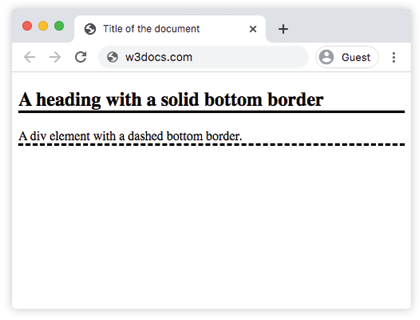
    <h2>A heading with a solid bottom border</h2>
    <div>A div element with a dashed bottom border.</div>
  </body>
</html>
Result
Example of the border-bottom-style property with multiple values:
<!DOCTYPE html>
<html>
  <head>
    <title>Title of the document</title>
    <style>
      h2 {
        border-bottom-style: double;
      }
      p {
        border-style: solid;
        border-bottom-style: dashed;
      }
      div {
        border-bottom-style: groove;
        border-bottom-width: 8px;
      }
    </style>
  </head>
  <body>
    <h2>A heading with a double bottom border</h2>
    <p> A paragraph with a dashed bottom border. </p>
    <div>A div element with a groove bottom border.</div>
  </body>
</html>
Example of the border-bottom-style property with the “hidden” values:
<!DOCTYPE html>
<html>
  <head>
    <title>Title of the document</title>
    <style>
      h1 {
        color: red;
        text-align: center;
        border: 5px solid black;
        border-bottom-style: hidden;
      }
    </style>
  </head>
  <body>
    <h1>Examples with border-bottom-style property</h1>
  </body>
</html>
Example of the border-bottom-style property with the “inset” values:
<!DOCTYPE html>
<html>
  <head>
    <title>Title of the document</title>
    <style>
      h1 {
        color: red;
        text-align: center;
        border: 5px solid;
        border-bottom-style: inset;
      }
    </style>
  </head>
  <body>
    <h1>Examples with border-bottom-style property</h1>
  </body>
</html>
Example of the border-bottom-style property with the “outset” values:
<!DOCTYPE html>
<html>
  <head>
    <title>Title of the document</title>
    <style>
      h1 {
        text-align: center;
        border: 5px solid;
        border-bottom-style: outset;
      }
    </style>
  </head>
  <body>
    <h1>Examples with border-bottom-style property</h1>
  </body>
</html>