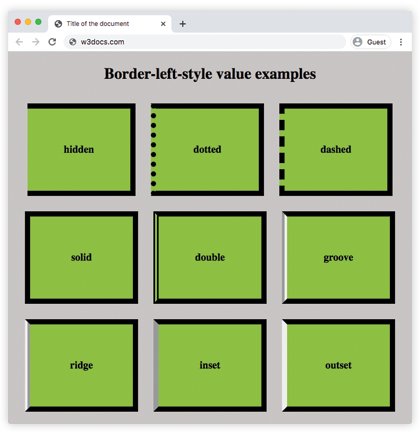
The CSS border-left-style property sets the style of an element’s left border. It is defined as a single keyword that is selected from those available for the border-style property. This property is used to set the style of all four sides of an element, but border-left-style sets a style only for the left border.
The left border’s default width is medium. It can be changed either with the border-left-width or border-width property.
Not all browsers render the styles in the same way. For example, Chrome renders the dots as rectangular dots, not circular ones.
| Initial Value | none |
| Applies to | All elements. It also applies to ::first-letter. |
| Inherited | No |
| Animatable | No |
| Version | CSS1 |
| DOM Syntax | object.style.borderLeftStyle = “solid”; |
Syntax
border-left-style: none | hidden | dotted | dashed | solid | double | groove | ridge | inset | outset | initial | inherit;Example of the border-left-style property:
<!DOCTYPE html>
<html>
  <head>
    <style>
      p {
        border-left-style: solid;
      }
      div {
        border-left-style: dotted;
      }
    </style>
  </head>
  <body>
    <p> Example with solid border-left-style.</p>
    <div>Example with dotted border-left-style.</div>
  </body>
</html>
Example of the border-left-style property with all the values:
<!DOCTYPE html>
<html>
  <head>
    <title>Title of the document</title>
    <style>
      body {
        background: #c9c5c5;
        font-size: 20px;
        text-align: center;
      }
      main div {
        display: flex;
        align-items: center;
        justify-content: center;
        color: black;
        padding-top: 30px;
        padding-bottom: 30px;
        width: 200px;
        height: 100px;
        margin: 15px;
        font-weight: bold;
        background-color: #8ebf42;
        border: 10px solid;
      }
      .flex-center {
        display: flex;
        justify-content: center;
      }
      /* border-left-style example classes */
      .b1 {
        border-left-style: hidden;
      }
      .b2 {
        border-left-style: dotted;
      }
      .b3 {
        border-left-style: dashed;
      }
      .b4 {
        border-left-style: solid;
      }
      .b5 {
        border-left-style: double;
      }
      .b6 {
        border-left-style: groove;
      }
      .b7 {
        border-left-style: ridge;
      }
      .b8 {
        border-left-style: inset;
      }
      .b9 {
        border-left-style: outset;
      }
    </style>
  </head>
  <body>
    <h1>Border-left-style value examples</h1>
    <main class="flex-center">
      <div class="b1">
        hidden
      </div>
      <div class="b2">
        dotted
      </div>
      <div class="b3">
        dashed
      </div>
    </main>
    <main class="flex-center">
      <div class="b4">
        solid
      </div>
      <div class="b5">
        double
      </div>
      <div class="b6">
        groove
      </div>
    </main>
    <main class="flex-center">
      <div class="b7">
        ridge
      </div>
      <div class="b8">
        inset
      </div>
      <div class="b9">
        outset
      </div>
    </main>
  </body>
</html>
Result