The border-top-color property defines the color of the top border of an element.
You can specify the top border color, as well as bottom, right, and left border colors with the border-color shorthand property.
If you use the border-top-color property, you should first set the border-style or border-top-style properties and then change the color of the defined style.
The default width of a border is medium. You can specify the width using either the border-width or border-top-width properties.
| Initial Value | currentColor |
| Applies to | All elements. It also applies to ::first-letter. |
| Inherited | No |
| Animatable | Yes. The color of the top border is animatable. |
| Version | CSS1 |
| DOM Syntax | object.style.borderTopColor = “black”; |
Syntax
border-top-color: color | transparent | initial | inherit;Example of the border-top-color property:
<!DOCTYPE html>
<html>
  <head>
    <title>Title of the document</title>
    <style>
      div {
        width: 300px;
        padding: 20px;
        border-style: solid;
        border-color: #666;
        border-top-color: #1c87c9;
      }
    </style>
  </head>
  <body>
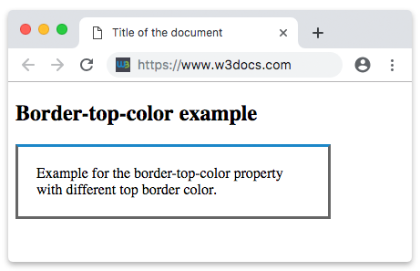
    <h2>Border-top-color example</h2>
    <div>Example for the border-top-color property with different top border color.</div>
  </body>
</html>
Result
Example of the border-top-color property with the “transparent” value:
<!DOCTYPE html>
<html>
  <head>
    <title>Title of the document</title>
    <style>
      h2 {
        padding-bottom: 8px;
        text-align: center;
        border: 12px groove #1c87c9;
        border-top-color: transparent;
      }
    </style>
  </head>
  <body>
    <h2>A heading with a transparent top border</h2>
  </body>
</html>
Example of the border-top-color property with a named color value:
<!DOCTYPE html>
<html>
  <head>
    <title>Title of the document</title>
    <style>
      div {
        padding: 10px;
        width: 50%;
        border: solid #666;
        border-top-color: darkred;
      }
    </style>
  </head>
  <body>
    <div>Border-top-color property with a named color value.</div>
  </body>
</html>
Example of the border-top-color property with a hexadecimal value:
<!DOCTYPE html>
<html>
  <head>
    <title>Title of the document</title>
    <style>
      div {
        padding: 10px;
        width: 50%;
        border: solid #666;
        border-top-color: #1c87c9;
      }
    </style>
  </head>
  <body>
    <div>Border-top-color property with a hexadecimal value.</div>
  </body>
</html>
Example of the border-top-color property with a RGB value:
<!DOCTYPE html>
<html>
  <head>
    <title>Title of the document</title>
    <style>
      div {
        padding: 10px;
        width: 50%;
        border: solid #666;
        border-top-color: rgb(142, 191, 66);
      }
    </style>
  </head>
  <body>
    <div>Border-top-color property with a RGB value.</div>
  </body>
</html>
Example of the border-top-color property with a HSL value:
<!DOCTYPE html>
<html>
  <head>
    <title>Title of the document</title>
    <style>
      div {
        padding: 10px;
        width: 50%;
        border: solid #666;
        border-top-color: hsl(24, 80%, 50%);
      }
    </style>
  </head>
  <body>
    <div>Border-top-color property with a HSL value.</div>
  </body>
</html>