The flex-basis property specifies the initial main size of the flexible item. When this property is not included, its value is set to 0%.
The flex-basis property is one of the CSS3 properties.
If there are no flexible items, the flex-basis property won’t have any effect.
The flex-basis property will have a priority when both flex-basis with a value other than auto and width (or height in case of flex-direction with a value set to column) are set.
| Initial Value | auto |
| Applies to | Flex items, including in-flow pseudo-elements. |
| Inherited | No. |
| Animatable | Yes. Items are animatable. |
| Version | CSS3 |
| DOM Syntax | object.style.flexBasis = “100px”; |
Syntax
flex-basis: number | auto | initial | inherit;Example of the flex-basis property:
<!DOCTYPE html>
<html>
  <head>
    <title>Title of the document</title>
    <style>
      .box {
        width: 300px;
        height: 80px;
        border: 1px solid #666;
        display: -webkit-flex; /* Safari */
        display: flex;
      }
      .box div {
        -webkit-flex-grow: 0; /* Safari 6.1+ */
        -webkit-flex-shrink: 0; /* Safari 6.1+ */
        -webkit-flex-basis: 40px; /* Safari 6.1+ */
        flex-grow: 0;
        flex-shrink: 0;
        flex-basis: 40px;
      }
      .box div:nth-of-type(2) {
        -webkit-flex-basis: 140px;  /* Safari 6.1+ */
        flex-basis: 140px;
      }
    </style>
  </head>
  <body>
    <h2>Flex-basis property example</h2>
    <div class="box">
      <div style="background-color: #eeeeee;">40px</div>
      <div style="background-color: #1c87c9;">140px</div>
      <div style="background-color: #8ebf42;">40px</div>
      <div style="background-color: #cccccc;">40px</div>
      <div style="background-color: #666666;">40px</div>
    </div>
  </body>
</html>
Result
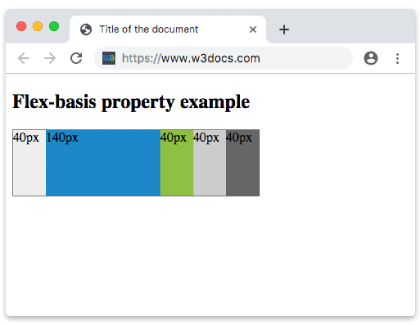
Example of the flex-basis property with all the values:
<!DOCTYPE html>
<html>
  <head>
    <title>Title of the document</title>
    <style>
      .box {
        height: 70px;
        display: flex;
      }
      .box div {
        flex-grow: 0;
        flex-shrink: 0;
        flex-basis: 60px;
        padding: 15px;
        /* For Safari 6.1 and above browsers */
        -webkit-flex-grow: 0;
        -webkit-flex-shrink: 0;
        -webkit-flex-basis: 60px;
      }
      .box div:first-child {
        background-color: #40c3da;
      }
      .box div:nth-of-type(2) {
        flex-basis: 40%;
        -webkit-flex-basis: 40%;
        background-color: lightgreen;
      }
      .box div:nth-of-type(3) {
        flex-basis: auto;
        -webkit-flex-basis: auto;
        background-color: yellow;
      }
      .box div:nth-of-type(4) {
        flex-basis: initial;
        -webkit-flex-basis: initial;
        background-color: orange;
      }
      .box div:nth-of-type(5) {
        flex-basis: inherit;
        -webkit-flex-basis: inherit;
        background-color: pink;
      }
    </style>
  </head>
  <body>
    <h2>Flex-basis property example</h2>
    <div class="box">
      <div>
        number 60px
      </div>
      <div>
        percentage 40%
      </div>
      <div>
        auto
      </div>
      <div>
        initial
      </div>
      <div>
        inherit
      </div>
    </div>
  </body>
</html>
Example of the flex-basis property specified in pixels:
<!DOCTYPE html>
<html>
  <head>
    <title>Title of the document</title>
    <style>
      .box {
        width: 460px;
        height: 70px;
        display: flex;
      }
      .box div {
        flex-grow: 0;
        flex-shrink: 0;
        flex-basis: 70px;
        padding: 15px;
        /* For Safari 6.1 and above browsers */
        -webkit-flex-grow: 0;
        -webkit-flex-shrink: 0;
        -webkit-flex-basis: 70px;
      }
      .box div:first-child {
        background-color: #40c3da;
      }
      .box div:nth-of-type(2) {
        flex-basis: 100px;
        -webkit-flex-basis: 100px;
        background-color: lightgreen;
      }
      .box div:nth-of-type(3) {
        background-color: #1c87c9;
      }
      .box div:nth-of-type(4) {
        flex-basis: 150px;
        -webkit-flex-basis: 150px;
        background-color: orange;
      }
      .box div:nth-of-type(5) {
        background-color: #8ebf42;
      }
    </style>
  </head>
  <body>
    <h2>Flex-basis property example</h2>
    <div class="box">
      <div>
        70px
      </div>
      <div>
        100px
      </div>
      <div>
        70px
      </div>
      <div>
        150px
      </div>
      <div>
        70px
      </div>
    </div>
  </body>
</html>