The CSS align-content property aligns a flex container’s lines when there is available space vertically (on the cross-axis).
The align-content property is one of the CSS3 properties.
When there is only one line in the flexbox, this property will not affect. It needs multiple lines within a flexible container.
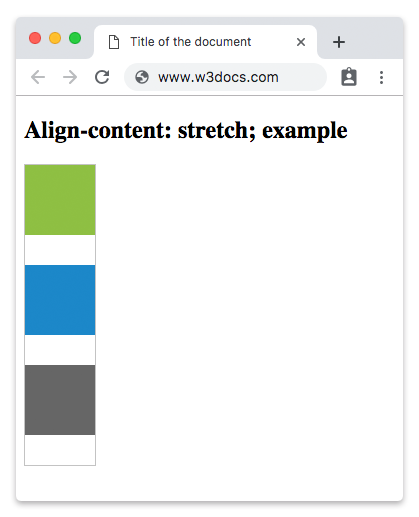
The value “stretch” is this property’s default value.
The align-content property accepts the following values:
- flex-start
- flex-end
- center
- space-between
- space-around
- stretch
| Initial Value | stretch |
| Applies to | Multi-line flex containers. |
| Inherited | No. |
| Animatable | No. |
| Version | CSS3 |
| DOM Syntax | object.style.alignContent = “flex-end”, |
Syntax:
align-content: flex-start | flex-end | center | space-between | space-around | stretch | initial | inherit;Example of the align-content property:
<!DOCTYPE html>
<html>
  <head>
    <title>Title of the document</title>
    <style>
      #example {
        width: 70px;
        height: 300px;
        padding: 0;
        border: 1px solid #c3c3c3;
        display: -webkit-flex;
        /* Safari */
        -webkit-flex-flow: row wrap;
        /* Safari 6.1+ */
        -webkit-align-content: stretch;
        /* Safari 7.0+ */
        display: flex;
        flex-flow: row wrap;
        align-content: stretch;
      }
      #example li {
        width: 70px;
        height: 70px;
        list-style: none;
      }
    </style>
  </head>
  <body>
    <h2>Align-content: stretch; example</h2>
    <ul id="example">
      <li style="background-color:#8ebf42;"></li>
      <li style="background-color:#1c87c9;"></li>
      <li style="background-color:#666;"></li>
    </ul>
  </body>
</html>
Result
Example of the align-content property with the “center” value:
<!DOCTYPE html>
<html>
  <head>
    <style>
      #example {
        width: 70px;
        height: 300px;
        padding: 0;
        border: 1px solid #c3c3c3;
        display: -webkit-flex;
        /* Safari */
        -webkit-flex-flow: row wrap;
        /* Safari 6.1+ */
        -webkit-align-content: center;
        /* Safari 7.0+ */
        display: flex;
        flex-flow: row wrap;
        align-content: center;
      }
      #example li {
        width: 70px;
        height: 70px;
        list-style: none;
      }
    </style>
  </head>
  <body>
    <h2>Align-content: center; example</h2>
    <ul id="example">
      <li style="background-color:#8ebf42;"></li>
      <li style="background-color:#1c87c9;"></li>
      <li style="background-color:#666;"></li>
    </ul>
  </body>
</html>
Example of the align-content property with the “flex-start” value:
<!DOCTYPE html>
<html>
  <head>
    <style>
      #example {
        width: 70px;
        height: 300px;
        padding: 0;
        border: 1px solid #c3c3c3;
        display: -webkit-flex;
        /* Safari */
        -webkit-flex-flow: row wrap;
        /* Safari 6.1+ */
        -webkit-align-content: flex-start;
        /* Safari 7.0+ */
        display: flex;
        flex-flow: row wrap;
        align-content: flex-start;
      }
      #example li {
        width: 70px;
        height: 70px;
        list-style: none;
      }
    </style>
  </head>
  <body>
    <h2>Align-content: flex-start; example</h2>
    <ul id="example">
      <li style="background-color:#8ebf42;"></li>
      <li style="background-color:#1c87c9;"></li>
      <li style="background-color:#666;"></li>
    </ul>
  </body>
</html>
Example of the align-content property with the “flex-end” value:
<!DOCTYPE html>
<html>
  <head>
    <style>
      #example {
        width: 70px;
        height: 300px;
        padding: 0;
        border: 1px solid #c3c3c3;
        display: -webkit-flex;
        /* Safari */
        -webkit-flex-flow: row wrap;
        /* Safari 6.1+ */
        -webkit-align-content: flex-end;
        /* Safari 7.0+ */
        display: flex;
        flex-flow: row wrap;
        align-content: flex-end;
      }
      #example li {
        width: 70px;
        height: 70px;
        list-style: none;
      }
    </style>
  </head>
  <body>
    <h2>Align-content: flex-end; example</h2>
    <ul id="example">
      <li style="background-color:#8ebf42;"></li>
      <li style="background-color:#1c87c9;"></li>
      <li style="background-color:#666;"></li>
    </ul>
  </body>
</html>
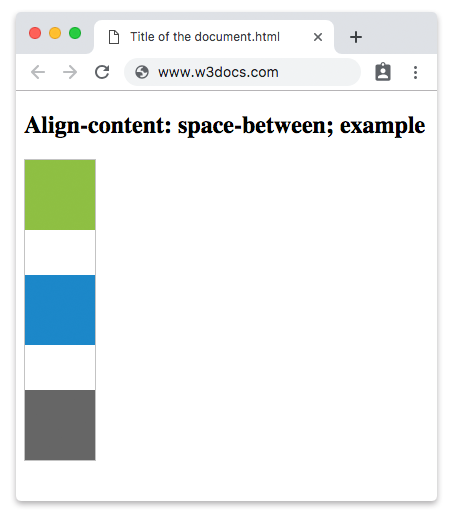
In the following example the items are placed between the lines.
Example of the align-content property with the “space-between” value:
<!DOCTYPE html>
<html>
  <head>
    <style>
      #example {
        width: 70px;
        height: 300px;
        padding: 0;
        border: 1px solid #c3c3c3;
        display: -webkit-flex;
        /* Safari */
        -webkit-flex-flow: row wrap;
        /* Safari 6.1+ */
        -webkit-align-content: space-between;
        /* Safari 7.0+ */
        display: flex;
        flex-flow: row wrap;
        align-content: space-between;
      }
      #example li {
        width: 70px;
        height: 70px;
        list-style: none;
      }
    </style>
  </head>
  <body>
    <h2>Align-content: space-between; example</h2>
    <ul id="example">
      <li style="background-color:#8ebf42;"></li>
      <li style="background-color:#1c87c9;"></li>
      <li style="background-color:#666;"></li>
    </ul>
  </body>
</html>
Result
Another example with the “space-around” value. There is equal space between the items.
Example of the align-content property with the “space-around” value:
<!DOCTYPE html>
<html>
  <head>
    <style>
      #example {
        width: 70px;
        height: 300px;
        padding: 0;
        border: 1px solid #c3c3c3;
        display: -webkit-flex;
        /* Safari */
        -webkit-flex-flow: row wrap;
        /* Safari 6.1+ */
        -webkit-align-content: space-around;
        /* Safari 7.0+ */
        display: flex;
        flex-flow: row wrap;
        align-content: space-around;
      }
      #example li {
        width: 70px;
        height: 70px;
        list-style: none;
      }
    </style>
  </head>
  <body>
    <h2>Align-content: space-around; example</h2>
    <ul id="example">
      <li style="background-color:#8ebf42;"></li>
      <li style="background-color:#1c87c9;"></li>
      <li style="background-color:#666;"></li>
    </ul>
  </body>
</html>