The border-bottom-width property sets the width of the bottom border.
You need to set the border-style or the border-bottom-style property before the border-bottom-width property. First you need to have borders before you can change the width.
The specification doesn’t set the exact thickness set by each keyword, the precise result when using one of them is implementation-specific. But they always follow the pattern thin ≤ medium ≤ thick, and the values are constant within a single document.
| Initial Value | medium |
| Applies to | All elements. It also applies to ::first-letter. |
| Inherited | No. |
| Animatable | Yes. The width can be animatable. |
| Version | CSS1 |
| DOM Syntax | object.style.borderBottomWidth = “5px”; |
Syntax
border-bottom-width: medium | thin | thick | length | initial | inherit;Example of the border-bottom-width property:
<!DOCTYPE html>
<html>
  <head>
    <style>
      p {
        border-style: dotted;
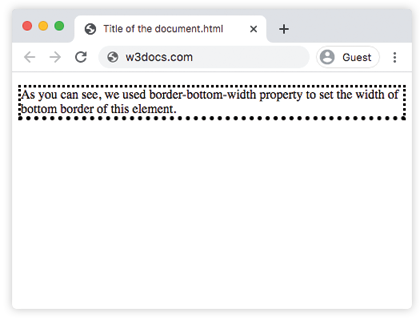
        border-bottom-width: thick;
      }
    </style>
  </head>
  <body>
    <p>
      As you can see, we used border-bottom-width property to set the width of bottom border of this element.
    </p>
  </body>
</html>
Result
Example of the border-bottom-width property with the “medium” value:
<!DOCTYPE html>
<html>
  <head>
    <title>The title of the document</title>
    <style>
      h2 {
        border-bottom-style: groove;
        border-bottom-width: medium;
      }
      div {
        border-style: groove;
        border-bottom-width: medium;
      }
    </style>
  </head>
  <body>
    <h2>A heading with a medium bottom border.</h2>
    <div>A div element with a medium bottom border.</div>
  </body>
</html>
Example of the border-bottom-width property that shows the difference between the “thin” and “thick values:
<!DOCTYPE html>
<html>
  <head>
    <title>The title of the document</title>
    <style>
      h2 {
        padding: 5px;
        border-bottom-style: ridge;
        border-bottom-width: thin;
        border-color: #cccccc;
      }
      div {
        padding: 5px;
        border-style: ridge;
        border-bottom-width: thick;
      }
    </style>
  </head>
  <body>
    <h2>A heading with thin bottom border</h2>
    <div>A div element with thick bottom border.</div>
  </body>
</html>