The CSS border-image-repeat property is used to specify if the border-image will be rounded, repeated or stretched. It is one of the CSS3 properties.
The border-image-repeat property may be defined using one or two values. If one value is specified, it applies the same behavior on all four sides. If two values are specified, the first applies to the top and bottom, and the second to the left and right.
| Initial Value | stretch |
| Applies to | All elements, except internal table elements when border-collapse is “collapse”. It also applies to ::first-letter. |
| Inherited | No. |
| Animatable | No. |
| Version | CSS3 |
| DOM Syntax | object.style.borderImageRepeat = “round”; |
Syntax
border-image-repeat: stretch | repeat | round | initial | inherit;Example of the border-image-repeat property:
<!DOCTYPE html>
<html>
  <head>
    <title>The title of the document</title>
    <style>
      .border {
        border: 10px solid transparent;
        padding: 20px;
        border-image: url(/uploads/media/default/0001/01/812bf6a749522b8185c1beee20dd99dd6c6c87da.jpeg) round;
        border-image-slice: 100;
        border-image-repeat: round;
        border-image-width: 10px;
      }
    </style>
  </head>
  <body>
    <h2>Border-image-slice property example</h2>
    <p class="border">border-image-repeat: round;</p>
    <p>Here is the original image used:</p>
    <img src="/uploads/media/default/0001/01/812bf6a749522b8185c1beee20dd99dd6c6c87da.jpeg" style="width:50%">
  </body>
</html>
Result
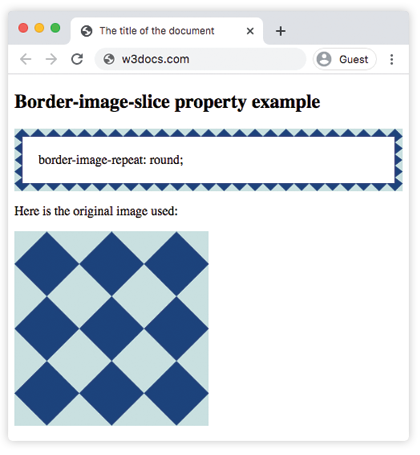
Example of the border-image-repeat property with the “round” and “repeat” values:
<!DOCTYPE html>
<html>
  <head>
    <title>The title of the document</title>
    <style>
      .border1 {
        border: 10px solid transparent;
        padding: 20px;
        border-image: url(/uploads/media/default/0001/01/812bf6a749522b8185c1beee20dd99dd6c6c87da.jpeg) round;
        border-image-slice: 100;
        border-image-repeat: round;
        border-image-width: 10px;
      }
      .border2 {
        border: 10px solid transparent;
        padding: 20px;
        border-image: url(/uploads/media/default/0001/01/812bf6a749522b8185c1beee20dd99dd6c6c87da.jpeg) round;
        border-image-slice: 100;
        border-image-repeat: repeat;
        border-image-width: 10px;
      }
    </style>
  </head>
  <body>
    <h2>Border-image-repeat property example</h2>
    <p class="border1">border-image-repeat: round;</p>
    <p class="border2">border-image-repeat: repeat;</p>
    <p>Here is the original image used:</p>
    <img src="/uploads/media/default/0001/01/812bf6a749522b8185c1beee20dd99dd6c6c87da.jpeg" style="width:50%">
  </body>
</html>
Example of the border-image-repeat property with the “space” and “stretched” values:
<!DOCTYPE html>
<html>
  <head>
    <style>
      .border1 {
        border: 10px solid transparent;
        padding: 20px;
        border-image: url(/uploads/media/default/0001/01/812bf6a749522b8185c1beee20dd99dd6c6c87da.jpeg) round;
        border-image-slice: 100;
        border-image-repeat: space;
        border-image-width: 10px;
      }
      .border2 {
        border: 10px solid transparent;
        padding: 20px;
        border-image: url(/uploads/media/default/0001/01/812bf6a749522b8185c1beee20dd99dd6c6c87da.jpeg) round;
        border-image-slice: 100;
        border-image-repeat: stretch;
        border-image-width: 10px;
      }
    </style>
  </head>
  <body>
    <h2>Border-image-repeat property example</h2>
    <p class="border1">border-image-repeat: space;</p>
    <p class="border2">border-image-repeat: stretch;</p>
    <p>Here is the original image used:</p>
    <img src="/uploads/media/default/0001/01/812bf6a749522b8185c1beee20dd99dd6c6c87da.jpeg" style="width:50%">
  </body>
</html>