The border-top-width property is used to define the width of an element’s top border.
The width of the top border, as well as all the other border sides, can be defined with the border or border-width shorthand properties.
For setting the border-top-width you should first define the border-style property, because you need borders before setting its width. You can use either border-style or border-top-style to specify the border’s style.
| Initial Value | medium |
| Applies to | All elements. It also applies to ::first-letter. |
| Inherited | No |
| Animatable | Yes. The width of the border is animatable. |
| Version | CSS1 |
| DOM Syntax | object.style.borderTopWidth = “5px”; |
Syntax
border-top-width: medium | thin | thick | length | initial | inherit;Example of the border-top-width property:
<!DOCTYPE html>
<html>
  <head>
    <title>Title of the document</title>
    <style>
      p {
        padding: 8px;
        border-style: dotted;
        border-top-width: thick;
      }
    </style>
  </head>
  <body>
    <h2>Border-top-width example</h2>
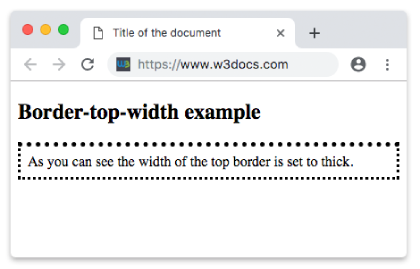
    <p>As you can see the width of the top border is set to thick.</p>
  </body>
</html>
Result
Example of the border-top-width property with all the values:
<!DOCTYPE html>
<html>
  <head>
    <title>Title of the document</title>
    <style>
      body {
        background: #ccc;
        font-size: 20px;
        text-align: center;
      }
      main div {
        display: flex;
        align-items: center;
        justify-content: center;
        color: black;
        padding-top: 30px;
        padding-bottom: 30px;
        width: 200px;
        height: 100px;
        margin: 15px;
        font-weight: bold;
        border: solid;
      }
      .flex-center {
        display: flex;
        justify-content: center;
      }
      /* border-top-width example classes */
      .b1 {
        border-top-width: medium;
      }
      .b2 {
        border-top-width: thin;
      }
      .b3 {
        border-top-width: thick;
      }
      .b4 {
        border-top-width: 10px;
      }
      .b5 {
        border-top-width: initial;
      }
      .b6 {
        border-top-width: inherit;
      }
    </style>
  </head>
  <body>
    <h1>Border-top-width value examples</h1>
    <main class="flex-center">
      <div class="b1">
        medium
      </div>
      <div class="b2">
        thin
      </div>
      <div class="b3">
        thick
      </div>
    </main>
    <main class="flex-center">
      <div class="b4">
        10px lenght
      </div>
      <div class="b5">
        initial
      </div>
      <div class="b6">
        inherit
      </div>
    </main>
  </body>
</html>