The color property describes the color of the text content and text decorations. A background color can be combined with a text color to make the text easy readable. You can find web colors in our HTML colors section and try to choose your preferred colors with our Color Picker tool. The default value of this property varies from one browser to another.
| Initial Value | Varies from one browser to another. |
| Applies to | All elements. It also applies to ::first-letter and ::first-line. |
| Inherited | Yes. |
| Animatable | Yes. The color is animatable. |
| Version | CSS1 |
| DOM Syntax | object.style.color = “#1c87c9”; |
Syntax
color: color | initial | inherit;Example of the color property:
<!DOCTYPE html>
<html>
  <head>
    <title>Title of the document</title>
    <style>
      .blue {
        color: #1c87c9;
      }
    </style>
  </head>
  <body>
    <h2>Color property example</h2>
    <p>This is some paragraph for example.</p>
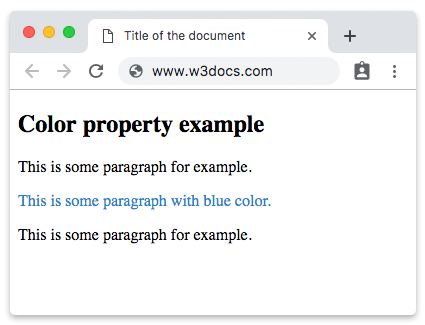
    <p class="blue">This is some paragraph with blue color.</p>
    <p>This is some paragraph for example.</p>
  </body>
</html>
Result
Example of the color property with a named color value:
<!DOCTYPE html>
<html>
  <head>
    <title>Title of the document</title>
    <style>
      .blue {
        color: blue;
      }
    </style>
  </head>
  <body>
    <h2>Color property example</h2>
    <p>This is some paragraph for example.</p>
    <p class="blue">This is some paragraph with a named blue color.</p>
    <p>This is some paragraph for example.</p>
  </body>
</html>
Example of the color property with a hexadecimal value:
<!DOCTYPE html>
<html>
  <head>
    <title>Title of the document</title>
    <style>
      .color {
        color: #8ebf42;
      }
    </style>
  </head>
  <body>
    <h2>Color property example.</h2>
    <p>This is some paragraph for example</p>
    <p class="color">This is some paragraph with a hexadecimal color value (#8ebf42 for green).</p>
    <p>This is some paragraph for example.</p>
  </body>
</html>
Example of the color property with a RGB value:
<!DOCTYPE html>
<html>
  <head>
    <title>Title of the document</title>
    <style>
      .color {
        color: rgb(142, 191, 66);
      }
    </style>
  </head>
  <body>
    <h2>Color property example.</h2>
    <p>This is some paragraph for example</p>
    <p class="color">This is some paragraph with a RGB color value.</p>
    <p>This is some paragraph for example.</p>
  </body>
</html>
Example of the color property with a HSL value:
<!DOCTYPE html>
<html>
  <head>
    <title>Title of the document</title>
    <style>
      .color {
        color: hsl(89, 43%, 51%);
      }
    </style>
  </head>
  <body>
    <h2>Color property example.</h2>
    <p>This is some paragraph for example</p>
    <p class="color">This is some paragraph with an HSL color value.</p>
    <p>This is some paragraph for example.</p>
  </body>
</html>