The column-count property specifies the number of columns which divides the content of an element.
The column-count property is one of the CSS3 properties.
It has two values: auto and number. “Auto” is the default value of this property. The number of columns is determined by other properties such as column-width. “Number” value specifies the number of columns into which the content of the element should be flowed.
| Initial Value | auto |
| Applies to | Block containers except table wrapper boxes. |
| Inherited | No. |
| Animatable | Yes. The number of the columns is animatable. |
| Version | CSS3 |
| DOM Syntax | object.style.columnCount = “4”; |
Syntax
column-count: number | auto | initial | inherit;Example of the column-count property:
<!DOCTYPE html>
<html>
  <head>
    <title>Title of the document</title>
    <style>
      div {
        -webkit-column-count: auto;
        /* Chrome, Safari, Opera */
        -moz-column-count: auto;
        /* Firefox */
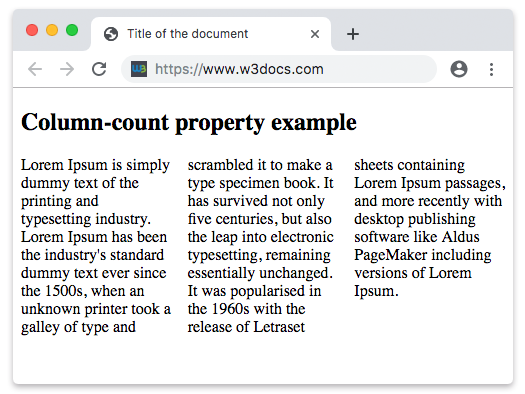
        column-count: 3;
      }
    </style>
  </head>
  <body>
    <h2>Column-count property example</h2>
    <div>
      Lorem Ipsum is dummy text of the printing and typesetting industry. Lorem Ipsum has been the industry's standard dummy text ever since the 1500s, when an unknown printer took a galley of type and scrambled it to make a type specimen book. It has survived not only five centuries, but also the leap into electronic typesetting, remaining essentially unchanged. It was popularised in the 1960s with the release of Letraset sheets containing Lorem Ipsum passages, and more recently with desktop publishing software like Aldus PageMaker including versions of Lorem Ipsum.
    </div>
  </body>
</html>
Result
Example of the column-count property with the column specified as 7:
<!DOCTYPE html>
<html>
  <head>
    <title>Title of the document</title>
    <style>
      div {
        -webkit-column-count: 7;
        /* Chrome, Safari, Opera */
        -moz-column-count: 7;
        /* Firefox */
        column-count: 7;
      }
    </style>
  </head>
  <body>
    <h2>Column-count property example</h2>
    <div>
      Lorem Ipsum is dummy text of the printing and typesetting industry. Lorem Ipsum has been the industry's standard dummy text ever since the 1500s when an unknown printer took a galley of type and scrambled it to make a type specimen book. It has survived not only five centuries, but also the leap into electronic typesetting, remaining essentially unchanged. It was popularised in the 1960s with the release of Letraset sheets containing Lorem Ipsum passages, and more recently with desktop publishing software like Aldus PageMaker including versions of Lorem Ipsum. It is a great fact that a reader will be distracted by the readable content of a page when looking at its layout.
    </div>
  </body>
</html>