The column-gap property sets the length of the gap between columns.
The column-gap property is one of the CSS3 properties.
It is specified by two values: normal and length. “Normal” is a default value. The gap between columns is normal. “Gap” can be specified in em, px and percentages.
When a column-rule is used between columns, it will be in the middle of the gap.
| Initial Value | normal |
| Applies to | Multi-column elements, flex containers, grid containers. |
| Inherited | No. |
| Animatable | Yes. The lenght of the columns gap is animatable. |
| Version | CSS3 |
| DOM Syntax | object.style.columnGap = “100px”; |
Syntax
column-gap: length | normal | initial | inherit;Example of the column-gap property:
<!DOCTYPE html>
<html>
  <head>
    <title>Title of the document</title>
    <style>
      div {
        -webkit-column-count: 4; /* Chrome, Safari, Opera */
        -moz-column-count: 4; /* Firefox */
        column-count: 4;
        -webkit-column-gap: normal; /* Chrome, Safari, Opera */
        -moz-column-gap: normal; /* Firefox */
        column-gap: normal;
      }
    </style>
  </head>
  <body>
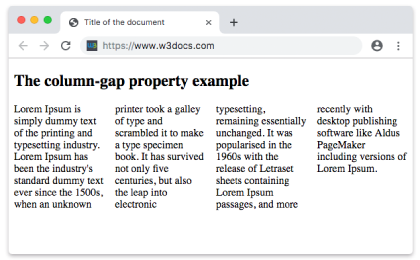
    <h2>The column-gap property example</h2>
    <div>
      Lorem Ipsum is dummy text of the printing and typesetting industry. Lorem Ipsum has been the industry's standard dummy text ever since the 1500s when an unknown printer took a galley of type and scrambled it to make a type specimen book. It has survived not only five centuries, but also the leap into electronic typesetting, remaining essentially unchanged. It was popularised in the 1960s with the release of Letraset sheets containing Lorem Ipsum passages, and more recently with desktop publishing software like Aldus PageMaker including versions of Lorem Ipsum.
    </div>
  </body>
</html>
Result
Example of the column-gap property with the “length” value:
<!DOCTYPE html>
<html>
  <head>
    <title>Title of the document</title>
    <style>
      div {
        -webkit-column-count: 4; /* Chrome, Safari, Opera */
        -moz-column-count: 4; /* Firefox */
        column-count: 4;
        -webkit-column-gap: 30px;  /* Chrome, Safari, Opera */
        -moz-column-gap: 30px; /* Firefox */
        column-gap: 30px;
      }
    </style>
  </head>
  <body>
    <h2>Column-gap property example</h2>
    <div>
      Lorem Ipsum is dummy text of the printing and typesetting industry. Lorem Ipsum has been the industry's standard dummy text ever since the 1500s when an unknown printer took a galley of type and scrambled it to make a type specimen book. It has survived not only five centuries, but also the leap into electronic typesetting, remaining essentially unchanged. It was popularised in the 1960s with the release of Letraset sheets containing Lorem Ipsum passages, and more recently with desktop publishing software like Aldus PageMaker including versions of Lorem Ipsum.
    </div>
  </body>
</html>