The direction property defines the text direction.
The direction property sets the base text direction of block-level elements and the direction of embeddings which are created by the unicode-bidi property. It also sets the text’s default alignment of block-level elements and the direction that cells flow within a table row.
The text direction is usually specified inside a document, like the dir attribute of HTML, instead of the direct use of the direction property. In contrast to the HTML dir attribute, the CSS direction property is not inherited into table cells from the table columns, because table cells aren’t within the columns, they are inside of rows.
| Initial Value | ltr |
| Applies to | All elements. |
| Inherited | Yes. |
| Animatable | Discrete. |
| Version | CSS2 |
| DOM Syntax | object.style.direction = “rtl”; |
Syntax
direction: ltr | rtl | initial | inherit;Example of the direction property:
<!DOCTYPE html>
<html>
  <head>
    <title>Title of the document</title>
    <style>
      div {
        direction: rtl;
      }
    </style>
  </head>
  <body>
    <p>As you can see, this text is written with default direction.</p>
    <div>However, this text is written from right to left as we defined.</div>
  </body>
</html>
Result
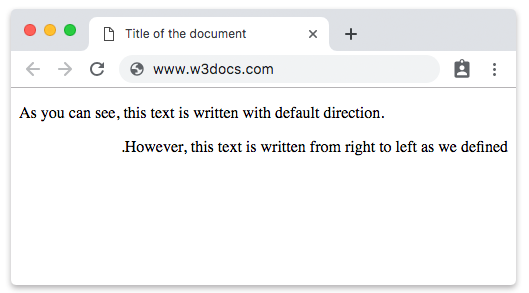
In the given example the “rtl” value is used. The text goes from right to left.