The grid-column-start property specifies the start position of the item within the column by adding a line, a span, or nothing. In other words, it defines the block-start position of its grid area.
| Initial Value | auto |
| Applies to | Grid items. |
| Inherited | No. |
| Animatable | Yes. The starting point is animatable. |
| Version | CSS Grid Layout Module Level 1 |
| DOM Syntax | object.style.gridColumnStart = “6”; |
Syntax
grid-column-start: auto | span n | column-line | initial | inherit;Example of the grid-column-start property:
<!DOCTYPE html>
<html>
  <head>
    <title>Title of the document</title>
    <style>
      .grid-container {
        display: grid;
        grid-template-columns: auto auto auto auto;
        grid-gap: 10px;
        background-color: #666;
        padding: 10px;
      }
      .grid-container > div {
        background-color: #ccc;
        text-align: center;
        padding: 20px 0;
        font-size: 30px;
      }
      .box1 {
        grid-column-start: 6;
      }
    </style>
  </head>
  <body>
    <h2>Grid-column-start property example</h2>
    <div class="grid-container">
      <div class="box1">1</div>
      <div>2</div>
      <div>3</div>
      <div>4</div>
      <div>5</div>
      <div>6</div>
    </div>
  </body>
</html>
Result
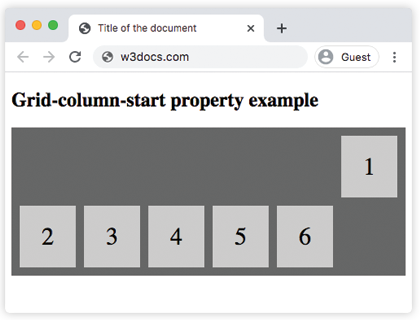
Here, we have specified from which column the display of the item should start. In the following example, we have specified the number of columns the item will span.
Example of the grid-column-start property specified as “span 2”:
<!DOCTYPE html>
<html>
  <head>
    <title>Title of the document</title>
    <style>
      .span-container {
        display: grid;
        grid-template-columns: auto auto auto auto;
        grid-gap: 10px;
        background-color: #888;
        padding: 10px;
        margin-top: 20px;
      }
      .span-container > div {
        background-color: #fff;
        text-align: center;
        padding: 20px 0;
        font-size: 30px;
      }
      .span-box1 {
        grid-column-start: span 2;
      }
    </style>
  </head>
  <body>
    <h2>Grid-column-start property example</h2>
    <div class="span-container">
      <div class="span-box1">1</div>
      <div>2</div>
      <div>3</div>
      <div>4</div>
      <div>5</div>
      <div>6</div>
    </div>
  </body>
</html>
Example of the grid-column-start property with the “auto” value:
<!DOCTYPE html>
<html>
  <head>
    <title>Title of the document</title>
    <style>
      .grid-container {
        display: grid;
        grid-template-columns: auto auto auto auto;
        grid-gap: 10px;
        background-color: #666;
        padding: 10px;
      }
      .grid-container > div {
        background-color: #ccc;
        text-align: center;
        padding: 20px 0;
        font-size: 30px;
      }
      .box1 {
        grid-column-start: auto;
      }
    </style>
  </head>
  <body>
    <h2>Grid-column-start property example</h2>
    <div class="grid-container">
      <div class="box1">1</div>
      <div class="box2">2</div>
      <div class="box3">3</div>
      <div class="box4">4</div>
      <div class="box5">5</div>
      <div class="box6">6</div>
      <div class="box7">7</div>
      <div class="box8">8</div>
      <div class="box9">9</div>
    </div>
  </body>
</html>
Example of the grid-column-start property with the “column-line” value:
<!DOCTYPE html>
<html>
  <head>
    <title>Title of the document</title>
    <style>
      .grid-container {
        display: grid;
        grid-template-columns: auto auto auto auto;
        grid-gap: 12px;
        background-color: red;
        padding: 15px;
      }
      .grid-container>div {
        background-color: #dcdcdc;
        text-align: center;
        padding: 20px 0;
        font-size: 35px;
        color: white;
      }
      .box1 {
        grid-column-start: 4;
      }
    </style>
  </head>
  <body>
    <h1> Grid-column-start Property </h1>
    <div class="grid-container">
      <div class="box1">1</div>
      <div>2</div>
      <div>3</div>
      <div>4</div>
      <div>5</div>
      <div>6</div>
      <div>7</div>
      <div>8</div>
      <div>9</div>
    </div>
  </body>
</html>