The margin-left property is used to define how much the left margin of the element will be set.
There are some rare situations when width, margin-left, border, padding, the content area and margin-right are defined. When it happens, the margin-left will be ignored and it will be set as if the auto value is defined.
The margin-left property is defined as the keyword <auto>, <percentage> or a <length>. Its value may be negative, positive or zero.
| Initial Value | 0 |
| Applies to | All elements. It also applies to ::first-letter. |
| Inherited | No. |
| Animatable | Yes. Left margin of the element is animatable. |
| Version | CSS2 |
| DOM Syntax | object.style.marginLeft = “20px”; |
Syntax
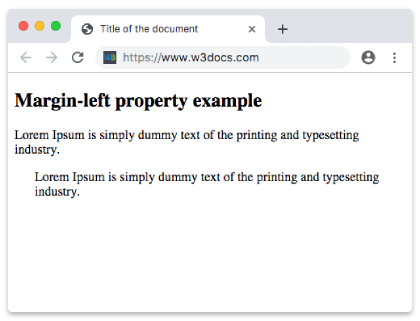
margin-left: length | auto | initial | inherit;Example of the margin-left property defined as “px”:
<!DOCTYPE html>
<html>
  <head>
    <title>Title of the document</title>
    <style>
      .left {
        margin-left: 25px;
      }
    </style>
  </head>
  <body>
    <h2>Margin-left property example</h2>
    <p>Lorem Ipsum is simply dummy text of the printing and typesetting industry.</p>
    <p class="left">Lorem Ipsum is simply dummy text of the printing and typesetting industry.</p>
  </body>
</html>
Result
Example of the margin-left property defined as “em”:
<!DOCTYPE html>
<html>
  <head>
    <title>Title of the document</title>
    <style>
      .left {
        margin-left: 8em;
      }
    </style>
  </head>
  <body>
    <h2>Margin-left property example</h2>
    <p>Lorem Ipsum is simply dummy text of the printing and typesetting industry.</p>
    <p class="left">Lorem Ipsum is simply dummy text of the printing and typesetting industry.</p>
  </body>
</html>
Example of the margin-left property defined as “px”, “em” and “%”:
<!DOCTYPE html>
<html>
  <head>
    <title>Title of the document</title>
    <style>
      p.p1 {
        margin-left: 6em;
      }
      p.p2 {
        margin-left: 40px;
      }
      p.p3 {
        margin-left: 10%;
      }
    </style>
  </head>
  <body>
    <h2>Margin-left property example</h2>
    <p>No specified margin.</p>
    <p class="p1"> Left margin is set to 6em.</p>
    <p class="p2">Left margin is set to 40px.</p>
    <p class="p3">Left margin is set to 10%.</p>
    <p>No specified margin</p>
  </body>
</html>