The margin-right property is used to define how much the right margin of the element will be set.
| Initial Value | 0 |
| Applies to | All elements. It also applies to ::first-letter. |
| Inherited | No. |
| Animatable | Yes. Right margin of the element is animatable. |
| Version | CSS2 |
| DOM Syntax | object.style.marginRight = “50px”; |
Syntax
margin-right: length | auto | initial | inherit;Example of the margin-right property:
<!DOCTYPE html>
<html>
  <head>
    <title>Title of the document</title>
    <style>
      .right {
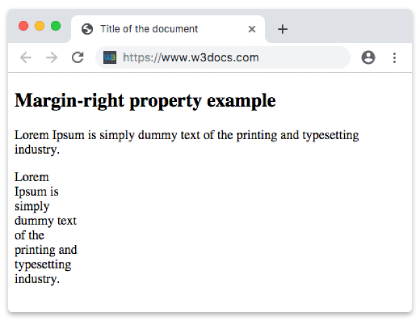
        margin-right: 400px;
      }
    </style>
  </head>
  <body>
    <h2>Margin-right property example</h2>
    <p>Lorem Ipsum is simply dummy text of the printing and typesetting industry.</p>
    <p class="right">Lorem Ipsum is simply dummy text of the printing and typesetting industry.</p>
  </body>
</html>
Result
Example of the margin-right property specified in “%”:
<!DOCTYPE html>
<html>
  <head>
    <title>Title of the document</title>
    <style>
      .right {
        margin-right: 50%;
      }
    </style>
  </head>
  <body>
    <h2>Margin-right property example</h2>
    <p>Lorem Ipsum is simply dummy text of the printing and typesetting industry.</p>
    <p class="right">Lorem Ipsum is simply dummy text of the printing and typesetting industry.</p>
  </body>
</html>
Example of the margin-right property with the “auto” value:
<!DOCTYPE html>
<html>
  <head>
    <title>Title of the document</title>
    <style>
      .right {
        margin-right: auto;
      }
    </style>
  </head>
  <body>
    <h2>Margin-right property example</h2>
    <p>
      Lorem Ipsum is simply dummy text of the printing and typesetting industry. Lorem Ipsum is simply dummy text of the printing and typesetting industry.
    </p>
    <p class="right">
      Lorem Ipsum is simply dummy text of the printing and typesetting industry. Lorem Ipsum is simply dummy text of the printing and typesetting industry. Lorem Ipsum is simply dummy text of the printing and typesetting industry.
    </p>
  </body>
</html>