The margin-top property is used to define the top margin of an element.
The top and bottom margins of an element can collapse into one, which is equal to the largest of the two margins. However, this happens only in the case of vertical margins.
Negative values are allowed.
| Initial Value | 0 |
| Applies to | All elements. It also applies to ::first-letter. |
| Inherited | No. |
| Animatable | Yes. Top margin of the element is animatable. |
| Version | CSS2 |
| DOM Syntax | object.style.marginTop = “50px”; |
Syntax
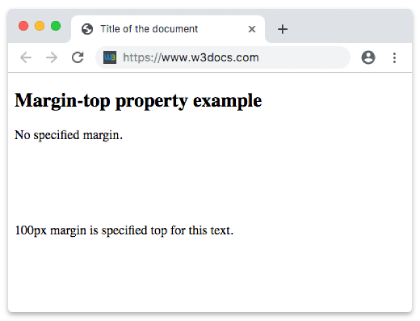
margin-top: length | auto | initial | inherit;Example of the margin-top property:
<!DOCTYPE html>
<html>
  <head>
    <title>Title of the document</title>
    <style>
      .margin-top {
        margin-top: 100px;
      }
    </style>
  </head>
  <body>
    <h2>Margin-top property example</h2>
    <p>No specified margin.</p>
    <p class="margin-top"> 100px margin is specified top for this text.</p>
  </body>
</html>
Result
Example of the margin-top property specified in “em”:
<!DOCTYPE html>
<html>
  <head>
    <title>Title of the document</title>
    <style>
      p.example {
        margin-top: 5em;
      }
    </style>
  </head>
  <body>
    <h2>Margin-top property example</h2>
    <p>Lorem Ipsum is simply dummy text of the printing and typesetting industry.</p>
    <p class="example">Lorem Ipsum is simply dummy text of the printing and typesetting industry.</p>
    <p>Lorem Ipsum is simply dummy text of the printing and typesetting industry.</p>
  </body>
</html>
Example of the margin-top property specified in “%”:
<!DOCTYPE html>
<html>
  <head>
    <title>Title of the document</title>
    <style>
      .margin-top {
        margin-top: 10%;
        background-color: lightblue;
      }
    </style>
  </head>
  <body>
    <h2>Margin-top property example</h2>
    <p>No specified margin.</p>
    <p class="margin-top"> 10% margin is specified top for this text.</p>
  </body>
</html>
Example of the margin-top property with the “initial” value:
<!DOCTYPE html>
<html>
  <head>
    <title>Title of the document</title>
    <style>
      .margin-top {
        margin-top: initial;
        background-color: lightgreen;
      }
    </style>
  </head>
  <body>
    <h2>Margin-top property example</h2>
    <p>No specified margin.</p>
    <p class="margin-top"> Margin top is specified for this text.</p>
  </body>
</html>
Example of the margin-top property with the “inherit” value:
<!DOCTYPE html>
<html>
  <head>
    <title>Title of the document</title>
    <style>
      div {
        margin-top: 50px;
      }
      .margin-top {
        margin-top: inherit;
        background-color: lime;
      }
    </style>
  </head>
  <body>
    <h2>Margin-top property example</h2>
    <div>
      Here is some text.
      <p class="margin-top"> Margin top is specified for this text.</p>
    </div>
  </body>
</html>