The outline-color property defines the color of an outline.
An outline is a line that is drawn around an element. But it is different from the border property. The width and height properties of an element do not include the outline width because the outline is not considered a part of the element’s dimensions.
Hexadecimal, RGB, RGBA, HSL, HSLA or color names can be set as a value for the outline-color property. See the color values in the HTML colors section.
| Initial Value | invert |
| Applies to | All elements. |
| Inherited | No. |
| Animatable | Yes. Color is animatable. |
| Version | CSS2 |
| DOM Syntax | object.style.outlineColor = “#8ebf42”; |
Syntax
outline-color: invert | color | initial | inherit;Example of the outline-color property:
<!DOCTYPE html>
<html>
  <head>
    <title>Title of the document</title>
    <style>
      p {
        border: 3px solid #ccc;
        outline-style: double;
        outline-color: invert;
      }
    </style>
  </head>
  <body>
    <h2>Outline-color property example</h2>
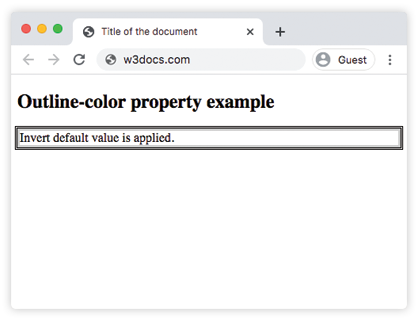
    <p>Invert default value is applied.</p>
  </body>
</html>
Result
Example of the outline-color property with hexadecimal, RGB, RGBA, HSL, HSLA colors:
<!DOCTYPE html>
<html>
  <head>
    <title>Title of the document</title>
    <style>
      .p1 {
        outline-style: solid;
        outline-color: #1c87c9;
      }
      .p2 {
        outline-style: solid;
        outline-color: hsl(65, 100%, 50%);
      }
      .p3 {
        outline-style: solid;
        outline-color: hsla(84, 49%, 50%, 1);
      }
      .p4 {
        outline-style: solid;
        outline-color: rgb( 224, 0, 0);
      }
      .p5 {
        outline-style: solid;
        outline-color: rgba(204, 204, 204, 1);
      }
    </style>
  </head>
  <body>
    <h2>Outline-color property example</h2>
    <p class="p1">This is a paragraph with hexadecimal blue outline.</p>
    <p class="p2">This is a paragraph with hsl yellow outline.</p>
    <p class="p3">This is a paragraph with hsla green outline.</p>
    <p class="p4">This is a paragraph with rgb red outline.</p>
    <p class="p5">This is a paragraph with rgba grey outline.</p>
  </body>
</html>