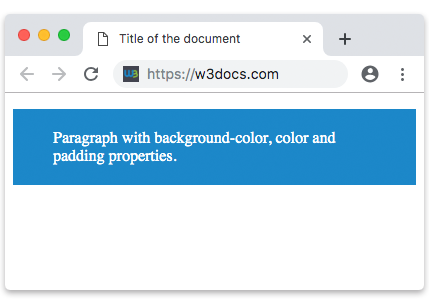
The padding property is used to create padding space on all the sides of an element’s content.
Padding values are set using lengths or percentages.
CSS padding property is a shorthand for the following properties:
- padding-top
- padding-bottom
- padding-left
- padding-right
We can use the padding property for all sides (top, bottom, left, right).
The padding property may be defined with one, two, three, or four values:
- When four values are specified the first value sets the top side, the second sets the right side, the third value sets the bottom side, and the fourth value sets the left side.
- When three values are specified, the first one sets the top side, the second one sets the right and left sides, and the third value sets the bottom side.
- When two values are specified, the first value sets the top and bottom sides and the second one sets the right and left sides.
- If the padding has only one value it is applied to all four values
| Initial Value | 0 |
| Applies to | All elements, except when the display property is set to table-row-group, table-header-group, table-footer-group, table-row, table-column-group and table-column. It also applies to ::first-letter. |
| Inherited | No. |
| Animatable | Yes. Padding space is animatable. |
| Version | CSS1 |
| DOM Syntax | object.style.padding = “30px”; |
Syntax
padding: length | initial | inherit;Example of the padding property:
<!DOCTYPE html>
<html>
  <head>
    <title>Title of the document</title>
    <style>
      p {
        background-color: #1c87c9;
        color: #fff;
        padding: 15px 30px 20px 40px;
      }
    </style>
  </head>
  <body>
    <h2>Padding property example</h2>
    <p>Paragraph with background-color, color and padding properties.</p>
  </body>
</html>
In the given example this code means that the padding in the top side must be 15px, in the right side 30px, in the bottom side 20px and in the left side 40px.
Example of the padding property with the “%” value:
<!DOCTYPE html>
<html>
  <head>
    <title>Title of the document</title>
    <style>
      p {
        background-color: #1c87c9;
        color: #fff;
        padding: 5% 10% 10% 5%;
      }
    </style>
  </head>
  <body>
    <h2>Padding property example</h2>
    <p>Paragraph with background-color, color and padding properties.</p>
  </body>
</html>
In the example below two values are specified. The first value sets the top and bottom sides and the second value sets the right and left sides:
Example of the padding property with two values:
<!DOCTYPE html>
<html>
  <head>
    <title>Title of the document</title>
    <style>
      p {
        background-color: #1c87c9;
        color: #fff;
        padding: 20px 40px;
      }
    </style>
  </head>
  <body>
    <h2>Padding property example</h2>
    <p>Paragraph with background-color, color and padding properties.</p>
  </body>
</html>
Result