The padding-top property sets the padding space on the top of an element.
| Initial Value | 0 |
| Applies to | All elements, except when the display property is set to table-row-group, table-header-group, table-footer-group, table-row, table-column-group and table-column. It also applies to ::first-letter. |
| Inherited | No. |
| Animatable | Yes. Padding space is animatable. |
| Version | CSS1 |
| DOM Syntax | object.style.paddingTop = “10px”; |
Syntax
padding-top: length | initial | inherit;Example of the padding-top property:
<!DOCTYPE html>
<html>
  <head>
    <title>The title of the document</title>
    <style>
      p {
        border: 2px solid #666;
        color: #8ebf42;
        padding-top: 30px;
      }
    </style>
  </head>
  <body>
    <h2>Padding-top property example</h2>
    <p>Lorem Ipsum is simply dummy text of the printing and typesetting industry.</p>
  </body>
</html>
Result
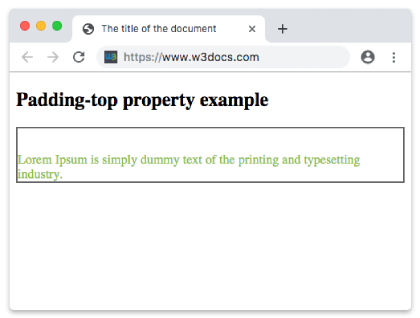
Example of the padding-top property that is set in “em”.
<!DOCTYPE html>
<html>
  <head>
    <title>The title of the document</title>
    <style>
      p {
        border: 2px solid #666;
        color: #8ebf42;
        padding-top: 4em;
      }
    </style>
  </head>
  <body>
    <h2>Padding-top property example</h2>
    <p>Lorem Ipsum is simply dummy text of the printing and typesetting industry.</p>
  </body>
</html>
Example of the padding-top property specified in percentage:
<!DOCTYPE html>
<html>
  <head>
    <title>The title of the document</title>
    <style>
      p {
        border: 2px solid #cccccc;
        color: #8ebf42;
        padding-top: 15%;
      }
    </style>
  </head>
  <body>
    <h2>Padding-top property example</h2>
    <p>Lorem Ipsum is simply dummy text of the printing and typesetting industry.</p>
  </body>
</html>