The text-decoration-skip-ink property specifies how underlines and overlines are drawn when they cross over a glyph.
| Initial Value | auto |
| Applies to | All elements. |
| Inherited | Yes. |
| Animatable | No. |
| Version | CSS Text Decoration Module Level 4 |
| DOM Syntax | object.style.textDecorationSkipInk = “none”; |
Syntax
text-decoration-skip-ink: auto | none | initial | inherit;
Example of the text-decoration-skip-ink property:
<!DOCTYPE html>
<html>
  <head>
    <title>Title of the document</title>
    <style>
      .ex1 {
        margin: 0;
        font-size: 2em;
        text-decoration: underline #1c87c9;
        text-decoration-skip-ink: none;
      }
      .ex2 {
        margin: 0;
        font-size: 2em;
        text-decoration: underline #1c87c9;
        text-decoration-skip-ink: auto;
      }
    </style>
  </head>
  <body>
    <h2>
        Text-decoration-skip-ink property example
    </h2>
    <h3>
        Text-decoration-skip-ink: none;
    </h3>
    <p class="ex1">
      Lorem ipsum is simply dummy text
    </p>
    <h3>
        Text-decoration-skip-ink:auto;
    </h3>
    <p class="ex2">
      Lorem ipsum is simply dummy text
    </p>
  </body>
</html>
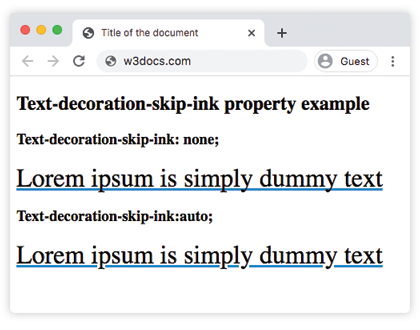
Result
Values
| Value | Description |
|---|
| auto | Underlines and overlines are only drawn where they do not touch or closely approach a glyph. This is the default value of this property. |
| none | Underlines and overlines are drawn for all text content including parts that cross over glyph descenders and ascenders. |
| initial | Sets the property to its default value. |
| inherit | Inherits the property from its parent element. |