The text-orientation property specifies the orientation of characters in a line.
It has five values: mixed, upright, sideways, sideways-right, use-glyph-orientation. All of them work in vertical typographic modes.
This property had the “sideways-left” and the “sideways-right” values, now they are redefined as one the “sideways-right” value. Instead, the “sideways-lr” and the “sideways-rl” values are added to the writing-mode property for using it with non-vertical writing systems.
| Initial Value | mixed |
| Applies to | All elements, except table row groups, rows, column groups and columns. |
| Inherited | Yes. |
| Animatable | No. |
| Version | CSS3 |
| DOM Syntax | object.style.textOrientation = “upright”; |
Syntax
text-orientation: mixed | upright | sideways | sideways-right | use-glyph-orientation | initial | inherit;Example of the text-orientation property with the “mixed” value:
<!DOCTYPE html>
<html>
  <head>
    <title>Title of the document</title>
    <style>
      p {
        writing-mode: vertical-rl;
        text-orientation: mixed;
      }
    </style>
  </head>
  <body>
    <h2>Text-orientation property example</h2>
    <p>Lorem ipsum is simply dummy text.</p>
  </body>
</html>
Result
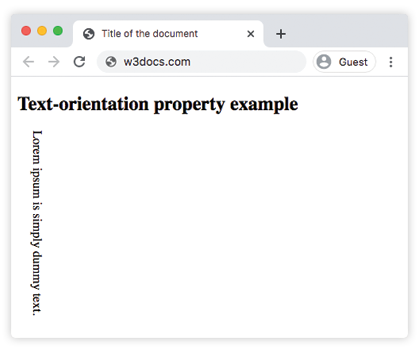
Example of the text-orientation property with the “upright” value:
<!DOCTYPE html>
<html>
  <head>
    <title>Title of the document</title>
    <style>
      p {
        writing-mode: vertical-lr;
        text-orientation: upright;
      }
    </style>
  </head>
  <body>
    <h2>Text-orientation property example</h2>
    <p>Lorem ipsum is simply dummy text.</p>
  </body>
</html>
Example of the text-orientation property:
<!DOCTYPE html>
<html>
  <head>
    <title>Title of the document</title>
    <style>
      body {
        background-color: #ffffff;
        color: #000000;
        font-size: 1.1em;
      }
      .example {
        background: #cccccc;
        color: #fff;
        padding: 3em;
        margin: 40px auto 0;
        width: 400px;
        max-width: 400px;
        display: flex;
      }
      h1 {
        color: #8ebf42;
        margin: 0.15em 0.75em 0 0;
        font-family: 'Bungee Shade', cursive;
        -webkit-writing-mode: vertical-lr;
        -ms-writing-mode: tb-lr;
        writing-mode: vertical-lr;
        text-orientation: upright;
        -webkit-font-feature-settings: "vkrn", "vpal";
        font-feature-settings: "vkrn", "vpal";
      }
      p {
        margin: 0;
        line-height: 1.5;
        font-size: 1.15em;
      }
    </style>
  </head>
  <body>
    <h2>Text-orientation property example</h2>
    <div class="example">
      <h1>Lorem Ipsum</h1>
      <p>
        Lorem Ipsum is dummy text of the printing and typesetting industry. Lorem Ipsum has been the industry's standard dummy text ever since the 1500s when an unknown printer took a galley of type and scrambled it to make a type specimen book. It has survived not only five centuries, but also the leap into electronic typesetting, remaining essentially unchanged.
      </p>
    </div>
  </body>
</html>
Values
| Value | Description |
|---|---|
| mixed | The characters are rotated 90° clockwise. This is the default value of this property. |
| upright | The characters of horizontal scripts are laid out naturally (upright), as well as the glyphs for vertical scripts. This property makes all the characters to be considered as left-to-right: the used value of direction is forced to be ltr. |
| sideways | The characters are laid out as they would be horizontally, but with the whole line rotated 90° clockwise. |
| sideways-right | An alias to sideways that is kept for compatibility purposes. |
| use-glyph-orientation | Leads to use the value of the obsolete SVG properties glyph-orientation-vertical and glyph-orientation-horizontal. This value is not in use anymore. |
| initial | It makes the property use its default value. |
| inherit | It inherits the property from its parents element. |
Browser support
 |  |  |  |
|---|---|---|---|
| 48.0+ | 41.0+ | 10.1 -webkit- | 35.0+ |