HTML <bdi> tag stands for Bidirectional Isolate Element. It is used to inform the browser to isolate the span of text which may be formatted in opposite directions than the surrounding text.
This tag is new in HTML5 and useful for languages such as Arabic or Hebrew, or if the browser dynamically inserts some text without knowing the directionality of text.
Syntax:
<bdi>Content</bdi> Following are some specifications about the <bdi> tag
| Display | Inline |
| Start tag/End tag | Both start and End tag |
| Usage | Semantic/textual |
Example:
<!DOCTYPE html>
<html>
<head>
<title>Bdi tag</title>
             <style>
     bdi{
           font-size: 25px;
                     color: red; }
       </style>
</head>
<body>
<h2>Example of HTML bdi tag</h2>
<p>
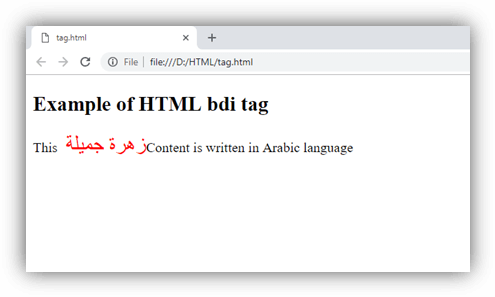
This <bdi> ???? ????? </bdi>  Content is written in Arabic language
</p>
</body>
</html>
Output:
Attributes
Tag-specific attribute:
The <bdi> tag does not include any specific attribute
Global attribute:
The <bdi> tag supports all Global attribute
Event Attributes:
The <bdi> tag supports all Event Attributes
Difference between <bdi> and <bdo>
HTML <bdi> tag is new element of HTML5 and it is very similar to HTML <bdo> element. But the main difference in both the elements is that <bdi> tag isolates the content from its surrounding content but <bdo> tag reveres the direction. Sometimes <bdo> tag may cause some unexpected rendering errors so try to use <bdi> if required.
Supporting Browsers
| Element |  Chrome Chrome |  IE IE |  Firefox Firefox |  Opera Opera |  Safari Safari |
| <bdi> | Yes | No | Yes | Yes | Yes |