HTML <bdo> tag stands for “bidirectional override” which is used to overrides the current/default text direction. This tag sets the direction of content within it to render on browser from left to right or right to left.
The <bdo> tag is useful for the languages which are written from right to left such as Arabic and Hebrew.
Syntax:
<bdo dir=" "> Content......</bdo> Following are some specifications about the <bdo> tag
| Display | Inline |
| Start tag/End tag | Both start and End tag |
| Usage | textual |
Example:
<!DOCTYPE html>
<html>
<head>
    <title>Bdo tag</title>
 </head>
<body>
     <h2>Example of HTML bdo tag</h2>
     <p style="color:#ff4040">This is Normal Content with default directionality</p>
     <p>This is with left to right directionality:
         <bdo dir="ltr" style="color: #5f9ea0">A beautiful Flower</bdo>
     </p>
      <p>This is with right to left directionality:
         <bdo dir="rtl" style="color:#68228b">A beautiful Flower</bdo>
      </p>
 </body>
</html>
Output:
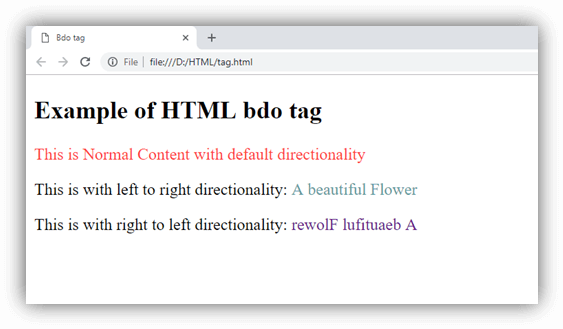
Attributes
Tag-specific attributes
| Attribute | Value | Description |
|---|---|---|
| dir | ||
| ltr | Defines the directionality from left to right. | |
| rtl | Defines the directionality from right to left. |
Global Attributes
The <bdo> tag supports the Global attribute in HTML.
Event Attributes
The <bdo> tag supports the Event attribute in HTML.
Supporting Browsers
| Element |  Chrome Chrome |  IE IE |  Firefox Firefox |  Opera Opera |  Safari Safari |
| <bdo> | Yes | Yes | Yes | Yes | Yes |