HTML <big> tag was used to increase the text font size one level bigger than the document’s base font size or surrounding text size, such as small to medium, medium to large, etc.
Syntax:
<big>Content... </big> Following are some specifications about the <big> tag
| Display | Inline |
| Start tag/End tag | Both start and End tag |
| Usage | Fonts and Web Typography |
Example:
 <!DOCTYPE html>
 <html>
 <head>
   <title>Big tag</title>
 </head>
 <body>
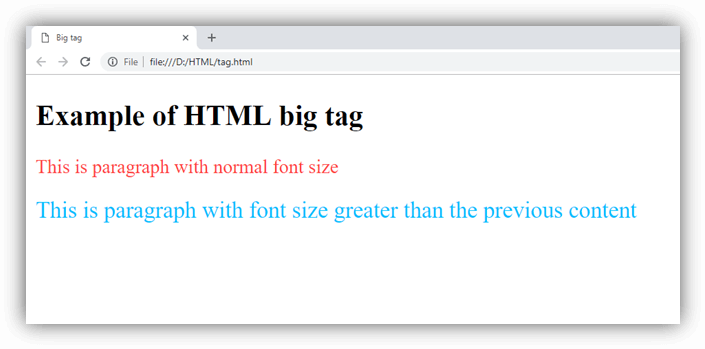
   <h2>Example of HTML big tag</h2>
    <p style="color:#ff4040">This is paragraph with normal font size</p>
    <p style="color:#00bfff">
        <big>This is paragraph with font size greater than the previous content</big>
    </p>
  </body>
</html>
Output:
Increasing Font-size using CSS property:
<!DOCTYPE html>
<html>
<head>
    <style>
          .fsize{
        font-size: 18px;
        color: red;
        }
    </style>
</head>
<body>
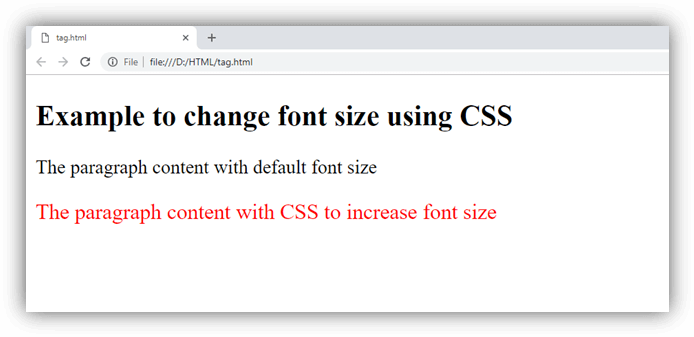
    <h2>Example to change font size using CSS</h2>
    <p>The paragraph content with default font size</p>
    <p class="fsize">The paragraph content with CSS to increase font size</p>
</body>
</html>
Output:
Attribute
Tag-specific Attribute:
The <big> element does not contain any specific attribute.
Global Attribute
The <big> element supports the Global Attribute in HTML.
Supporting Browsers
| Element |  Chrome Chrome |  IE IE |  Firefox Firefox |  Opera Opera |  Safari Safari |
| <big> | Yes | Yes | Yes | Yes | Yes |