HTML <caption> tag is used to add a caption or title of an HTML table. It should be used inside the <table> element and just after the <table> start tag. A table may contain only one <caption> element.
Syntax:
<caption>Table title...</caption> Following are some specifications about the <caption> tag
| Display | Inline |
| Start tag/End tag | Both start and End tag |
| Usage | textual |
Example 1:
<!DOCTYPE html>
<html>
<head>
    <title>Caption Tag</title>
    <style>
        table, td, th {
        border: 3px solid gray;
        border-collapse: collapse;}
    </style>
 </head>
 <body>
    <h2>Example of Caption tag</h2>
   <table width="800">
      <caption>Employee Details</caption>
      <thead>
        <tr>
            <th>Sr. No.</th>
            <th>Name</th>
            <th>Email</th>
          </tr>
        </thead>
       <tbody>
        <tr>
            <td>1.</td>
            <td>Ankit Pandey</td>
            <td>ankit2@gmail.com</td>
        </tr>
        <tr>
            <td>2.</td>
            <td>Ashvini Kumar</td>
            <td>ashvini@gmail.com</td>
        </tr>
        <tr>
            <td>3.</td>
            <td>Swati Sharma</td>
            <td>swati8@gmail.com</td>
        </tr>
    </tbody>
</table>
</body>
</html>
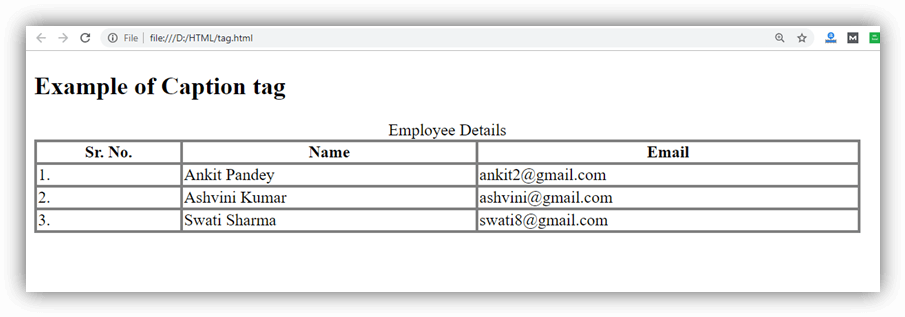
Output:
Attribute
Tag-specific Attributes
| Attribute | Value | Description |
|---|---|---|
| align | topbottomleftright | It aligns the caption with respect to table |
Global Attributes
The <caption> tag supports the Global attributes
Event Attributes
The <caption> tag supports the event attributes.
Supporting Browsers
| Element |  Chrome Chrome |  IE IE |  Firefox Firefox |  Opera Opera |  Safari Safari |
| <caption> | Yes | Yes | Yes | Yes | Yes |