HTML <colgroup> tag specifies group of column within an HTML table. It is used a parent container of one or more <col> elements to apply different properties in an HTML table.
Syntax:
<colgroup>......</colgroup> Following are some specifications about the HTML <colgroup> tag
| Display | None |
| Start tag/End tag | Start tag and End Tag |
| Usage | HTML tables |
Example:
<!DOCTYPE html>
<html>
<head>
    <title>Colgroup tag</title>
</head>
<body>
<h2>Example of Colgroup Tag</h2>
<table border="1">
    <colgroup>
        <col  style="background-color: green" width="40">
        <col span="2" style="background-color:   #ff7256" width="80">
    </colgroup>
    <tr>
        <th>Sr.No</th>
        <th>Product</th>
        <th>Price</th>
    </tr>
    <tr>
        <td>1</td>
        <td>Rice</td>
         <td>85</td>
    </tr>
    <tr>
        <td>2</td>
        <td>Butter</td>
         <td>260</td>
       </tr>
    <tr>
        <td>3</td>
        <td>Mango</td>
         <td>125</td>
    </tr>
</table>
</body>
</html>
Output:
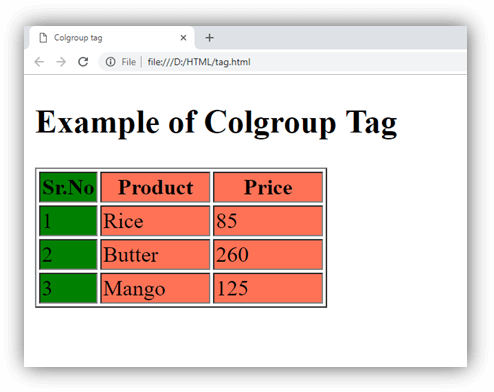
Attributes
| Attribute | Value | Description |
|---|---|---|
| align | leftcenterrightjustifychar | It specifies the alignment of the column content. (Not supported in HTML5). |
| char | character | It specifies the alignment of the content in a column group to the character. (Not supported in HTML5). |
| charoff | number | It sets the number of characters to offset the column data from the alignment character specified by the char attribute. (Not supported in HTML5). |
| span | number | It specifies the number of columns a colgroup should span. |
| valign | topmiddlebottombaseline | It specifies the vertical alignment of the column group. (Not supported in HTML5). |
| width | %Pixelsrelative_length | It specifies the width of the group of column. (Not supported in HTML5). |
Global Attribute
HTML <colgroup> tag supports all Global attributes in HTML.
Event Attribute
HTML <colgroup> tag supports all event attributes in HTML.
Supporting Browsers
| Element |  Chrome Chrome |  IE IE |  Firefox Firefox |  Opera Opera |  Safari Safari |
| <colgroup> | Yes | Yes | Yes | Yes | Yes |