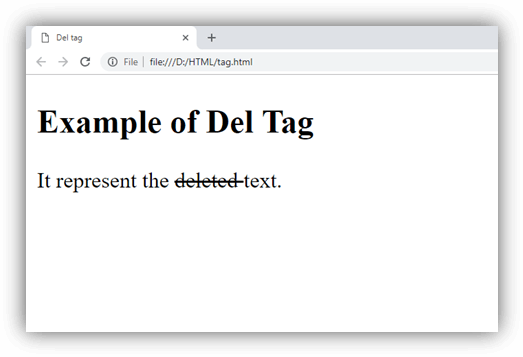
HTML <del> tag is used to represent the range of text that has been deleted/removed from the document. It is used as a Markup for the deleted content. The browser generally renders it by strike a line through the deleted text, although this can be changed using the CSS property.
Syntax:
<del> Content........</del> Following are some specifications about the HTML <del> tag
| Display | Inline |
| Start tag/End tag | Both Start and End tag |
| Usage | Textual |
Example 1:
<!DOCTYPE html>
<html>
<head>
<title>Del tag</title>
</head>
<body>
<h2>Example of Del Tag</h2>
<p>It represent the <del> deleted </del> text. </p>
</body>
</html>
Output:
Example 2
Using CSS and <ins> tag
<!DOCTYPE html>
<html>
<head>
<title>Del tag</title>
<style>
    del{
        color: red;
        background-color: #fde1e5;}
   ins{
       color:#16c39a;}
</style>
</head>
<body>
<h2>Example of Del Tag</h2>
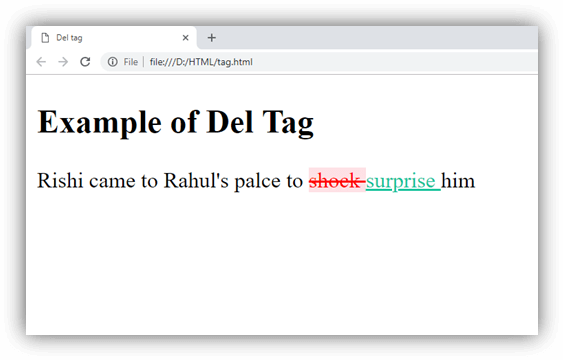
<p>Rishi came to Rahul's palce to <del>shock </del> <ins> surprise </ins> him</p>
</body>
</html>
Output:
Attribute
| Attribute | Value | Description |
|---|---|---|
| cite | URL | It specifies a URL of the resource which explains change or reason of deleting text. |
| datetime | YYYY-MM-DDThh:mm:ssTZD | It specifies the date and time when text is deleted. |
Global Attribute
HTML <del> tag supports the Global attributes.
Event Attribute
HTML <del> tag supports the Event attributes.
Supporting Browsers
| Element |  Chrome Chrome |  IE IE |  Firefox Firefox |  Opera Opera |  Safari Safari |
| <del> | Yes | Yes | Yes | Yes | Yes |